| Readme: | Short: Native MTProto Telegram chat client
Uploader: michele.dipace@kaffeine.net (Michele Dipace)
Author: Michele Dipace <michele.dipace@kaffeine.net>
Type: comm/tcp
Version: 0.0.91
Replaces: comm/tcp/tgamiga.ppc-morphos.lha
Architecture: ppc-morphos
Requires: MorphOS 3.x with its TCP/IP stack
WHAT IS THIS?
-------------
Telegram Amiga brings real, live Telegram chat to the Amiga -- not through
a gateway, a proxy service or a web wrapper, but by speaking Telegram's
own MTProto protocol natively, from scratch, on your machine. You sign in
to your normal Telegram account, your chat list appears, and you talk to
people (and they talk back) on hardware that may well be older than they
are.
Everything is built in: RSA, Diffie-Hellman, AES, SHA and the SRP two-
factor login are implemented inside the program. Zero external
dependencies -- no MUI, no ixemul.library, no AmiSSL, no TCP helper
beyond your system's own bsdsocket stack.
One program, two faces, one engine and one saved login:
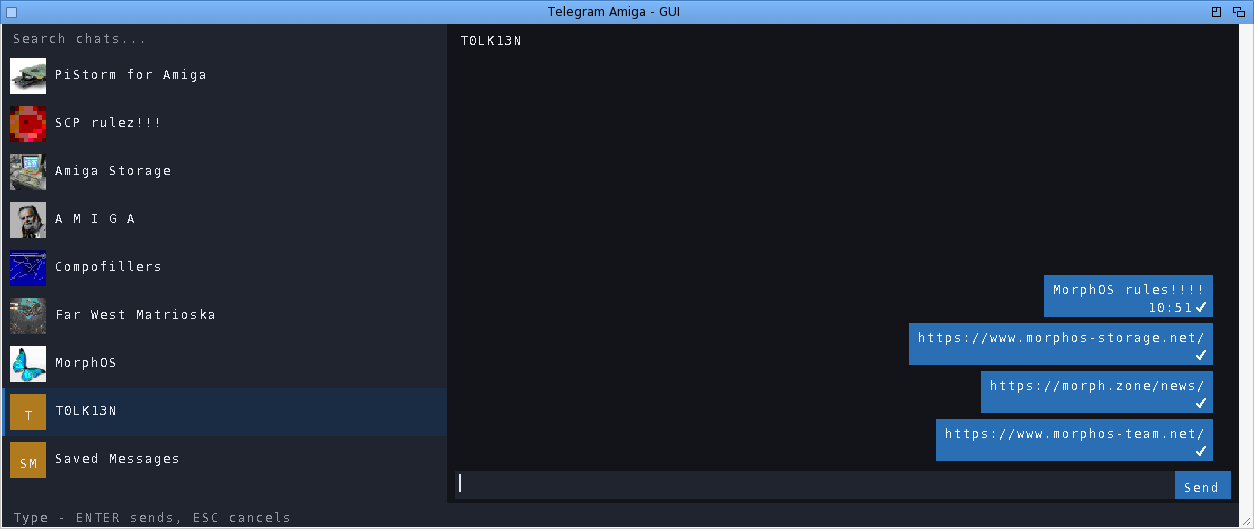
TelegramAmiga - the native Intuition/GadTools GUI: chat list with real
profile-picture avatars, message bubbles, scrollbars,
mouse wheel, context menus. This package ships its icon.
The same binary also runs a full-screen text/console client
from a Shell -- the manual gives the command line.
WHAT CAN I ACTUALLY DO WITH IT?
-------------------------------
Read and send messages in private chats, groups and channels. Download a
received file (right-click -> Download) or send one from disk, up to
250 MiB on this build, including files over 10 MiB.
Photos appear immediately as blurred previews, refine from a bounded download
and reuse decoded pixels from disk when reopened. Click one for a larger
progressive viewer, or disable inline loading on a slower machine and open
only the images you choose. Forward one message to Saved Messages in a
click, or choose another destination through chat search.
Use the pinned Saved Messages chat as a cloud transfer drawer between the
Amiga and your phone or PC. Reply to a specific message (right-click it).
Edit or delete your own messages. See
real delivery state: one tick = sent, two blue ticks = read, updating
live. See who is typing. Search for chats. Send messages from your desk
at work and find the conversation already synced when you get home to
the Amiga -- and the other way round.
Message times follow your Amiga clock. Unread badges and your chat order
survive restarts. The window remembers where you left it, and can open
on its own screen if you prefer a dedicated page for chatting.
GETTING STARTED
---------------
1. Copy this drawer to a WRITABLE volume (not from the archive directly).
2. Double-click TelegramAmiga (or TelegramAmiga-TUI on very low-end setups).
3. First run walks you through the normal Telegram login: phone number,
the code Telegram sends you, and your cloud password if you use
two-factor. That is all -- next time it goes straight to your chats.
The login is stored in telegram-auth.bin next to the program. Treat that
file like a house key: NEVER copy it around or share it -- anyone who has
it has your Telegram session. Full EN and IT manuals are in the archive,
including per-platform notes and troubleshooting.
WHAT IS NEW IN 0.0.91
---------------------
ADDED
- Sending a photo now opens its own dialog instead of a bare requester: the
file's name and size, a caption line already holding whatever was in the
composer, and Photo, File and Cancel as explicit choices. ENTER sends, ESC
cancels, and the draft only leaves the composer once the send starts. The
same dialog serves the menu, the file requester and a Workbench drop.
- Photos can carry a caption. It rides the sendMedia of the photo and of the
document fallback used above 10 MiB alike, converted from the platform
charset to UTF-8, so accented text arrives intact. The text client takes it
as /photo <path> [caption].
- The chat header shows the open chat's avatar beside its name, drawn like its
sidebar row, with the coloured initials as the fallback.
- About names where the project lives, so a user who wants to report something
or fetch a newer build has the address in front of them.
CHANGED
- Consecutive messages from the same sender no longer repeat the name: a run
shows it once, the way the desktop client groups a busy conversation, which
also buys back vertical space on a small screen.
- The round chrome of the desktop client: avatars and the unread badges are
circles and pills, the jump-to-newest button is a disc, and message bubbles
have their corners clipped. On screens that afford exact colours the edge
carries a one-pixel blend ring, which is the anti-aliasing hard-edged
hardware can do; paletted screens keep their crisp edges.
- Every Amiga lane now ships without the offline self-tests, which CI runs on
the host binary instead. The binaries lose about 15 per cent: 110 KB on
AmigaOS 3, 136 on MorphOS, 178 on AmigaOS 4, 128 on AROS. Field diagnostics
are still compiled in everywhere, and a stripped build says so plainly when
a self-test flag is used.
- Background photo work can no longer be starved for good by a busy event loop
on 68k: after a bounded number of deferred turns it proceeds anyway, the
same valve the other lanes already had.
FIXED
- Text that sits inside something now sits in the middle of it. The caret
covers the glyph cell instead of floating above it, the reply strip centres
its text and clears the composer by a few pixels, the unread counts centre
in their badge, and the avatar initials centre in their circle. All four
were the same mistake, a baseline guessed from the line height, and all four
grew worse the taller the font, which is why MorphOS showed them first.
- A photo whose cache entry vanishes after a successful write is now reported
as the failure it is, instead of being fetched again on every repaint
forever. A tired or full volume can do this, and the loop hid it.
- The plain-68000 build pauses briefly between the rounds of the initial
chat-list download, so a PCMCIA network card gets breathing room instead of
a continuous burst.
A COMMUNITY PROJECT
-------------------
MIT licensed, non-commercial, written for the love of the platform.
Bug reports and wishes are very welcome -- testers on real hardware
(A1200s, A4000s, Pegasos, Sam, FPGA machines) are what moves this
project forward.
Source + issues:
https://github.com/kaffeine1/telegram-amiga
Development diary:
https://androidlab.it/en/telegram-amiga-mtproto-client-development-diary/
|


 Ambient (150)
 TelegramAmiga_0.0.91.lha