| Readme: | Short: Image manager and viewer for MorphOS
Author: Yannick Buchy (papiosaur2@hotmail.fr)
Type: gfx/show
Version: 1.2
Architecture: ppc-morphos
ABOUT
=====
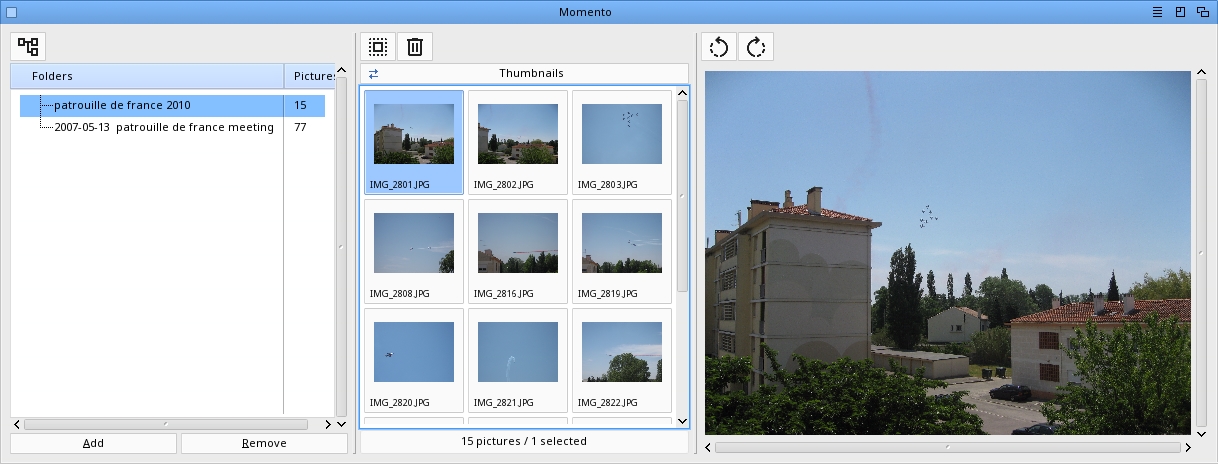
Momento is an image manager and viewer for MorphOS with a modern MUI
interface. It features a three-panel layout: folder tree, file list,
and image preview.
FEATURES
========
* Three-panel MUI interface (folders / files / preview) with two
independent resize bars between panels
* Folder tree with recursive subdirectory scanning, alphabetically
sorted, empty folders included so freshly created drawers are
always visible
* Right-click context menu on the folder tree with "New folder..."
and "Rename folder..." actions
* Drag & drop to physically MOVE folders inside the tree, with
explicit confirmation and full thumbnail-cache propagation;
intra-volume moves are instant (dos.library Rename), cross-volume
moves use C:Copy + C:Delete transparently
* Switchable view modes: multi-column list or thumbnail grid
* Asynchronous thumbnail generation — GUI stays responsive even
on folders with hundreds of large DSLR images
* Multi-column sortable file list (name, size, date)
* Image preview with automatic scaling
* Rotate preview 90° left / right with toolbar buttons above the
image; rotation is persisted to disk losslessly for JPEG (via
EXIF Orientation tag) and PNG (via libpng re-encode), the
thumbnail in the grid is refreshed automatically
* JPG, PNG, native BMP, GIF, IFF/ILBM, TIFF, TGA, PCX, WebP
* Robust to malformed files: PNG with .jpg extension, corrupt JPEG,
exotic IFF, broken BMP — none can crash or freeze Momento
* Drag & drop folders and images from Ambient
* Drag & drop images between folders in the tree (move);
hold Shift while dropping to copy instead of move
* Cross-volume image moves handled transparently
(C:Copy + Delete when Rename is not possible)
* Previous/Next image navigation
* Full cursor-key navigation in BOTH list and thumbnail modes
(LEFT/RIGHT = previous/next image, UP/DOWN in thumbnail mode =
previous/next grid row)
* Multi-selection of thumbnails with Shift+click and Alt+click
range selection
* Delete files with confirmation
* Persistent folder list and view mode (PROGDIR:Momento.prefs),
saved atomically with crash recovery — the drawer list cannot
be lost any more even if Momento freezes mid-save; autosaved
on add/remove drawer, on quit, and on demand from the Settings
menu
REQUIREMENTS
============
* MorphOS 3.19+
INSTALLATION
============
Extract the Momento archive to your preferred location
USAGE
=====
* Add drawers via menu Project > Add Drawer (Cmd+A), the Add button
under the folder tree, or by dragging them from Ambient
* Remove a drawer from the list with the Remove button (only removes
the entry — files on disk are NOT touched)
* Right-click any folder in the tree to open a context menu with
"New folder..." (create a sub-folder inside the selected one)
and "Rename folder..." (rename the selected folder on disk, with
the thumbnail cache automatically following along)
* Drag & drop a folder in the tree onto another folder to move it
physically on disk. A confirmation dialog is shown before any
disk write. Works intra-volume and inter-volume. Drop on self
or on a descendant is refused automatically
* Click on a folder in the left panel to list images; the first
image is automatically selected and previewed
* Switch between List and Thumbnails view using the cycle gadget
* Click on a file or thumbnail in the center panel to display preview
* Navigate with cursor keys LEFT/RIGHT or Previous (Cmd+P) and
Next (Cmd+N). In thumbnail mode, cursor UP/DOWN moves the
selection by one grid row
* Multi-select thumbnails with Shift+click (toggle one) or
Alt+click (range from last clicked to current) for batch delete
or drag & drop
* Rotate the current preview 90° left / right with the two icon
buttons above the picture area. The rotation is saved to disk
immediately (lossless for JPEG and PNG) and the thumbnail in
the grid is refreshed
* Drag images from the file list onto a folder to move them;
hold Shift while dropping to copy instead of move
* Drop folders or images from Ambient onto the window
* Delete selected image with Edit > Delete (Del)
* Click on column headers to sort by name, size, or date
* Save the folder list and view mode with Settings > Save Momento
settings (Cmd+S); they are also saved automatically when you
add/remove a drawer, on quit, and restored on next launch
KEYBOARD SHORTCUTS
==================
Cmd+A Add drawer
Cmd+S Save Momento settings
Cmd+P Previous image
Cmd+N Next image
Suppr Delete selected image
Cmd+? About
Cmd+Q Quit
HISTORY
=======
1.2 (10.04.2026)
- Right-click context menu on the folder tree: New folder...
and Rename folder...
- Drag & drop folders inside the tree to move them on disk,
intra- or inter-volume, with confirmation and thumbnail-
cache propagation
- Drag & drop image moves now show a progress window with
conflict handling (Skip / Overwrite / Cancel) and update
the source/destination picture counts in the tree
- Shift+drop copies images instead of moving them
- Cross-volume image drag & drop (C:Copy + Delete fallback
when Rename is not possible)
- Sub-folders sorted alphabetically; empty folders now
visible in the tree
- Full cursor-key navigation in thumbnail mode (LEFT/RIGHT
by image, UP/DOWN by grid row) and instant blue selection
highlight on click
- Status line at the bottom of the center panel:
"N pictures / M selected"
- Toolbar icon buttons: Select All, Delete, Expand/Collapse
tree, Rotate
- Sharper JPEG/PNG previews (full-res decode path)
- Atomic prefs save with automatic recovery — the drawer
list can no longer be lost to a crash during save
- Iconify now uses Momento.info instead of the generic MUI
icon
1.1 (08.04.2026)
- Image type is now detected from file content
- IFF files are validated before being passed to picture.datatype
- Native BMP decoder (1/4/8/24/32-bit BI_RGB)
- Cursor-key navigation in the file list now clears the previously
clicked selection so only the active row stays highlighted
(multi-selection with shift+click is preserved)
- File list date column now falls back to the filesystem modification
date when EXIF DateTime is unavailable, so non-JPEG formats and
EXIF-less JPEGs always show a date
- Window can now be resized larger: the preview widget no longer caps
the window width/height at 4096 pixels
- Three-panel layout reworked with two independent Balance gadgets so
the center column can be resized against either neighbour
- Folder tree no longer shows a "+" expander on drawers without
image-containing subdirectories
- Asynchronous thumbnail loading: the GUI stays fully responsive
while a folder of hundreds of DSLR images is being decoded
(you can scroll, click, switch folders or quit at any time)
- Thumbnail grid uses a stable Columns layout so the window no
longer shrinks or jumps when switching between folders of
different sizes
- First image of a directory is now auto-selected on folder open
- Thumbnail click handler only updates cells whose selection state
actually changes (was iterating all cells — laggy on big folders)
- JPEG previews are decoded at a resolution close to the display
panel
- Folder list is persisted to PROGDIR:Momento.prefs (one path per
line, plus key=value options) and restored on next launch
- View mode (list / thumbnails) is also saved in the preferences
- Settings > Save Momento settings (Cmd+S) for manual save; the
preferences are also saved automatically on quit
- New Remove button next to Add removes the selected drawer from
the list (does NOT delete files on disk); selecting any
subdirectory removes the root that owns it
1.0 (06.04.2026)
- Initial release
COPYRIGHT
=========
Momento is Donationware. It is freely usable and distributable.
If you enjoy it, a donation is welcome to support future features.
Momento is provided "as is" without warranty of any kind. The author
shall not be held responsible for any loss of data resulting from the
use of this software. Always keep backups of your important files.
Momento is (c) 2025-2026 Yannick Buchy. All rights reserved.
CONTACT
=======
Bug reports and suggestions are welcome to papiosaur2@hotmail.fr
THANKS
======
MorphOS Team for MorphOS
Poly and CptBlood for suggestions and reports bugs
CptBlood and Gabriel Sokol for their support
Skateman for the YouTube video
|


 Ambient (149)

 Momento_1.2.lha