| Readme: | Short: BBS terminal for classic boards
Uploader: n3@clutchbbs.com (n3)
Author: n3
Type: comm/bbs
Version: 0.20
Architecture: ppc-morphos >= 3.0.0
ABOUT
=====
MTerm is a MorphOS-native BBS terminal application for connecting to
classic ANSI, Amiga, and C64-style bulletin board systems.
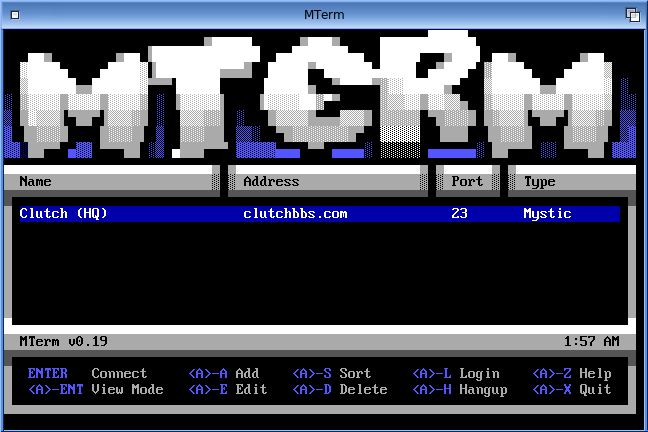
It provides a fast, simple terminal experience with a built-in phonebook,
ANSI, Amiga, and PETSCII display handling, ZMODEM transfers, multiple
display sizes, and MorphOS-friendly window and screen behaviour.
FEATURES
========
* MorphOS-native BBS terminal client
* ANSI, Amiga, and C64 support
* Built-in phonebook for storing and launching BBS connections
* ZMODEM upload and download support
* XMODEM upload and download support
REQUIREMENTS
============
* MorphOS 3.x
* Network connection
* BBS address or phonebook entry
INSTALLATION
============
Extract the MTerm archive to your preferred location.
Run MTerm from Ambient, Shell, or your chosen launcher.
USAGE
=====
* Start MTerm.
* Open or create a phonebook entry for the BBS you want to call.
* Connect to the selected BBS.
* Use CP437, Topaz (Amiga), or C64 mode for BBS entries where appropriate.
* Press <A>-Enter to cycle display size:
normal -> medium -> fullscreen -> normal
SHORTCUTS
=========
UP/DOWN Select
ENTER Connect
DEL Delete Entry
CTRL-C Run/Stop in C64 session
<A>-Enter Cycle display size
<A>-H Hang up
<A>-X Quit
<A>-A Add a BBS entry
<A>-E Edit the selected phonebook entry
<A>-S Sort BBS entries
<A>-D Download
<A>-U Upload
<A>-B Buffer
<A>-L Send login credentials
<A>-I Import SyncTERM phone directory (syncterm.lst)
<A>-P Define download/upload paths
<A>-V Paste from clipboard
<A>-E Open phonebook while in an active session
<A>-T Toggle title bar while in an active session
<A>-Z Help menu
<A>-S Scale C64-40 fullscreen C64 session
STARTUP ARGUMENTS
=================
mterm Start phonebook menu
mterm host [port] Direct connect
mterm -f | --fullscreen Start in custom-screen fullscreen mode
mterm -m | --medium Start in medium windowed mode
mterm -w | --windowed Force normal windowed mode
mterm -p phonebook Use alternate phonebook file
mterm -h Show help
<A>-Enter cycles normal window -> scaled medium window -> fullscreen.
HISTORY
=======
0.20
* Added XMODEM transfer protocol support.
* Remapped keyboard shortcuts. See the Help section for details.
* Updated the Help section.
* Added borderless fullscreen mode with scaling.
* Added modem dialing simulation.
* Added UI enhancements and redraw improvements.
* Added blinking cursor support.
* Added beep sound toggle.
* Improved phonebook import handling.
* Improved key debounce handling.
* Added heap-safety fixes for buffer, menu, and top-bar redraw handling.
* Improved scrollback buffer stability, including mouse wheel and drag-to-copy support.
0.19
* Added new bitmap fonts.
* Repaired Commodore PETSCII rendering.
* Added third-party font license/notice documentation.
* Added window title bar.
* Added scroll wheel support to the buffer window.
* Changed copied text highlight to orange.
* Performed general code cleanup.
* Added local beep functionality when a BBS triggers a beep.
* Displayed current time in the main menu.
* Added elapsed connected time to the title bar.
* Added an option to define the startup mode for MTerm.
* Added GUI tweaks.
* Added menu tweaks and fixes.
* Added copy/paste support in menus.
* Added and fixed key mappings.
* Fixed the <A>-X shortcut during active sessions.
* Added <A>-T title bar toggle during active sessions.
0.18
* Added a notes section in the BBS entry.
* Added active-session phonebook access using <A>-E.
* Updated menus.
* Buffer and active phonebook editing now follow window positions.
* Updated copy/paste functions to work within the phonebook.
0.17
* Fixed unable-to-connect popup.
* Fixed window mode issues.
* Updated BBS entry editing.
* Added CMD-S shortcut to save in BBS entry.
* Adjusted phonebook to have more room for BBS name.
* Added sorting options for BBS name or software.
* Added favourite options for BBS entries. Favourites are indicated by "*".
0.16
* Added C64 fixes and updates.
* Fixed display issues.
* Added copy/paste functions.
- Copy from buffer.
- Paste in connected window with RMB.
* Corrected glyphs.
* Updated readme.
0.15
* Added in-session phonebook access with <A>-E.
* Phonebook opens while a BBS session remains connected.
* Added UI enhancements.
* Added temporary and backup phonebook protection in case of corruption.
0.14
* Added CMD-Enter display cycling:
normal -> medium -> fullscreen -> normal
* Medium mode scales the terminal grid for easier reading.
* Improved fullscreen and medium-window behaviour.
0.13
* Added UI enhancements.
* Fixed bugs.
0.12
* Standardized disconnect handling.
* Remote closes and socket errors now show the centered "Disconnected" popup.
* Removed extra connection-ended messages after disconnect.
0.11
* Improved ANSI/terminal display behaviour.
* Improved BBS compatibility.
* Cleaned up terminal state handling between sessions.
0.10
* Initial MorphOS BBS terminal release.
COPYRIGHT AND LICENSE
=====================
MTerm is provided as-is, without warranty of any kind.
Always keep backups of important files before uploading, downloading,
editing phonebook entries, or testing new builds.
MTerm is Copyright (c) 2026 n3 <clutchbbs.com>.
MTerm is freeware. The MTerm executable and MTerm-authored files may be
freely redistributed as part of the original archive.
This distribution may also include third-party runtime font files in the
Fonts/ directory. Those font files are separate runtime data files and are
not embedded in the MTerm executable. They remain under their own copyright
and license terms.
CONTACT
=======
Bug reports, suggestions, and compatibility notes are welcome.
Support: telnet://clutchbbs.com / n3@clutchbbs.com
|


 Ambient (150)
 MTerm_0.20.lha