| Readme: | Short: Driverless eSCL/AirScan network scanning for MorphOS
Author: Yannick Buchy
Type: driver/misc
Version: 1.5
Architecture: ppc-morphos
Requires: MorphOS 3.20 + an eSCL/AirScan network scanner
IPP-Scan 1.5 - Driverless eSCL/AirScan network scanning for MorphOS
===================================================================
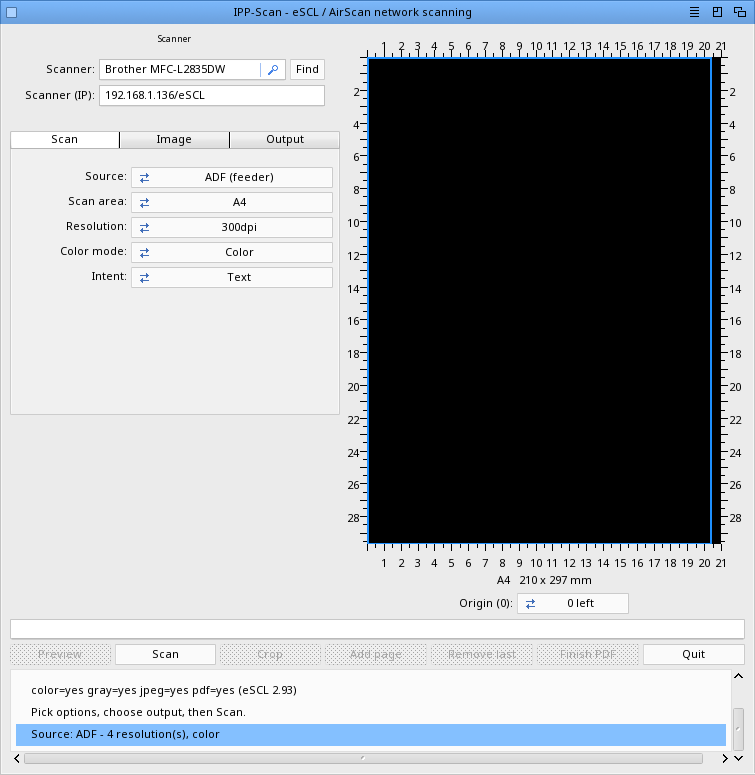
IPP-Scan is a native MorphOS tool that scans from a network
scanner using eSCL / AirScan directly ("driverless" scanning) - the scan
counterpart of IPP-Print.
Pick the scanner, choose the options, press Scan.
TECHNOLOGIES
------------
Provided by MorphOS:
- Ghostscript (preview rendering, OCR image rendering, post-scan crop)
External (optional, for OCR):
- Tesseract OCR engine (a native MorphOS PPC port of 5.5.1 + Leptonica 1.85.0
is provided)
Implemented by IPP-Scan:
- eSCL / AirScan driverless scanning (HTTP + XML)
- mDNS / Bonjour scanner discovery
- JPEG decoding and PDF wrapping of the scanned image
- Searchable PDF (image + invisible OCR text layer from Tesseract hOCR)
REGISTRATION
------------
Saving a scan to a file is reserved for registered users: IPP-Scan checks your
MorphOS registered name. The registration is SHARED with IPP-Print - a single
purchase covers both applications (you do not pay twice). In the unregistered
(demo) version you can still detect scanners and use the live Preview, but the
Scan button reports that saving is for registered users (and the preview leaves
no temporary file behind).
To get the full (registered) version, support the project:
IPP-Print + IPP-Scan (driverless printing & scanning): 19.90 euros
Stylos + IPP-Print + IPP-Scan (full bundle): 49.90 euros
Stylos (word processor): 39.90 euros
(One IPP-Print purchase registers both IPP-Print and IPP-Scan. Stylos is a
native MorphOS word processor by the same author.)
PayPal : papiosaur2@hotmail.fr (send as a friend to avoid fees)
After your payment, send an email to yannick.buchy@gmail.com with your
PayPal name and you will receive a registered build.
FEATURES
--------
- Automatic scanner discovery via mDNS / Bonjour (_uscan._tcp.local)
- Automatic detection of the scanner capabilities - per source, so the
flatbed and the document feeder each show their own resolutions, colour
modes and formats
- Source selection: flatbed (Platen) or automatic document feeder (ADF)
- Two-sided (duplex) scanning when the feeder advertises it
- Scan options: resolution, colour / grayscale / black & white, output
format (JPEG or PDF), scan area, compression and image adjustments
(brightness, contrast, gamma, highlight, shadow, sharpen, denoise,
saturation, threshold) - shown only when the scanner advertises them
- Scan-area selector limited to the formats the scanner glass can fit
(A4, Letter, A5, B5, A6...), with a live size readout under the preview
- Preview pane with a centimetre ruler on all four sides and a frame
showing where the selected area is captured on the glass
- Scan-origin indicator (which glass corner is the 0 point), remembered
- Quick preview: a low-resolution flatbed scan shown right in the window
before committing to a full scan
- Output to a file of your choice, with a single Format selector:
JPEG, PDF (image), PDF (image+text = searchable PDF) or Text - the last
two run OCR via an external Tesseract binary (5.5.1 MorphOS port provided)
- OCR options (shown only for the text formats): language (from the installed
tessdata), page layout, and auto-rotate, each with bubble help
- Post-scan Crop: select a region on the result and re-save it (any format)
without re-scanning
- Manual IP entry (press Enter), for scanners not found by mDNS
- Last scanner is restored at next launch without re-scanning the network
- Responsive while waiting; clear error reporting on failure
- Fully localised interface and log (15 languages)
- Single log file for easy troubleshooting
INSTALLATION
------------
Simply copy the IPP-Scan drawer to your preferred location.
USAGE
-----
1. At launch, IPP-Scan searches for scanners (mDNS), selects the first one
and detects its capabilities. Press "Find" to scan again, or type the
scanner IP and press Enter.
2. Choose the source (flatbed or feeder); the resolution, colour and format
lists adapt to what that source supports.
3. Set the options, choose the output file, then press "Scan". On a flatbed
you can press "Preview" first for a quick low-resolution look.
LOG
---
A single log file is written next to the program: PROGDIR:IPP-Scan.log
It records everything (scanner detection and full capabilities, the eSCL
requests sent and the scanner's responses). This is the file to look at -
and to send - if anything goes wrong.
NOTES
-----
- eSCL scanners return JPEG; a PDF output is the JPEG wrapped in a PDF.
- Only the sources and options the scanner advertises are offered (e.g.
duplex stays greyed on a simplex-only feeder).
- OCR (the PDF image+text and Text formats) needs the Tesseract binary plus
its language data. Simplest: drop "tesseract" in the IPP-Scan drawer (found
automatically as PROGDIR:tesseract) and the "tessdata" drawer next to it.
Otherwise put tesseract on the command path (C:) or set "OCRCmd = <full
path>" in IPP-Scan.prefs. A native MorphOS PPC port of Tesseract 5.5.1 +
Leptonica (with eng/fra/osd models) is provided.
- Searchable PDF (image+text): the original scan JPEG is kept untouched and an
invisible text layer is added from Tesseract's hOCR - so the file stays small
and in its original colour (no re-encoding of the page image).
HISTORY
-------
Version 1.5 (23.06.2026)
- Options reorganised into three tabs (Scan / Image / Output): shorter window,
larger preview
- The window now opens immediately; detection runs after, so an absent scanner
no longer delays startup
- A dead saved IP fails fast (non-blocking connect) instead of hanging; a clear
"scanner unreachable" message is shown
- OCR re-save warns when the scan is below 300 dpi (poor text)
- Prefs no longer store the output filename or the tesseract path
Version 1.4 (23.06.2026)
- Much faster preview/result/crop display: the scan JPEG is decoded in-process
via Reggae
- New "Save" button: re-save the current scan in the chosen format, no re-scan
- Multi-page review: ADF scans and the Add-page/Finish batch are both navigable
page by page (Prev/Next); the pages stay on screen after Finish
- Crop now works in Photo intent (switches to Text/Document so the region is kept)
- Fixed the scan region being ignored on some scanners (ScanSettings element order)
- Scanner detection runs before the window opens (no visible option rebuild)
- Faster startup: the saved scanner IP is probed briefly before the mDNS search
- Temporary files are cleaned after each scan/crop/finish/preview (only the
output file is kept)
- Wider capability reading: ResolutionRange, PNG/TIFF/raster, blank-page
Version 1.3 (22.06.2026)
- OCR (text recognition) using an external Tesseract binary, with a native
MorphOS PPC port of Tesseract 5.5.1 + Leptonica 1.85.0 provided
- Unified output Format selector (in the Output section): JPEG, PDF (image),
PDF (image+text = searchable PDF), or Text - the OCR ones run Tesseract
- Searchable PDF: the original scan JPEG kept as-is + an invisible text layer
built from Tesseract hOCR (small, original colour; no re-encoding)
- "Text detection options" panel (shown only for the OCR formats): language
(built from the installed tessdata), page layout (PSM), auto-rotate (OSD),
with bubble help on each
- When an OCR format is chosen, the resolution list is limited to >= 300 dpi
(Tesseract's sweet spot) and the real dpi is passed to Tesseract
- Post-scan Crop: select a region on the result and re-save the cropped scan
(any format) without re-scanning
- Effective-dpi correction: the real scan dpi is derived from the returned
image, so the preview/PDF are sized correctly even when a scanner caps or
ignores the requested resolution
- Bilinear preview scaling (sharper on-screen result), preview rendered at
the scan's own dpi
- Clearer Intent labels (Text / Photo / Text + graphics); the redundant
"Preview" intent removed (the Preview button covers it)
- More detailed OCR logging (per-step commands, timings, captured output)
Version 1.2 (21.06.2026)
- Fixed scans and previews failing on some scanners (e.g. HP M274n): the
scanner's "not ready yet" reply (HTTP 503) is now awaited and retried
instead of aborting
Version 1.1 (20.06.2026)
- Preview pane with a centimetre ruler on all four sides
- Scan-area selector with a live size readout; the list is limited to
the formats the scanner glass can actually fit
- Scan-origin indicator (which glass corner is 0), remembered
- More image adjustments offered when the scanner advertises them
- Reorganised and aligned settings; Scan button next to Preview
- Translated option lists (colour mode, source, intent, sides)
- Several preview / crop refinements (no flicker, frame resets on a
new preview, ruler matches the scanned size)
Version 1.0 (15.06.2026)
- First release: driverless eSCL / AirScan network scanning
- mDNS scanner discovery and automatic capability detection
- Per-source options (flatbed / feeder), duplex when supported
- Quick flatbed preview and live preview pane
- Menus (About, Iconify, Quit, Settings - MUI) and an About window
- Registration shared with IPP-Print (demo: preview only)
- Fully localised interface and log (15 languages)
COPYRIGHT
---------
Copyright (c) 2026 Yannick Buchy
IPP-Scan is provided as-is without warranty.
The eSCL/scan engine is derived from the UniScan work; IPP-Scan shares its
mDNS discovery module with IPP-Print and the Stylos word processor.
CONTACT
-------
yannick.buchy@gmail.com
THANKS
------
- MorphOS Team for MorphOS
- CptBlood, Geit for suggestions and tests
|


 Ambient (150)
 IPP-Scan_1.5.lha