| Readme: | Short: Sigma Demo - a spreadsheet for MorphOS
Author: Yannick Buchy
Type: biz/spread
Version: 2.1
Architecture: ppc-morphos
Requires: MorphOS 3.20+ (Ghostscript for printing)
============================================================================
SIGMA - Spreadsheet
Version 2.1
============================================================================
INTRODUCTION
------------
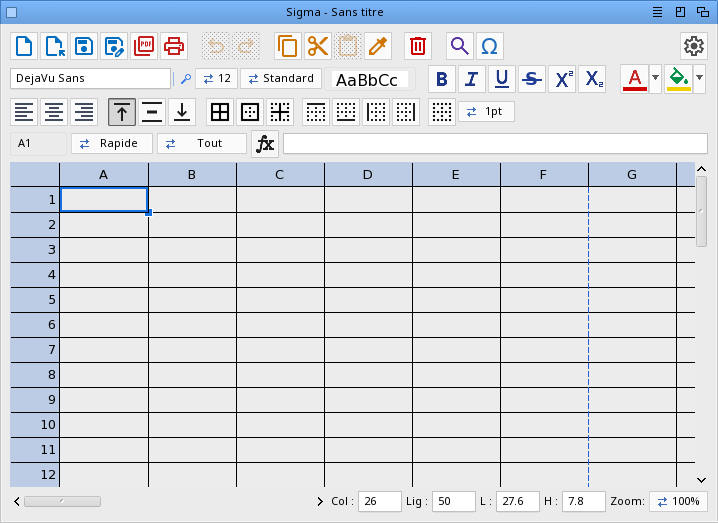
Sigma is a spreadsheet for MorphOS built with MUI (Magic User Interface) and
TTEngine for TrueType font rendering. It offers live formulas, rich cell
formatting and native OpenDocument (.ods) import/export, with full UTF-8
Unicode support throughout.
TECHNOLOGIES
------------
Provided by MorphOS:
- TTEngine (TrueType font rendering)
- xadmaster.library (ZIP container reading, for ODS and XLSX import)
- clipboard.library (clipboard shared with the other programs)
- Ghostscript (rasterizing for printing)
Implemented by Sigma:
- A formula engine (cell references, ranges, the usual functions)
- A sparse cell model (millions of logical cells, RAM tracks only used ones)
- OpenDocument Spreadsheet (.ods) reader/writer
- XLSX (Excel) import
- CSV (RFC-4180) import/export
- A PDF writer (embedded TrueType fonts)
- Driverless printing: printer discovery (mDNS) and the IPP protocol
INSTALLATION
------------
Simply copy the Sigma drawer to your preferred location.
Fonts are scanned automatically; no configuration required.
REGISTRATION & UPGRADES
-----------------------
Sigma 2.1 Demo
The demo version lets you try every feature. Saving your work (ODS or CSV),
exporting to PDF and printing require the registered version; opening,
editing and importing are free.
The title bar shows "Sigma Demo" until the program is registered.
Registered version:
Sigma (version 2.1 and future updates): 29.90 euros
Sigma + Stylos + IPP-Print + IPP-Scan (full bundle): 69.90 euros
All future Sigma features are included free of charge, among them:
- XLSX (Excel) export
- Charts
Stylos is a WYSIWYG word processor for MorphOS; IPP-Print/IPP-Scan add
driverless printing and scanning. Each has its own registration.
PayPal: papiosaur2@hotmail.fr (send as a friend to avoid fees)
Contact: yannick.buchy@gmail.com to receive your registered version.
If you have any questions, don't hesitate to ask.
BUG HUNTERS WANTED
------------------
Help improve Sigma! Send a clear bug report with steps to reproduce to
yannick.buchy@gmail.com (the .ods/.csv file and a snapshot are welcome).
Each confirmed bug earns you a 5 euros discount on your license.
Find 6 confirmed bugs and you get Sigma for free, including all updates.
FEATURES
--------
Spreadsheet
- Several sheets in one document (up to 32): tab bar under the grid, double-click
a tab to rename it, right-click to insert / rename / delete; every sheet is
saved in the .ods file
- Grid up to 16384 rows x 256 columns (sparse: memory tracks only used cells)
- Keyboard navigation, scrolling, zoom 50%-300%
- Freeze panes: the rows above and the columns left of the active cell stay on
screen while the rest scrolls (Table menu or right-click menu)
- Adjustable visible extent (Col/Row fields)
- Column width / row height (W/H fields, keyboard + wheel) in millimetres or
inches (selectable in Preferences), with true 1:1 physical sizing from the
screen DPI
Formulas
- = + - * / and parentheses, A1 cell references, A1:B2 ranges
- References to another sheet: =Sales.B2, =SUM(Sales.B2:B3), ='My sheet'.A1
- Relative and absolute references ($A$1, $A1, A$1)
- Numbers AND text: string literals "...", text concatenation with &, and
formulas can return text (e.g. =IF(A1>0,"OK","NO"))
- Math/stat: SUM, AVERAGE, MIN, MAX, COUNT, COUNTA, PRODUCT, MEDIAN, STDEV,
VAR, ABS, INT, TRUNC, SIGN, ROUND, ROUNDUP, ROUNDDOWN, CEILING, FLOOR, MOD,
POWER, SQRT
- Logic: IF, IFERROR, AND, OR, NOT, TRUE, FALSE; comparisons (< > = <= >= <>)
- Conditional: SUMIF, COUNTIF, AVERAGEIF
- Lookup: VLOOKUP, HLOOKUP, INDEX, MATCH
- Text: LEN, LEFT, RIGHT, MID, UPPER, LOWER, TRIM, CONCATENATE, CONCAT,
TEXTJOIN (both accept ranges), SUBSTITUTE, REPT, FIND, SEARCH, EXACT, VALUE,
TEXT
- Dates: DATE, TODAY, NOW, YEAR, MONTH, DAY, WEEKDAY (Excel-compatible serials)
- Info: ISBLANK, ISNUMBER, ISTEXT, ISERROR, N
- Percent suffix: =A1*20%, =50%+10%
- Case-insensitive; errors: #CYCLE #REF! #DIV/0! #N/A #ERR
- Function names can be typed in English or in your own language - French,
German, Italian, Spanish, Portuguese, Dutch (SUM / SUMME / SOMMA / SUMA / SOM,
VLOOKUP / SVERWEIS / CERCA.VERT / BUSCARV / PROCV...); files always store the
English names for interop
- Point mode: while typing a formula, click or drag cells to insert their
reference; drag a range handle to resize an existing reference
Editing
- Inline editing with a blinking caret, in-cell text selection
- Cell and text clipboard (Ctrl+C / Ctrl+X / Ctrl+V); copy/paste keeps the
cell formatting (colours, borders, font, alignment, number format), and
pasting a formula shifts its relative references ($-anchored parts stay fixed)
- Paste values only / Paste format only (right-click menu), and the clipboard is
shared with other MorphOS programs as tab-separated text
- Fill handle: drag the bottom-right grip to continue a series (numbers, a text
ending in a number, formulas with their references shifted) or copy, with a
live preview while dragging
- Merge / unmerge (split) cells, from the toolbar or the right-click menu
- Sort a selected range (ascending / descending) by the column the selection
started from; a header row is recognised and left in place
- Multi-line cells: Alt+Enter breaks the line inside a cell, the row grows to fit
- Undo / redo (Ctrl+Z / Ctrl+Y)
- Insert / delete rows and columns (references auto-adjust)
- Find / Replace
- Go to a cell: type a reference (B15, or a range A1:C5) in the name box at the
top-left and press Enter - or use Edit -> Go to cell (Cmd/Ctrl+G)
- Recent files menu
Formatting
- Bold, italic, underline (+ double), strikethrough (+ double), super/subscript
- Text and cell background colours (palette + colour picker)
- Per-cell font and size
- Horizontal and vertical alignment
- Cell borders: All / Outer / Inner / None presets plus individual
top / bottom / left / right sides, with selectable line width
(Thin / Medium / Thick = 1 / 2 / 3 px) and a format painter
- Seven number formats: 0.00, integer, thousands, percent, currency (EUR),
scientific, date (DD/MM/YYYY)
- Unicode symbol band for inserting special characters
File formats
- OpenDocument Spreadsheet (.ods) import and export: data, live formulas,
fonts, colours, alignment, borders, number formats, column widths and row
heights - a faithful round-trip, and interoperable with LibreOffice/Excel
- XLSX (Excel) import: text, formulas, cell styles, colours, borders, number
formats, alignment, column/row sizes and merged cells
- CSV (RFC-4180, UTF-8) import and export; the import auto-detects the field
separator (comma, semicolon or tab) so European Excel/Calc files load too
- PDF export (Project -> Export PDF): the used range is paginated onto the paper
size, orientation and margins set in Preferences, with cell backgrounds,
borders, fonts (bold/italic), colours and alignment; page breaks are shown on
the grid as dashed lines
- Printing (Project -> Print): driverless IPP printing, printers found on the
network by themselves, with paper size, orientation, copies, collation,
duplex, media type, colour mode, quality, page range, scaling and a preview.
Needs Ghostscript (MOSSYS:Data/Printers/gs by default, path in Preferences)
- Drag & drop a file icon onto the window to open it
Interface
- Localized: English by default, with 15 translations included (French, German,
Italian, Spanish, Portuguese, Dutch, Danish, Norwegian, Swedish, Finnish,
Polish, Czech, Hungarian, Greek and Turkish)
- Preferences, five pages: Display (monitor and resolution detection, screen
diagonal -> computed DPI, cell background theme, header and cursor colours,
cursor width, mm / inch unit), New document (default font, size and zoom,
create icons for saved files), Export PDF (paper size, orientation, margins,
export DPI, Ghostscript path, open the PDF afterwards), Autosave (on/off,
interval, directory and file name) and Misc
- Title bar shows the file name and an asterisk when there are unsaved changes
FILE FORMATS
------------
.ods OpenDocument Spreadsheet - the recommended format, keeps everything
.xlsx Excel workbook - import only (open Excel files)
.csv Comma-Separated Values - data only (no formulas, no formatting)
Formulas are stored in OpenDocument (OpenFormula) form on export and converted
back on import, so they stay live and editable in other office suites.
KEYBOARD SHORTCUTS
------------------
Cmd + N New
Cmd + O Open
Cmd + S Save
Cmd + P Export PDF
Cmd + G Go to cell
Cmd + Z Undo
Cmd + Y Redo
Cmd + X Cut
Cmd + C Copy
Cmd + V Paste
Cmd + + AutoSum
Cmd + ? About
Cmd + Q Quit
Arrow keys Move the active cell
Shift + Arrows Extend the selection
Alt + Arrows Jump 20 cells (Alt + Shift = extend by 20)
Ctrl + Arrows Jump to the data edge
Home / End Row start / row end (Ctrl+Home = A1, Ctrl+End = last cell)
Enter / type Edit the cell ; Enter validates and moves down
Alt + Enter Line break inside the cell
F2 Edit the active cell
Mouse wheel Scroll ; Ctrl + wheel zooms
HISTORY
-------
2.1 - Several sheets in one document (up to 32): a tab bar under the grid, "+"
to add one, double-click a tab to rename it, right-click to insert,
rename or delete it. Each sheet keeps its own cells, sizes, merges,
frozen panes and undo history.
- Saving to .ods writes every sheet and opening one reads them all, names
included, so a workbook from Excel or LibreOffice arrives whole.
- Formulas reach across sheets: =Sales.B2, =SUM(Sales.B2:B3), ='My sheet'.A1.
Renaming a sheet rewrites the formulas pointing at it.
- PDF export and printing cover the sheet on screen, as in Excel and Calc.
- The Find/Replace bar, the Col/Row fields and the Go to cell and Rename
dialogs are translated: they were showing fixed labels.
- Preferences: the "Display" page is split in two, "Screen" for the monitor
measurements and "Appearance" for the sheet. Cursor width and colour now
share one line, and the warning under the screen size is re-wrapped to
the width of the page instead of being cut at a fixed 54 columns.
- Preferences: "Autosave" and "Misc" become one "Files" page. Misc held a
single checkbox and its name said nothing. The autosave directory is
picked from a drawer requester, and the page has tooltips.
- Preferences: a draggable separator between the category list and the
page, its position remembered.
- Preferences: the PDF viewer and Ghostscript paths are picked from a file
requester; they had to be typed in by hand.
2.0 - Freeze panes: put the cursor where the split should be and pick Freeze
panes (Table menu or right-click); the rows above and the columns to the
left stay put while the rest scrolls, with a dark line marking the split.
The same entry releases them, and opening another sheet starts fresh.
- Opening a workbook with several sheets says so. Sigma reads the first
sheet only; until now the others vanished without a word, and saving
over the original dropped them for good.
- Sorting keeps a header row in place instead of burying it in the data.
A first row is taken as a header when it stands out from the column
being sorted: text over numbers, or bold over plain.
- Percentages count in calculations. Typing "50%" in a cell stores half,
shown as 50 %, so sums and products use it; it used to be plain text,
worth zero. Formulas take the sign too: =A1*20%, =50%+10%.
- A sheet passed at launch is opened: double-click an .ods, .xlsx or .csv
whose icon points at Sigma, drop it on the Sigma icon, or name it on the
Shell command line. Sigma ignored it and came up with an empty sheet.
1.9 - Flicker-free startup: cell gridlines no longer flash from black to grey
when the window opens (their colour is ready before the first paint),
which also removes a heavy extra repaint at launch on slower machines.
- The Merge / Split toolbar button icons, missing from the 1.8 archive,
are now included.
- Dragging the fill handle or a selection no longer pegs the CPU: the
repaint is throttled instead of redrawn on every crossed cell.
- Typing in a merged cell no longer makes the merge visibly re-split
while the text is shown.
- Merged cells now render correctly in the print preview, PDF export and
printing: one span, with no leftover inner borders or covered-cell text.
- Editing a merged cell behaves like a normal cell: clicking, cursor
placement and text selection work across the whole merged span.
- Multi-line cells: Alt+Enter inserts a line break inside a cell (Enter
still validates); the row height grows automatically to fit. Line breaks
are kept in ODS/CSV save and in PDF export/printing.
- Double-clicking a cell places the caret at the click (Excel-style)
instead of selecting the word.
- A border preset (outer / all) on a merged cell now shows all four
sides, on screen and in the PDF (was top + left only).
- Selections follow the Excel/Calc rule: they always cover whole merged
cells, and the Merge / Split button matches (Merge on a range extended
out of a merge, Split only on an exact merge).
- The fill handle of a merged cell fills by whole merged blocks, snapped
to the merge size and re-creating the merges (Excel/Calc).
1.8 - Merge and unmerge (split) cells - one context-aware toolbar button
(greyed on a lone cell, Merge on a range, Split on a merged cell) or the
right-click menu; saved in ODS and read from Excel (XLSX). Undoable.
- Cell borders render like Excel/Calc (single 1px lines, light gridlines);
line width Thin / Medium / Thick. A border next to the row/column headers
no longer looks over-thick.
- Fill handle drags freely in any direction to fill a rectangular block.
- Ctrl + mouse-wheel zoom keeps the top-left in place (row 1 / column A stay).
- Toolbar buttons colour-coded by group.
- 15 interface languages (all of Stylos's): French, German, Italian,
Spanish, Portuguese, Dutch, Danish, Norwegian, Swedish, Finnish, Polish,
Czech, Hungarian, Greek and Turkish.
- Function names can now be typed in German, Italian, Spanish, Portuguese
or Dutch too (not just French); files still store English names.
1.7 - XLSX (Excel) import: text, formulas, cell styles, colours, borders,
number formats, alignment and column/row sizes.
- Date cells show the formatted date (DD/MM/YYYY); typing a date stores it
as a real date.
1.6 - Date functions now display as a date automatically: TODAY(), NOW() and
DATE() show DD/MM/YYYY in a cell that has no explicit number format
(French names AUJOURDHUI, MAINTENANT still map to them).
- The function picker is now a docked panel on the right of the sheet
(toggled by the Fx button) instead of a floating pop-up: the grid shrinks
but stays fully visible, and the panel never steals the keyboard focus.
You can chain and nest functions with the mouse - double-click ANNEE then
AUJOURDHUI to build ANNEE(AUJOURDHUI()) - then press Enter to validate.
- Colours are now exact: text/cell swatches, the current-colour buttons and
the cell background all paint the true RGB, so the toolbar swatch matches
the picked colour. Double-clicking a swatch applies it and closes the
window, and the toolbar button updates on every pick.
- Fixed: a cell with a background colour (or border) but no text was dropped
from the used area, so it vanished from the PDF export and the saved .ods -
it is now kept and exported.
- Print preview: a landscape document is now previewed on a landscape page
instead of a portrait frame.
1.5 - Formulas now use the semicolon (;) argument separator, like Excel and
LibreOffice Calc in French; the comma is still accepted on input.
- Concatenate a whole range: CONCAT(A1:C1) joins cells with no separator,
TEXTJOIN(sep; skip_empty; A1:C1) joins them with one - just drag-select
the range instead of clicking each cell.
- While writing a formula, Shift + click a cell to add it as a separate
reference (e.g. =SUM(A1;B5) for non-adjacent cells).
- ODS formula import/export is now fully Excel/Calc compatible: French
function names, commas inside text, and CONCAT/TEXTJOIN all round-trip.
- Right-click menu: on a cell, column header or row gutter, offering
cut/copy/paste, insert/delete rows and columns, sort and number format;
it first selects the clicked cell, whole column or whole row.
- Cutting a whole column or row (selected by its header) removes it; cutting
cells clears their text and formatting, like Excel/Calc.
- Copy and paste text with other applications (CED, Odyssey, TurboCalc,
Wayfarer...) through the system clipboard.
- Move a selection with the mouse: drag its border to move the block
(values + formats), Shift + drag a border to resize the selection.
1.4 - Closing or replacing a modified sheet now offers Save | Don't save |
Cancel (instead of only Discard | Cancel).
- Formula bar: edits show live in the cell as you type; long cell text
now scrolls while editing so the caret stays visible.
- Function picker shows a one-line description of the selected formula.
- Selection statistics: hover a selected range of numbers to see Sum,
Average, Count, Min and Max in a bubble.
- Fill handle locks to one axis (like a spreadsheet), so a horizontal
drag no longer spills below; dragging back restores overwritten cells.
- Grid ink (cell text, borders, headers) is now always black on the
white sheet, so a dark MUI theme no longer makes it unreadable.
- Colour panels (text/cell): a "Close" button beside Reset, opening one
panel closes the other, and the top row is centred.
1.3 - Printing (Project -> Print, toolbar): driverless IPP network printing
via Ghostscript, with printer discovery, page range, N-up, sides,
quality, scale-to-fit and a live preview.
- New Settings menu (Preferences + MUI); a real Save (Amiga+S) beside
Save as; Project/Settings menus regrouped like Stylos.
- PDF export options: page orientation (portrait/landscape), adjustable
margins, export DPI, and "open in the PDF viewer after export".
- Colour pickers (any RGB) for the cell background, headers and cursor.
- Autosave to a configurable file, with a restore prompt on the next
start after a crash.
- Undo/redo/paste toolbar buttons are greyed until they can be used.
- Preferences: wheel-adjustable screen size, computed-DPI source shown
(screen/entry), measurement unit + margins on the document page.
1.2 - Much larger formula engine: text and text functions, dates, lookups
(VLOOKUP/INDEX/MATCH), conditional sums (SUMIF/COUNTIF), more stats;
new date number format.
- PDF export (Project -> Export PDF): A4 with embedded fonts, so the
euro sign and accents always render.
- Copy/paste and the copy/apply-style tool keep full cell formatting
(colours, borders + width, font, alignment, number format).
- Individual top/bottom/left/right border buttons (+ All/Outer/Inner/None).
- Column width / row height in millimetres or inches.
- Preferences gained a Documents page (default font/size/zoom, create
icons, autosave to a recovery file); settings live in PROGDIR:Settings/
and the requesters reopen at the last-used directory.
- Pasting/inserting beyond the visible area grows it; the last row and
column scroll fully into view.
- Save confirms overwrite and warns of unsaved changes on quit.
- CSV import auto-detects the field separator (comma/semicolon/tab).
1.1 - The toolbar reflects the active cell, with exclusive (radio) alignment
buttons and stateful border buttons + a line-width selector.
- Relative/absolute references ($A$1): pasting or filling shifts the
relative parts and keeps the $-anchored ones fixed.
- Fill handle (copy value + format down/across) and range sort.
- Undo/redo now covers column-width and row-height changes.
- Formula names can be typed in French; files store the English names.
- New functions: MEDIAN, IFERROR, ROUNDUP/ROUNDDOWN, CEILING, FLOOR.
- ODS fixes: column widths honoured by LibreOffice/Excel; top-aligned
cells export correctly.
1.0 First public release.
Grid, formulas (with point mode), CSV and ODS import/export, full cell
formatting, number formats, find/replace, undo/redo, preferences with
EDID-based DPI, recent files, localization.
COPYRIGHT
---------
Sigma is Copyright (c) Yannick Buchy. All rights reserved.
DISCLAIMER
----------
Sigma is provided "as is", without warranty of any kind, express or implied.
You use it at your own risk: the author cannot be held responsible for any
data loss or damage resulting from its use. Always keep backups of important
files.
CONTACT
-------
Author: Yannick Buchy
Mail:yannick.buchy@gmail.com
THANKS
------
- MorphOS Team for MorphOS
- Geit and CptBlood for suggestions and report bugs
|


 Ambient (150)
 Sigma_2.1.lha