| Readme: | Short: CloneCollect - Collect files with same conditions
Author: Markus Lunk <sprockiroyalts@arcor.de>
Original author: Rupert Hausberger <natmeg@gmx.net> (1.0-1.7)
Uploader: Markus Lunk <sprockiroyalts@arcor.de>
Type: util/misc
Version: 1.21
Architecture: ppc-morphos
Requires: MorphOS, muimaster.library v19+; Reggae scale.filter (MorphOS 3.9+)
for the Analog picture mode
Recommended: MorphOS 3.20+
Description
===========
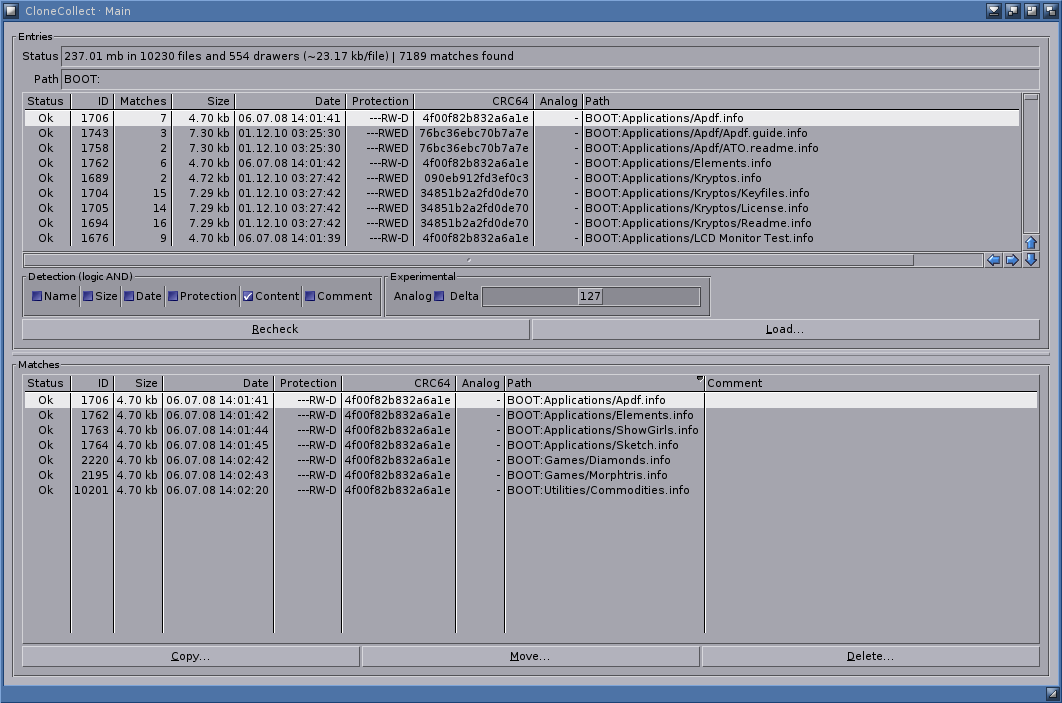
CloneCollect 1.21 is a highly modernized and updated version of CloneCollect
1.7, specialized on MorphOS' capabilities: many performance optimisations,
Reggae framework superseding DataTypes, native MUI List classes, support for
native filesystems up to 2TB partition size and file sizes of more than 4GB,
extensive ARexx port for full external control and a lot more plus bunches
of bug-fixes.
What does it do?
CloneCollect scans a drawer recursively and collects the files that match
one or more conditions you choose: file name, size, datestamp, protection
bits, file comment, content (CRC32, CRC64 or MD5 checksum, verified
byte-for-byte), or picture similarity ("Analog").
Analog compares pictures by how they look rather than by their bytes, so it
finds the same image saved at different resolutions - for example the same
wallpaper stored as 1024x768, 1680x1050 and 1920x1080. It decodes through
the system's Reggae pipeline, so it reads the picture formats MorphOS
supports (JPEG, PNG, GIF, WebP, ...).
The similarity tolerance ("Delta") defaults to 80 - a measured value, not a
guess: on labelled sets of picture variants every group was found from 77
upwards, while unrelated pictures only started being merged at 102. The best
value depends on your own pictures, so the guide explains how to tune it
quickly: start at 80 and step in tens - down (70, 60, 50) if unrelated
pictures end up grouped, up (90, 100) if copies you know about are missed.
Reports of what works best on your collections are welcome.
Matches can be copied, moved, deleted or opened with their default tool
(archives open as an Ambient lister). Long operations run in the background
with a progress window that can be paused and cancelled, optionally at a
reduced task priority so the rest of the system stays responsive.
Files and volumes larger than 4 GB are handled, multi-directory assigns
(Assign ADD) are searched in full, and files that cannot be examined are
logged rather than aborting the scan.
Press Help over a gadget for the built-in guide (Docs/CloneCollect.guide).
Scripting (1.21)
================
Shell:
CloneCollect PATH,NAME/S,SIZE/S,DATE/S,PROTECTION/S,CONTENT/S,COMMENT/S,
ANALOG/S,DELTA/K/N,CHECKSUM/K,LOWPRI/S,SCAN/S,VERBOSE/S,
EXPORT/K,ALL/S
Without SCAN the arguments only pre-set the window; with SCAN the given
drawer is scanned and compared straight away. "CloneCollect ?" shows the
template.
ARexx (port CLONECOLLECT):
SCAN <drawer> one complete run: scan recursively, then compare
RECHECK compare the loaded entries again, without reading the disk
SET <options> detection modes, DELTA, CHECKSUM, LOWPRI / NORMALPRI, PATH
STATUS parseable summary line in RESULT
CANCEL stop the running operation
EXPORT <file> write the result table as CSV (exact byte sizes, sorted by
size) - for comparing against another duplicate finder
MUI's own commands (QUIT, QUIT FORCE) work as usual. SCAN and RECHECK
return when the run has finished; a command arriving during a run answers
with RC=5 rather than starting a second one. See the guide's "ARexx
interface" page for a complete example script.
Author
======
Maintenance and versions since 1.9:
(C) 2026 Markus Lunk <sprockiroyalts@arcor.de>
Original author, versions 1.0 - 1.7 (2007-2012), and the origin of this
program:
Rupert Hausberger <natmeg@gmx.net>
License
=======
GPL. Please refer to the file COPYING for details.
History
=======
Docs/Changelog - essential changes, newest first
|


 Ambient (151)
 CloneCollect_1.21.lha