| Readme: | Short: Tile windows by dragging them to an edge
Uploader: michele.dipace@kaffeine.net (Michele Dipace)
Author: Michele Dipace <michele.dipace@kaffeine.net>
Type: util/cdity
Version: 0.41
Architecture: ppc-amigaos >= 4.0.0; ppc-morphos
Replaces: util/cdity/edgesnap.lha
WHAT IS NEW IN 0.41
A corner is now the corner itself. Anywhere along a side edge gives the
half, even with the title bar right under the screen's own; for a quarter,
push the pointer on into the corner, where the screen stops it. The top edge
is the screen's own title bar, so a window that sits at the top is no longer
maximised the moment it is touched. The Corner size setting gives the longer
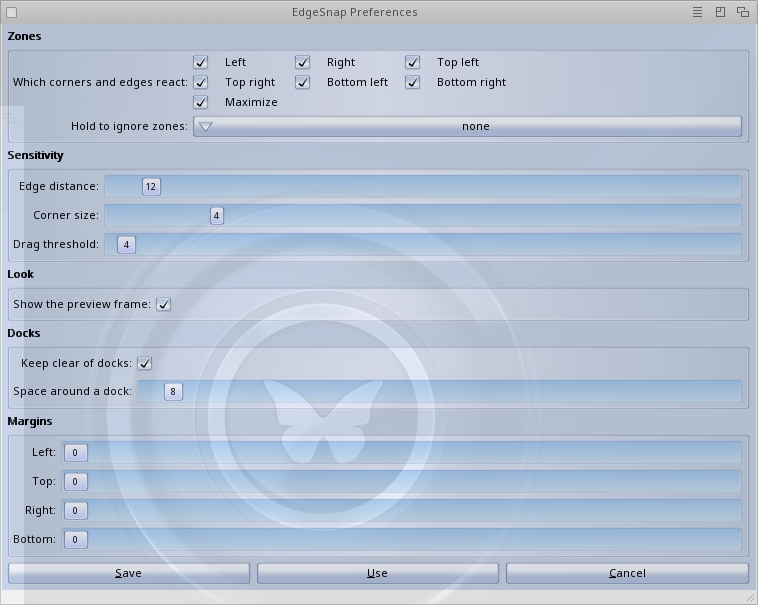
corners back. Preferences saved by an earlier version keep the corner size
they had, 4: set it to 0 for the corner itself.
A window that may not go past the edge of the screen keeps the pointer from
reaching it. Each system has its own setting for that, and the preferences
now show it on all three as "Windows can move off-screen". On MorphOS, where
it is off as delivered, the first installation turns it on and says so. From
a Shell: SYS:Prefs/EdgeSnap OFFSCREEN followed by QUERY, ON or OFF. Where it
stays off, pushing the mouse on against the edge now brings the frame up
reliably under a real hand, corners included.
The preferences program now writes a setting left at its default as a
comment, so a better default in a later version reaches everyone who never
changed that setting.
For programmers, edgesnap.library now gives a layout group gaps between its
windows and margins from the edges of the screen, applied when a program
places one of the group's windows as a cell.
WHAT IT IS
EdgeSnap gives AmigaOS 4.x, MorphOS and AROS x86_64 the window snapping that
Windows and macOS users reach for without thinking. Drag a window against a
screen edge or corner and it glides into that half or quarter of the screen.
A frame shows where it will land before you let go.
Two windows that end up side by side share a seam, and that seam can be
dragged: both windows are resized together, so half and half becomes sixty
and forty. Docks and panels are detected and never covered.
It installs as a commodity that starts with the system, so the behaviour is
simply there. Nobody has to launch anything.
THIS IS A BETA
Version 0.41 is still a beta. I checked it on real MorphOS hardware and
under emulation on AmigaOS 4.1 and AROS One 1.3 x86_64, each time by
installing the package over an earlier version. On one AROS installation
Wanderer's drawers can show black areas after a snap; another program that
moves windows does the same there, and the AROS developers are looking into
how Wanderer redraws a drawer. All of it remains worth reporting.
The interface below 1.0 is not frozen. If EdgeSnap covers your dock, misses
your seam or draws something odd, please include the system, version banner,
steps and a screenshot in your report.
Report it here, or to the address at the top of this file:
https://github.com/kaffeine1/edgesnap/issues
INSTALLING
Unpack the archive and double-click Install. It recognises the system,
proposes the matching build, and asks before doing anything: the library
goes to LIBS: and the preferences window to SYS:Prefs/. On AmigaOS 4 and
MorphOS the commodity goes to C: with a line in S:User-Startup. On AROS it
goes to SYS:WBStartup with its icon, and the first preview's copy in C: is
stopped and removed. Updating is just installing again: the running copy is
stopped and replaced, with no reboot.
USING IT
- Drag a window's title bar until the POINTER touches an edge or a
corner, then release.
- Grab the seam between two tiled windows - the pointer becomes a
double arrow - and drag it to re-balance them.
- ctrl alt cursor left/right/up snap the active window,
ctrl alt cursor down puts it back where it was, ctrl alt c puts
it in the middle at the size it has, and ctrl alt z opens a
selector under the pointer with all of that on nine cells.
- Settings live in SYS:Prefs/EdgeSnap, native on each system: ReAction
on AmigaOS 4, MUI on MorphOS, Zune on AROS. EdgeSnap follows changes
at once, without being restarted.
- Exchange enables, disables or removes it, as with any commodity.
- EdgeSnap QUIT stops it from a Shell or a script.
FOR PROGRAMMERS
The behaviour lives in edgesnap.library, not in the commodity: the commodity
is a client of it like any other program can be. Another program can place a
window in a zone or in any rectangle, find and move the seam between two
tiled windows, list the windows with their state, follow their changes and
lay out several windows in one call.
Since 2.10 the library also serves tiling window managers: one client owns
the interactive drag and any number own their layouts, work areas keep an
identity across a screen mode change, and a layout group can keep every
other program, the commodity's drag included, off its windows. Since 2.20 a
group can also keep gaps between its windows and margins from the edges of
the screen. The included esnaptest client exercises the whole API on all
three systems.
The library says 2.21 while EdgeSnap says 0.41, and that is not a mistake: a
library's version is its interface, not its product. While EdgeSnap is below
1.0 treat that interface as not frozen - methods are only ever appended,
never moved or removed, but names and arguments may still change.
THANKS
The icons are by Carlo Spadoni, who drew them for EdgeSnap and let me ship
them with it. The testers on the AROSWorld forum found the black areas in
Wanderer's drawers, the colour left along the seam and the traces of the
preview frame on one graphics driver, each with a video or a log that made
the cause findable.
LICENCE AND SOURCE
MIT. The full text is in the LICENSE file inside the archive.
Source, issues and the design notes: https://github.com/kaffeine1/edgesnap
|


 Ambient (151)
 EdgeSnap_0.41.lha