| Readme: | Short: Unofficial native Telegram chat client
Uploader: michele.dipace@kaffeine.net (Michele Dipace)
Author: Michele Dipace <michele.dipace@kaffeine.net>
Type: comm/tcp
Version: 0.0.95
Replaces: comm/tcp/TelegramAmiga-MOS.lha
Architecture: ppc-morphos
Requires: MorphOS 3.x with its TCP/IP stack
WHAT IS THIS?
-------------
Unofficial Telegram Amiga: it uses the Telegram API and is part of the
Telegram ecosystem, but it is not made by Telegram.
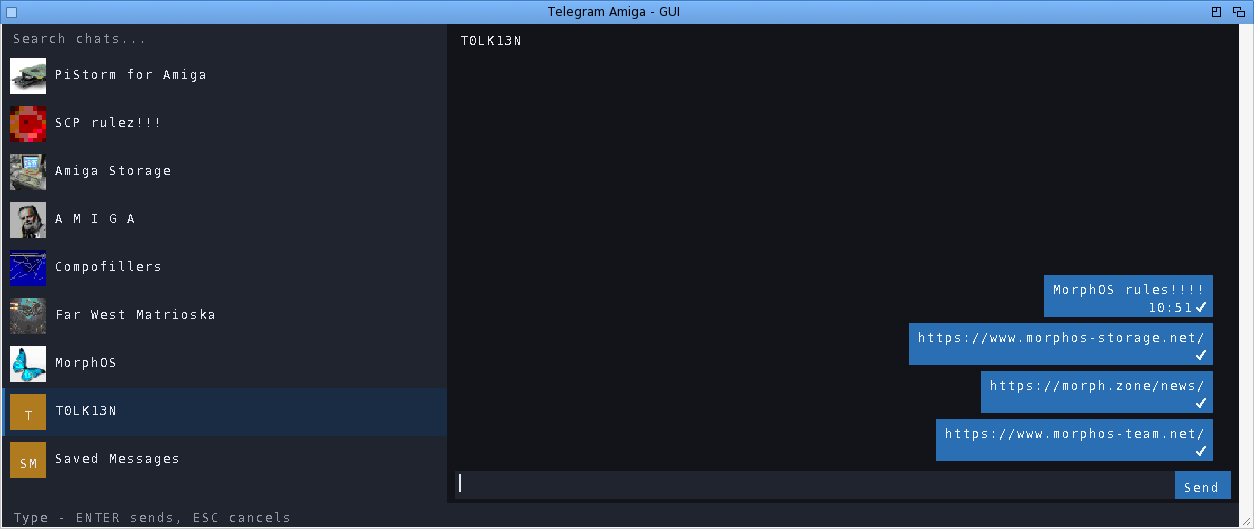
Telegram Amiga brings real, live Telegram chat to the Amiga -- not through
a gateway, a proxy service or a web wrapper, but by speaking Telegram's
own MTProto protocol natively, from scratch, on your machine. You sign in
to your normal Telegram account, your chat list appears, and you talk to
people (and they talk back) on hardware that may well be older than they
are.
Everything is built in: RSA, Diffie-Hellman, AES, SHA and the SRP two-
factor login are implemented inside the program. Zero external
dependencies -- no MUI, no ixemul.library, no AmiSSL, no TCP helper
beyond your system's own bsdsocket stack.
One program, two faces, one engine and one saved login:
TelegramAmiga - the native Intuition/GadTools GUI: chat list with real
profile-picture avatars, message bubbles, scrollbars,
mouse wheel, context menus. This package ships its icon.
The same binary also runs a full-screen text/console client
from a Shell -- the manual gives the command line.
WHAT CAN I ACTUALLY DO WITH IT?
-------------------------------
Read and send messages in private chats, groups and channels. Download a
received file (right-click -> Download) or send one from disk, up to
250 MiB on this build, including files over 10 MiB.
Photos appear immediately as blurred previews, refine from a bounded download
and reuse decoded pixels from disk when reopened. Click one for a larger
progressive viewer, or disable inline loading on a slower machine and open
only the images you choose. Forward one message to Saved Messages in a
click, or choose another destination through chat search.
Use the pinned Saved Messages chat as a cloud transfer drawer between the
Amiga and your phone or PC. Reply to a specific message (right-click it).
Edit or delete your own messages. See
real delivery state: one tick = sent, two blue ticks = read, updating
live. See who is typing. Search for chats. Send messages from your desk
at work and find the conversation already synced when you get home to
the Amiga -- and the other way round.
Message times follow your Amiga clock. Unread badges and your chat order
survive restarts. The window remembers where you left it, and can open
on its own screen if you prefer a dedicated page for chatting.
GETTING STARTED
---------------
1. Copy this drawer to a WRITABLE volume (not from the archive directly).
2. Double-click TelegramAmiga (or TelegramAmiga-TUI on very low-end setups).
3. First run walks you through the normal Telegram login: phone number,
the code Telegram sends you, and your cloud password if you use
two-factor. That is all -- next time it goes straight to your chats.
The login is stored in telegram-auth.bin next to the program. Treat that
file like a house key: NEVER copy it around or share it -- anyone who has
it has your Telegram session. Full EN and IT manuals are in the archive,
including per-platform notes and troubleshooting.
WHAT IS NEW IN 0.0.95
---------------------
ADDED
- The text client takes its commands from a script or a redirection
(TelegramAmiga <commands ...) as well as from a console, on every lane.
WaitForChar() only answers for consoles, so on any other input it always
said "nothing yet" and a scripted chat never read a line; such input now
counts as ready, since a read there returns data or the end at once. NIL: is
left as it was on AmigaOS 3.x, AmigaOS 4 and MorphOS, so a detached client
does not take an empty input for one that has ended. AROS keeps its file
handles private, so there a client given NIL: for input reads the end at
once and says "Input closed." instead of waiting for keys that cannot come.
This is what let the transfer measurements run on a real Vampire without
anyone at the keyboard.
- A "Full-size photos" setting in the Settings menu, off by default. With it
on, the photo viewer opens the largest copy of a picture the decoder can
read, with no byte cap, and draws it up to the size of the screen, at most
1024 pixels on the 68k and 2048 elsewhere instead of 512 and 768. Save photo
as... writes the original, the largest copy Telegram keeps (2560 pixels for
some uploads), even when it is a progressive JPEG the viewer cannot show;
when the original is the viewer's copy, one download serves both. The big
copy is decoded at up to twice the view's edge and scaled down block by
block, so no full-size frame is ever held: on a 68k the price is the longer
download and a few megabytes while the viewer is open, which is why it is a
choice. Each kind of copy has a cache file of its own, so switching the
setting never shows the other kind's picture, and the choice is kept in
data/telegram-photos.txt as full_size=, which older versions skip.
Self-tests check the picks, the file names, which copy a save takes, the
setting's round trip (also through a save of another photo setting) and the
decoder's new limit, and each fails when the code it covers is broken.
Checked on a Vampire and on MorphOS in QEMU, where Save photo as... wrote
the 2560x1920 original of a test upload.
CHANGED
- SHA-256 works on 32-bit words. Every message the client receives is hashed
whole to check its message key, so a 32 KB download part costs one SHA-256
of 32 KB. The rounds now rename their eight working variables instead of
moving them, rotate with single instructions and need no masks, and whole
blocks are hashed straight from the input instead of being copied through
the context first. On a Vampire a 32 KB hash takes 26 ms instead of 30, and
a download goes from 191 KB/s to 199: a modest step, because the compiler
had already done well with the old code. A self-test checks the FIPS
two-block vector, the new transform against the old one on random states and
blocks, and a digest taken in one call against the same data fed one byte at
a time; each part fails when its code is broken. The benchmark is now
--mtproto-crypto-bench and times SHA-256 too.
- Downloads keep several requests in flight. Every getFile used to wait for
its reply before the next one went out, and that wait was most of each part:
125 of the 150 ms a 64 KB part took on a desktop, and the same order of wait
on every Amiga. A window of requests now goes out ahead (8, or 4 on the 68k
and 2 on the low-memory 68000 build), and since Telegram answers them out of
order about half the time, a chunk that comes early is parked in a buffer
and written when its turn comes. On a desktop a 4 MB file now comes in 1.8 s
instead of 8.6 with a window of 4, and in 0.85 s with 8. On a Vampire, from
the text client, it doubles: 97 KB/s before, 191 with the 68k's window of 4,
and the wait for Telegram fell from 147 ms of each 32 KB part to 1. On a
real MorphOS machine, from the text client, a 4 MB file comes in at 1.35 to
1.6 MB/s: a 64 KB part takes about 37 ms, nearly all of it reading the
stream, where in September 88 ms of a part went on waiting for Telegram. Two
things changed underneath. The wait for a reply accepts any of the requests
out, and lets through the acknowledgements the server sends on their own
when several are pending. And the client's message ids no longer step back
when the reply to an older request arrives: each message from the server
used to set the last id, so the next message could reuse one and Telegram
refused it. A self-test checks the parking order, that a reset gives every
buffer back, and the ids; each check fails when the code it covers is
broken.
- Uploads keep several parts in flight too, with the same window as downloads.
Every saveFilePart used to wait for its acknowledgement before the next part
went out. Telegram may confirm the parts in any order and a part can be sent
twice at no cost, so nothing is parked here: the client only remembers which
parts are still unconfirmed. After anything unusual it closes the
connection, goes back to the lowest of them, and sends the next part the old
way, alone, before the window opens again; the first part of every upload
goes that way too, to open the connection. On a desktop a 4 MB file goes up
at 4.75 MB/s instead of 776 KB/s, and a file over 10 MB (saveBigFilePart) at
4.6 MB/s. On a Vampire, from the text client, 2 MB go up at 213 KB/s instead
of 112. Every test file was downloaded back and compared with the original.
There the time of a 32 KB part is now the CPU's: 67 ms of encryption and
about as much for the TCP/IP stack, which runs on the same processor. On
MorphOS, from the text client, 4 MB go up at 530 to 590 KB/s, against 210
KB/s with one part at a time in September, and the file downloaded back
matched the original. Socket buffers of 64 and 128 KB, in place of the 32 KB
Roadshow gives, changed nothing that stood out from the network's own
swings, and 128 KB on MorphOS (32 KB out and 64 KB in by default) did no
better, so the stacks keep their sizes. A self-test checks acknowledgements
taken out of order and a rewind to the right place in the file; each check
fails when the code it covers is broken.
- A first start no longer waits for the key exchange with the datacenter that
keeps the pictures. A profile picture lives on its owner's datacenter, and
the first time the client needs one from a datacenter other than its own it
must agree a key with it: on a 14 MHz 68030 that was 74 of the 89 seconds
before the window appeared. The exchange no longer runs while a chat opens.
The window comes up, or the chat just chosen shows, then the status line
says "Setting up pictures, once: may take a minute" and the exchange runs;
the picture appears when it is through. It still holds the window while it
runs, as the login does, but only once per datacenter, since the key is
kept. Under WinUAE, on that 68030, a cold start had its window up after 14 s
instead of 89, and the exchange then took 41 s with the faster pq split. A
self-test checks which datacenter is left waiting and that nothing is
offered without a session, and fails when that check is broken.
- The text client no longer prints a placeholder for an emoji it has no
emoticon for. Such an emoji is left out together with the space before it,
as the GUI already did, so "ciao <emoji> mondo" reads "ciao mondo"; a
message of nothing but such emoji shows "(emoji)" rather than an empty line.
The common emoji keep their emoticons (":)", "<3", "(y)"), letters of other
alphabets still show as "?" so a word does not vanish, and both clients
learn a few more symbols: the euro becomes "EUR", a bullet the middle dot,
"TM", "!!" and "!?" their plain forms, the play and back triangles "> " and
"<", typographic spaces a space, and the invisible parts of keycap digits,
subdivision flags and combining accents drop out instead of showing as "?".
The console's text path is now compiled in the host build too, and a
self-test runs it on twelve cases; dropping the rule that a left-out emoji
takes its space fails it.
- Neither window opens when a transfer runs on the chat's own connection,
which happens when the separate file connection cannot open. Between two
steps of a transfer the GUI reads that connection for new messages, and it
would take the replies still on their way.
- The program calls itself Unofficial Telegram Amiga, and says what it is.
Telegram's API terms let an app's title carry the word Telegram only after
"Unofficial" (2.3), and ask every client to tell its users that it uses the
Telegram API and is part of the Telegram ecosystem (2.2). The title changes
in the window, on the screen, in About, on the login screen and in the text
client, all from one definition, which is also how the platform code finds
the console window again. The login screen, About, the manuals, the README
and the readme of every channel carry the sentence the terms ask for, and
the channel listings start their description with "Unofficial". File and
package names do not change: TelegramAmiga, TelegramAmiga.lha and the
drawers are names, not the title, and renaming them would break updates.
- AES works a column at a time. Every byte that crosses the connection goes
through AES-256 in IGE mode, and the client did it one byte at a time:
SubBytes, ShiftRows and MixColumns as three passes over the state in every
round, which cost a Vampire 155 ms to decrypt a single 32 KB download part.
A round is now sixteen lookups in tables of 32-bit words and a few XORs per
block, with decryption through the equivalent inverse cipher; the tables (8
KB) are built from the S-box when first needed. On a Vampire a 32 KB part
now takes 34 ms to decrypt instead of 128, and 39 ms to encrypt instead of
183. A self-test checks the new code against the FIPS-197 vector and against
the byte form on random keys, IVs and lengths in both directions, and fails
when either direction is broken. --mtproto-crypto-bench reports the cost per
32 KB part on the machine it runs on, and a build with the self-tests also
times the byte form for comparison.
- The text client writes a message up to Telegram's own limit, 4096
characters. Its line stopped at 511 without a word, so a longer text or a
paste lost its end, and the line it sent was echoed into the transcript cut
at 500. The line now holds 4096 characters, the composer's three rows show
the part around the cursor, the echo wraps onto as many lines as the message
needs, and when the line is full the client says once that 4096 is the most
one message holds. Recall with the arrow keys keeps lines up to 511
characters and leaves longer ones out, rather than recall them cut short for
Enter to send as if whole. The sendMessage buffers are sized for the longer
of the two composers, two bytes a character once Latin-1 becomes UTF-8. On
the host, with the Amiga's Latin-1 text path, a 4096-character line of
accented letters (7888 bytes of UTF-8) went to Saved Messages and Telegram
kept it whole. A self-test lays out a 4000-character line in the composer
and fails with the old 640-byte buffer.
- On AmigaOS 3.x the JPEG decoder, the image scaling around it and inflate are
built at -O2. The 68k lane builds at -O0, since this compiler has
miscompiled the program at higher levels before, and only code the
self-tests prove correct goes faster. These three now do: on a stock A1200
(68EC020, cycle-exact under WinUAE) an avatar decodes in 0.93 s instead of
2.39, a 640x480 photo is scaled into a message in 8.9 s instead of 20.9, a
bilinear upscale takes 3.1 s instead of 9.3, and inflating a 9 KB answer 146
ms instead of 366, every result identical byte for byte. The TL reader
gained 3% and stays at -O0, being on the network path as well, and the
plain-68000 build keeps all three at -O0 until it is measured on a 68000.
--media-bench <drawer> times this work on any machine, on three files
scripts/make-media-bench.py makes, and prints a checksum of each result. A
self-test now inflates a stored, a fixed and a dynamic deflate block, and
fails when the branch of the inflater for any of them is broken; it passes,
with the others, on the emulated 68020.
- On the 68k a photo reaches a truecolor screen 16 rows per cybergraphics call
instead of 8, as on the other lines, halving the calls for 12 KB more of
staging buffer. It was meant for a tail of slow slices under AfA_OS;
measured there, the tail stayed, and the log showed its real causes (the
viewer's cache write and the cost of a full repaint under AfA), now in the
roadmap.
FIXED
- The drawer icon of the AmigaOS 3.x packages looked like a cloud of stray
pixels where the Workbench draws the four-colour image an icon carries
besides its colour one, as AmigaOS 3.0 and 3.1 do; a stock A1200 showed it
so. That image was made from the shaded drawer of the colour icon by error
diffusion in the four Workbench pens, which suits the flat program icon but
turns soft gradients into scattered dots. It is now drawn with a black
outline, brightness levels and a regular 2x2 texture, and no longer keeps
the faint dots of the selected state's glow. The colour image is Carlo's as
before, and the program icons do not change.
- Two-step verification can now finish on a slow 68k. Checking the password
derives a key with PBKDF2, 100000 rounds of SHA-512: 54 s on a Vampire, 27
minutes on a 14 MHz 68030 under WinUAE, and 31 on a stock A1200 emulated
cycle-exact (68EC020, 8 MB of fast memory), where the challenge Telegram
hands out with account.getPassword had expired long before the end, as had
the idle connection. The password could never be checked; a field report saw
exactly that, with no error at the end. The proof is now made in two steps.
Everything that depends only on the password and the account's salts comes
first, with the connection closed and the session saved: the derivation, g^a
and g^x. Then the client connects again, asks for a fresh challenge and
finishes with the one exponentiation that needs it, about a second on a
Vampire and half a minute on that 68030, before it sends auth.checkPassword.
If the salts changed in between, the password was changed elsewhere, and the
client says so. The text client's warning no longer tells slow machines to
turn Two-Step Verification off. A self-test checks the new code against the
values the single-step code computed, that a proof prepared with one
challenge and finished with another is the one the second alone gives, and
that a changed salt is caught; each check fails when the code it covers is
broken, and the test passes on the host and on a Vampire. A real login with
Two-Step Verification then went through on a stock A1200, from the text
client, in 35 minutes. The manuals no longer send such accounts to a faster
machine, or tell them to turn Two-Step Verification off.
- A key exchange could fail on a slow 68k before it had really begun. It opens
with pq, a product of two primes below 2^32 that the client must split
before it can answer, and the client split it with 64-bit arithmetic made of
shifts and additions and a division bit by bit at every step, in a file the
68k builds without optimisation. On a 14 MHz 68030 that took minutes, and
Telegram closed the connection first: under WinUAE the exchange a cold start
makes with the datacenter of the pictures failed that way after 138 s, where
the same start on the 23rd of September had got through in 74 s with kinder
numbers. The split now runs on 32-bit words in Montgomery form, four 32x32
products and no division per multiplication, with the processor's own 64-bit
multiply where it has one (68020, 030, 040 and the 68080), in a file built
with -O2. It takes 6.5 s on average on that 68030, and on a Vampire 0.29 s
instead of 7.1. The steps and the factor found are exactly those of the old
code, which stays in builds with self-tests as the reference: the self-test
compares the two on eight numbers of Telegram's size with three constants
each, on a 68k a second time through the 16-bit products the 68060 and the
68000 use, and fails when either path is broken. A walk that could go on for
ever after a wrong product now stops after one batch. The login's own key
exchange runs the same code.
- When an upload gave up on a part, the reason it reported ("part N of M" and
what went wrong) could run one byte past its 64-byte buffer, with a file of
a thousand parts or more and a long enough reason. It is now cut to fit.
- A photo or file sent with a long caption no longer fails once it has gone
up. The sendMedia that attaches the uploaded parts was built in 512 bytes,
which left a caption from about 140 to 420 bytes, depending on the file
name; with a longer one, from the GUI's send dialog or from /photo in the
text client, it failed to build after every part had been sent, and the
transfer ended as failed. It now has room for the longest caption and file
name. The caption itself held 1024 bytes, which Telegram's limit of 1024
characters fills only in plain ASCII; it now holds 1024 characters as UTF-8.
The text client, whose line now reaches 4096 characters, says before
uploading when a caption is longer than Telegram takes. A self-test builds
the three kinds of sendMedia with the longest caption and file name and,
where the text is Latin-1, converts 1024 accented characters into the
caption; each part fails with the old size.
- A long message that arrives is no longer cut inside a letter, and a cut one
says so. Its text comes in UTF-8 and was kept in 4096 bytes, which hold
Telegram's 4096 characters only in plain ASCII: accented letters and emoji
take two bytes or more, so a long Italian message could lose its last words.
The cut fell wherever the 4096th byte was, often in the middle of a letter,
which then showed as a stray A with a tilde at the end. The text now has 8
KB on every lane, enough for 4096 characters of two bytes: 528 KB more
memory on the PowerPC and AROS lanes, 272 KB on the 68k, and the low-memory
68000 build keeps its 2 KB. Every string the client reads, names and the
previews of pushed messages included, is now cut between characters, and a
message that does not fit ends with " [...]", its bold, italic and code kept
inside the part shown. On the host a 4096-character message of accented
letters (7888 bytes) came back whole with 8 KB, and with 4 KB as its first
2112 characters and " [...]". Self-tests cut a string, a long styled
message, a styled text that overflows and a pushed preview; each fails when
the code it covers is taken out.
- A text of several lines pasted into the text client no longer goes out as
one message a line. Every line break of the paste reached the client as the
Return key. A break with more of the text already waiting behind it now
stays in the message as a line break, shown in the composer as a pilcrow,
and the transcript echoes each line on its own; Return itself still sends,
and so does the break that ends a paste, with nothing behind it. A CR LF
pair counts as one break. This holds for the message line of an interactive
console only: the lines of a script stay lines, and so do the short prompts.
On the host, three pasted lines went to Saved Messages as one message with
its two line breaks; there the raw console now leaves Return as a CR, the
way an Amiga console sends it, so the same path runs. A self-test checks
that a break takes one cell in the composer and fails when it does not.
- On AROS the Shell that started the client no longer prints its colour codes
as text afterwards ("[42m[31m9." instead of a coloured prompt). The client
turns its output buffering off at start, and on AROS the C library does that
on the Shell's own console handle, so the change outlived the program: the
Shell then wrote its prompt a character at a time, and the console dropped
each lone ESC and printed the rest. On the way out the client now gives the
handle back the line buffering dos.library opens a console with. Seen on the
i386 VM after the window closed, and gone with the fix there and on the ARM
VM; the same Shell came back to colour.
- Photos keep their colours after the window comes back from an iconify or
from a switch to its own screen and back. Each time the window closes it
gives back cybergraphics.library, and a flag meant to try opening it once
per window stayed set, so the window that opened next never tried again and
drew every photo through palette pens, on a truecolor screen too. A debug
log on MorphOS showed it: the first window replayed photos in RGB, the
window after the switch used pens on the same 32-bit screen. The flag now
goes back with the library, and on a real MorphOS machine the photos kept
their colours through both. Present since true-colour photos came to AmigaOS
3.x RTG in 0.0.9.
- Save photo as... works before anything has been downloaded. Its requester
opens in the download drawer, and only a file download made that drawer, so
on a fresh install the first save failed with "Could not save that photo".
The client now makes the drawer, with its icon, before the requester opens,
as a download does. Found under MorphOS in QEMU while saving the original of
a 2560x1920 test photo; with the drawer in place the saved file was the
2560x1920 JPEG Telegram keeps. Present since Save photo as... came in
August.
A COMMUNITY PROJECT
-------------------
MIT licensed, non-commercial, written for the love of the platform.
Bug reports and wishes are very welcome -- testers on real hardware
(A1200s, A4000s, Pegasos, Sam, FPGA machines) are what moves this
project forward.
The icon is our own design. Carlo Spadoni optimised it for each system,
put it on a standard drawer for the drawer icon, and let me ship his
versions.
Source + issues:
https://github.com/kaffeine1/telegram-amiga
Development diary:
https://androidlab.it/en/telegram-amiga-mtproto-client-development-diary/
|


 Ambient (151)
 TelegramAmiga_0.0.95.lha