| Readme: | Short: Native MUI Discord client for MorphOS
Author: BeWorld (assisted by an AI, Claude)
Type: comm/net
Version: 1.0.0 (22.10.2026)
Architecture: ppc-morphos
Requires: MorphOS 3.20 or newer, openssl4.library (V4 or newer),
freetype.library (else ttengine.library), MagicBeacon
(optional), openurl.library,
clipboard.library (pictures in the clipboard)
_ _
/ \ ___ ___ ___ _ __ __| |
/ _ \ / __/ __/ _ \| '__/ _` |
/ ___ \ (_| (_| (_) | | | (_| |
/_/ \_\___\___\___/|_| \__,_|
A lightweight Discord client for MorphOS
==========================================================================
!!! WARNING - PLEASE READ BEFORE USE !!!
==========================================================================
* Accord is an UNOFFICIAL, third party client. It is not made,
supported or approved by Discord Inc. "Discord" is a trademark of
Discord Inc.
* Discord's Terms of Service do NOT allow third party clients.
Using Accord may get your account limited, suspended or banned.
USE IT AT YOUR OWN RISK. The author cannot be held responsible for
anything that happens to your account.
* Accord behaves like a normal user: it never automates anything,
never sends a message by itself, paces its requests like the
official client and never tries to get around a captcha. When
Discord asks for one, Accord explains it: do the same thing again in
Discord on your phone or another computer (a QR code and a link lead
to the same place), Accord sees the change by itself. To log in,
use the token instead (see FIRST START).
* Your token is the key to your account: never give it to anyone.
Accord only sends it to Discord itself (discord.com), never to any
other server.
* Voice and video are not supported.
==========================================================================
DESCRIPTION
-----------
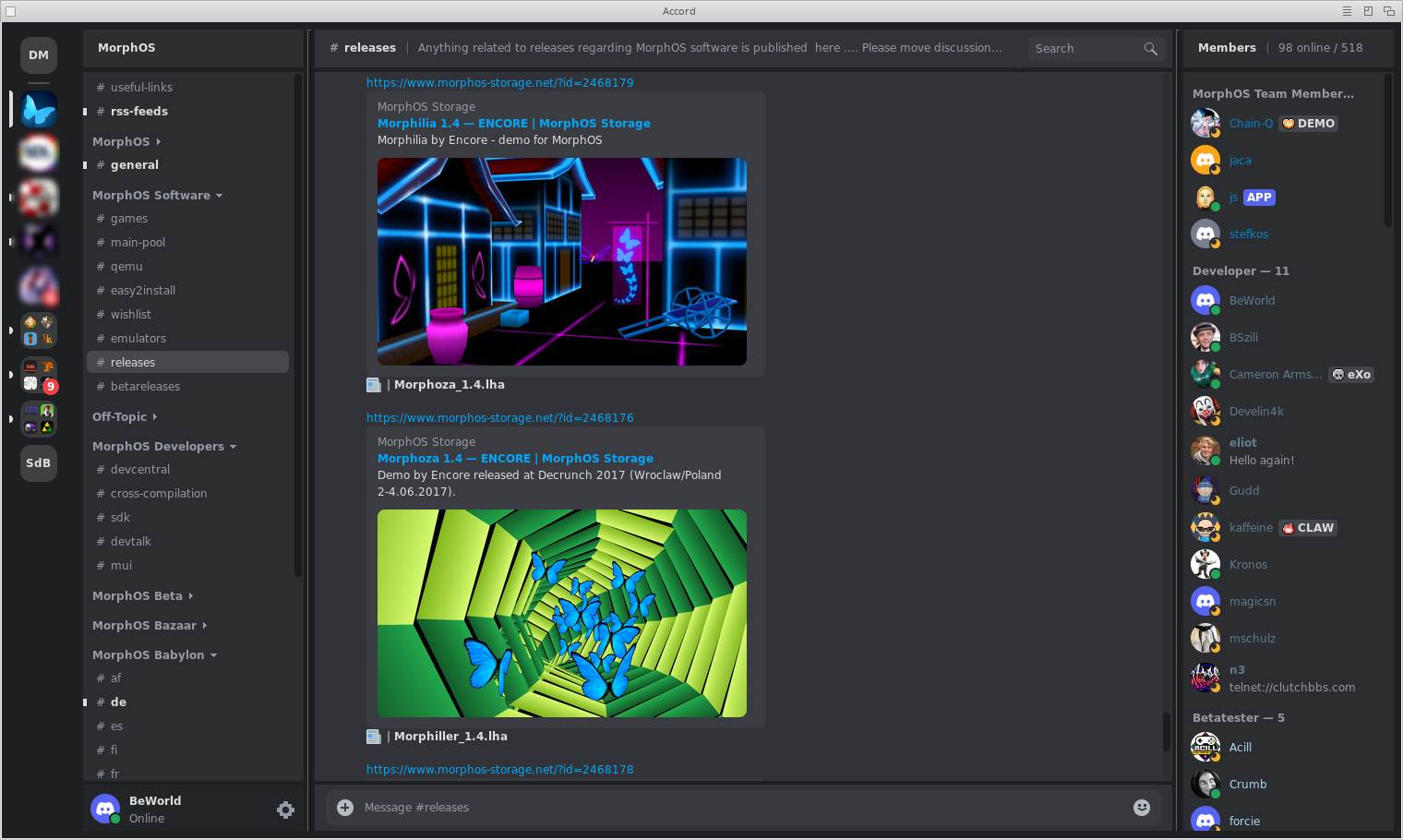
Accord is a native Discord client for MorphOS, written in C with MUI.
No embedded web browser, no Electron: one small program of about 3 MB
that follows your MUI settings, or uses Discord's own light and dark
colours if you prefer.
FEATURES
--------
Account
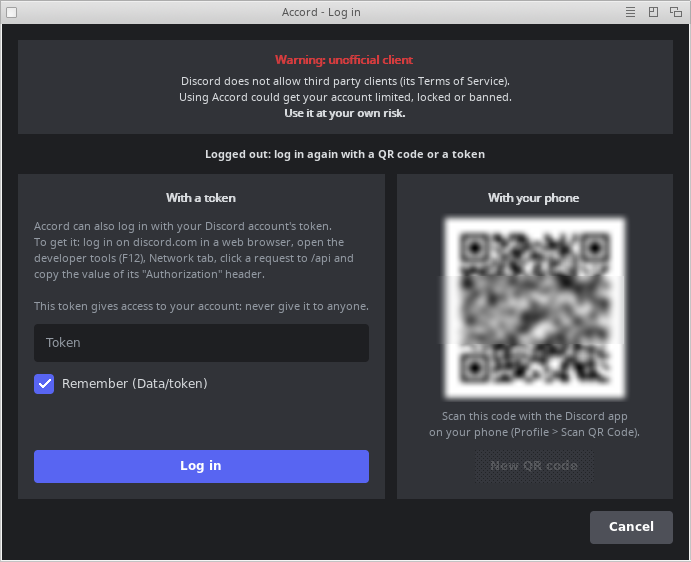
- Log in with a QR code, scanned with the Discord app of your phone
(recommended), or with a token
- Your account's card (banner, avatar, status), e-mail address hidden
- Status: Online, Idle, Do Not Disturb, Invisible (remembered)
Servers and channels
- Server bar with icons, folders, unread and mention badges
- Categories that fold (named as on Discord), unread channels in bold,
emoji in names
- Member list with roles, colours and presence, custom status or
activity, server tags and "APP" for bots
- Threads you joined, under their channel, live
- Forum (and media) channels read: their posts in cards, as on Discord
- Last channel remembered per server; Accord opens where you left it
Messages
- Real time, automatic reconnection and session resume
- Older messages loaded while scrolling up, "new messages" line
- Markdown: bold, italic, code, quotes, spoilers, titles, lists, links
- Reply, edit, delete, copy the text; toolbar on each message
(quick reactions, add a reaction, reply, edit)
- Emoji as pictures everywhere (Twemoji and server emoji), reactions,
emoji picker for your messages
- Pictures (a window with a mouse-wheel zoom), stickers (Discord's own
ones animated), link previews, file cards with download (any size)
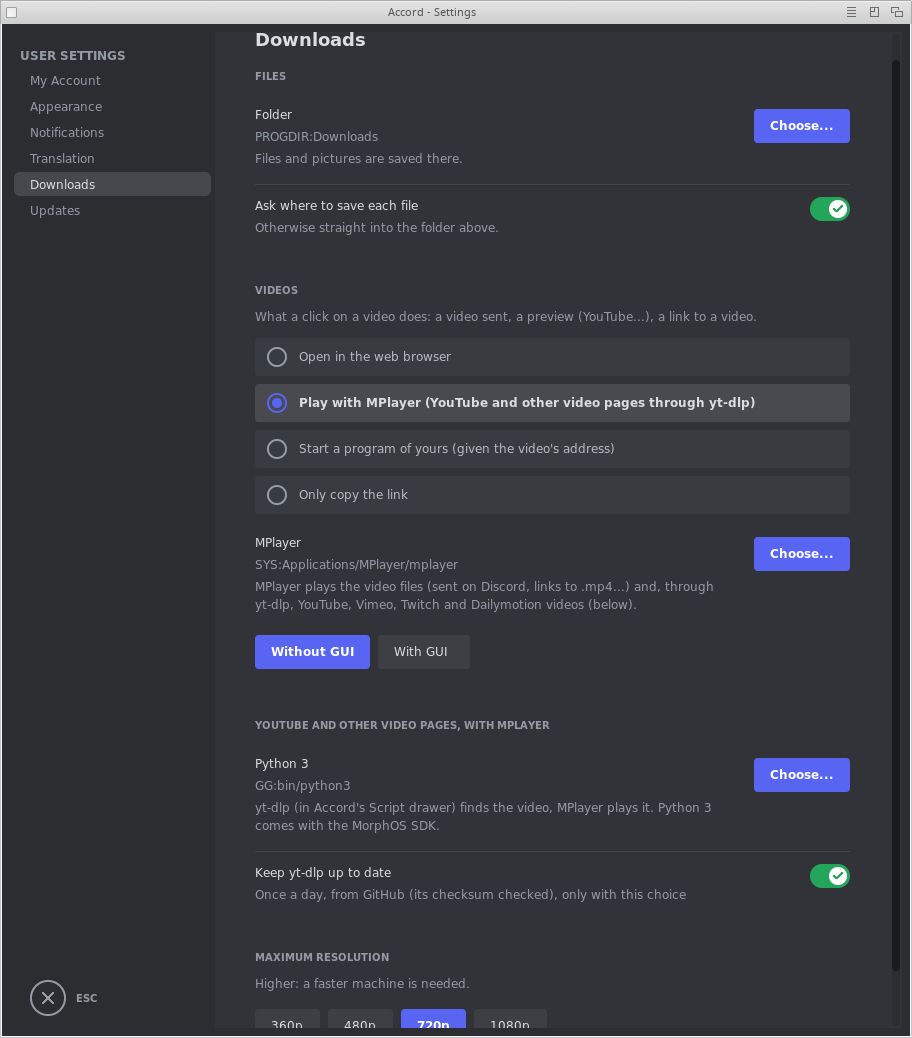
- Videos and sounds played in the web browser or MPlayer (YouTube and
other video pages too, through yt-dlp), or given to a program of yours
- Text and .md files: a preview in the message, a click reads them in
a window (Markdown for .md, fixed width for the others)
- Attachments: send up to 10 files, drag and drop from Ambient, paste
a picture (Amiga+V in the message field), or ARexx (ATTACH "file"
... to port ACCORD.1)
- Polls shown as on Discord, votes updated live (read only)
- "... is typing", messages that mention you highlighted, day lines
- Search in a server, channel or conversation, jump to any result
- Translate a message (Google Translate), to the language you choose;
what you write too (right click in the field > Translate: ...)
Private messages and friends
- Direct and group conversations with avatars and presence; a new one
only with a friend (to someone else, write from Discord itself)
- Friends page: online, all, pending, blocked, only shown (accept,
refuse, remove, block or ignore someone in Discord itself); message
requests and spam kept apart
- Profiles with bio, mutual friends and servers
Notifications and look
- MagicBeacon notifications on two lines: who (and where), then what
("Do Not Disturb" silences them); their bubble set in MagicBeacon's
preferences with the types Accord.NewPrivateMSG and Accord.NewMSG
- Iconified: a red badge on the icon with the private messages unread
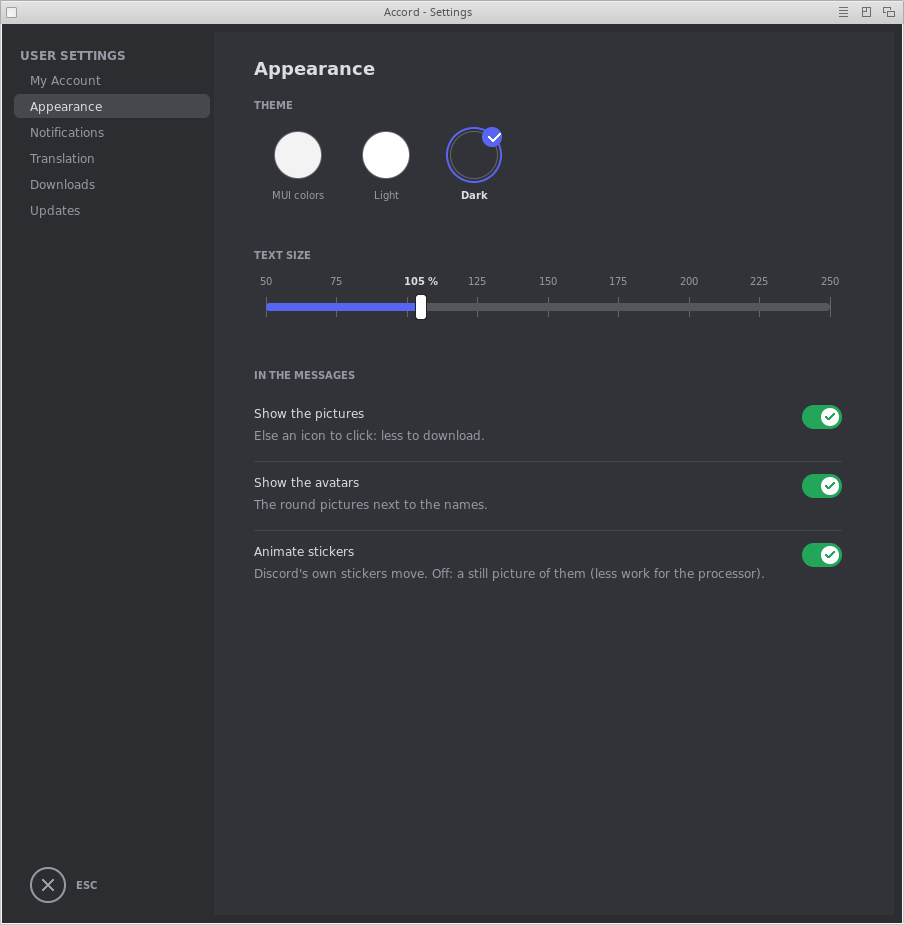
- Themes: MUI colours, Discord light, Discord dark
- Text size, show or hide pictures and avatars (saves bandwidth)
- Settings window laid out like Discord's
- Interface in English, French, German, Spanish, Italian, Dutch,
Polish, Portuguese (Brazil) and Swedish
Light and careful
- Disk cache for pictures (Cache drawer, 100 MB at most)
- Memory kept low: the messages of the channels left trimmed, the ones
of channels not seen for a while let go (loaded again when opened)
- Requests paced like a quiet client, no duplicates, no spam
- Network loss: a red bar, nothing is lost, automatic recovery
- Certificates (TLS) kept up to date, always checked
NOT SUPPORTED (YET)
-------------------
- Voice and video calls, screen sharing (not planned)
- Bot buttons and menus, "/" commands
- Voting in polls, creating one; forums: a new post, tag filters
- The list of all threads of a channel, pinned messages
- Chinese, Japanese and Korean fonts
INSTALLATION
------------
Copy the Accord drawer anywhere, then double click Accord.
Accord the program
Accord.info its icon
Data/ your settings, your token if you ask Accord to
remember it, the certificates (curl-ca-bundle.crt,
updated every month from curl.se), the About logo
Catalogs/ the translations: Catalogs/<language>/Accord.catalog
(found there, or copy them to LOCALE:Catalogs/)
Cache/ made by Accord: the pictures downloaded
Downloads/ made by Accord: the files and pictures you save
(another folder can be chosen: Settings > Downloads)
Script/ YouTube (and other video pages) played with MPlayer
through yt-dlp; Python 3 needed (see its ReadMe.txt)
Fonts/ optional: Text-Regular.ttf, Text-Bold.ttf,
Text-Italic.ttf, Text-BoldItalic.ttf to use your own
text font
The language follows your Locale preferences.
FIRST START
-----------
1. The login window shows a QR code. On your phone, in the Discord app:
Profile > Scan QR code, then confirm. That's all.
Sometimes Discord asks for a captcha at that moment. It can only be
answered by the computer logging in, and Accord cannot show it (nor
can the MorphOS web browsers): the login window then says so and
puts the cursor in the token field. Use the token (2.), or try a new
QR code later ("New QR code"): Discord does not always ask.
2. Or paste your token (read the warning above first). To get it, log in
on discord.com in a web browser (on another computer if needed), open
the developer tools (F12), Network tab, click a request to /api and
copy the value of its "Authorization" header.
3. "Remember" keeps the token in Data/token, in the Accord drawer, in
plain text. Without it, the token is kept nowhere and you log in again
at the next start. "Log out and forget the token" in the Project menu
removes it.
If you copy or share your Accord drawer, leave Data/token out!
Settings are kept in the Data drawer too (Data/), one small file each.
KEYBOARD
--------
Amiga+L Log in Amiga+S Settings
Amiga+R Reconnect Amiga+M Member list
Amiga+B Open in browser Amiga+H Iconify
Amiga+F Search messages Amiga+Q Quit
Amiga+? About Amiga+C Copy
Amiga+V Paste
Return send Shift+Return new line
Up edit your last message (in the empty message field)
Esc give up a reply or an edit; close the Settings
Copy takes the text selected with the mouse in the messages (drag over
it, double click: a word) or in a field, or else the message clicked
once (right click > Copy Text too). In the picture window, Amiga+C (or
right click > Copy Image) copies the picture. Typing anywhere in the
window writes in the message field. The close gadget of the main window
iconifies Accord: quit from the menu.
WHAT GOES WHERE (PRIVACY)
-------------------------
- discord.com, gateway.discord.gg: your account (with your token)
- cdn.discordapp.com, media.discordapp.net: pictures, avatars, files
(without your token)
- cdn.jsdelivr.net: the Twemoji pictures (without your token)
- translate.googleapis.com (or clients5.google.com): the text of a
message, or the one you write, only when you ask for its translation
(in yours: not its mentions, emoji, links and code)
- curl.se: the certificates list, once a month
- beworld.morphos-storage.net: a small file with the latest version of
Accord, once a day (Settings > Updates: turn it off, or "Check now").
A newer version is downloaded to Cache/update and checked (its
program must be named Accord and be the version announced). A green
icon at the top of the server bar then says it is ready: a click
installs it and restarts Accord, otherwise it is installed at the
next start. It is copied over this one (your Data/ and Cache/ stay);
the old program and the downloaded archive are deleted afterwards
- YouTube and other video pages played with MPlayer (Settings >
Downloads > Videos): yt-dlp and its script, not Accord, go to the
video's site, only when you click on one (without your token)
- github.com: with that choice and "Keep yt-dlp up to date" (on), the
checksums of yt-dlp's latest release once a day, and that release
when it is a new one (checked against them before it is used)
Nothing else, no statistics, no tracking.
CREDITS
-------
Created by BeWorld, assisted by an AI (Claude).
libcurl, OpenSSL 4 (openssl4.library), jansson, zlib
FreeType (freetype.library), ttengine.library, datatypes, MUI,
MagicBeacon
Emoji: Twemoji (jdecked/twemoji), CC-BY 4.0
SUPPORT
-------
Do you like Accord? Support me:
https://www.paypal.com/paypalme/BeWorldMOS
(The About window has a "Support Accord" button too.)
HISTORY
-------
1.0.0 (22.10.2026)
- MPlayer with or without its interface (Settings > Downloads), for
the videos and YouTube & co.
- Right click on a category: collapse or expand all of the server's;
the folded ones are kept from one start to the next
- Downloads: a bar above the input shows how far (%, size), its cross
cancels; a failed or cancelled one leaves the file it replaces as it
was
- As on Discord: the servers' icons are rounded squares, their pill
grows under the mouse; the lists and the channel's messages are lit
under it (the active window only)
- Safer: logging out or another account drops what was signed with the
old token; the token and DeepL key fields keep no copy (no Amiga+Z)
- Faster: the messages already measured are not measured again at each
new one
- Many fixes after a full audit of the code: @ # suggestions, drafts,
threads (their own permission), timed mutes, jumps to a message,
YouTube videos
0.9.9 (19.10.2026)
- Emoji window from the keyboard: Ctrl+E opens it (as on Discord),
type to filter, cursor keys to move, Return to take, Esc to close
(reactions too)
- @ and # suggestions over the input, as on Discord: members (avatar,
role color), roles, @everyone / @here (when allowed), @time, the
server's channels; cursor keys, Tab or Return, Esc, a click; sent as
real mentions (only the members Accord already knows)
- A draft per channel: what you wrote and did not send comes back when
you open the channel again (while Accord runs)
- "N new messages since 10:32" bar at the top, as on Discord: a click
goes back to the line, gone once the bottom was seen
- discord.com/channels/... links open in Accord: the channel, or the
message (loaded around it); the browser if it is not one of yours
- Translations by DeepL with your own API key (Settings > Language >
DeepL): the messages and the input; the key is only sent to DeepL,
Google Translate if DeepL fails
- Its filter field follows the theme
0.9.8 (18.10.2026)
- A short chime for private messages and mentions, as Discord's ping
(Settings > Notifications > Sound)
- Files dragged over the window (from Ambient or SRecord): a card
shows where they will be sent, as on Discord (MorphOS 3.20 and newer)
- "You're viewing older messages" bar when scrolled far up or after a
jump back in time: a click brings back the newest, as on Discord
- Quieter for Discord's anti-spam: each request says what Accord is
(X-Super-Properties, as Discord recommends); 3 new conversations in
10 minutes at most, one friend without a conversation per forward
0.9.7 (18.10.2026)
- Translate what you write: right click in the message field >
Translate (its mentions, emoji, links and code kept as they are)
- YouTube and other video pages played with MPlayer through yt-dlp
(Script drawer, Python 3 of the MorphOS SDK): resolution of your
choice, yt-dlp kept up to date
- Picture window: mouse-wheel zoom and dragging, smooth
- Settings laid out alike on every page
- ARexx command ATTACH (port ACCORD.1): files attached to the message
being written
- Icons instead of words on the buttons
- Categories as on Discord; notifications on two lines
- Iconified by MUI without a flash
- Faster and lighter: less memory, quicker drawing, a smarter picture
cache, a lighter log
- Many fixes (attachments over 8 MB, messages purged by moderators,
forwards, network loss at the login...) and safer (updates, token)
0.9.6 (17.10.2026)
- Animated stickers much lighter: only they are drawn again at each
frame (not the whole conversation), their frames and still picture
kept in Cache/ (a sticker seen before shows at once)
- The text drawn with MorphOS' FreeType (freetype.library), the same
fonts as before: its letters drawn once and kept, about twice as fast;
the fonts read once for all the views (ttengine.library if FreeType
is missing)
- Symbols that are not emoji (a moon, a check mark...) drawn with the
font: Twemoji has no picture for them (they were missing)
- Iconified, Accord's icon shows a red disc with the private messages
not read, as Discord's badge; it blinks when their number changes
(Settings > Notifications > Badge on the icon; off: MUI's icon)
- Polls shown as on Discord, in a card: the question, the answers with
a bar of their share of the votes and their %, yours ticked, the
winner when over, the votes and the time left; updated live (read
only: voting is for a next version)
- As Discord's member list: each member's custom status or activity
under its name ("Playing ...", "Listening to Spotify"); "APP" after a
bot's name (was BOT) and the server tag a user shows (its badge, its
letters), there and in messages and profiles
- Forum channels (and media ones) read, as on Discord: their posts in
cards (tags, title, author and the start of the first message with its
emoji, the number of messages, when), the pinned ones first, 25 more
at the bottom; a post clicked is read with its card on its top and
"<- forum" back to the list (where it was)
- Code blocks: a ``` after text on a line (Discord's way) starts one,
and their indentation is kept
0.9.5 (16.10.2026)
- Text and .md files: their first lines in the message, a click reads
them in a window (Download, Close)
- Sounds (voice messages too) played as the videos: web browser or
MPlayer (Settings > Downloads > Videos)
- An icon for each kind of file (text, code, sound, archive); a play
button on sounds, their download button kept
- Discord's own stickers (Lottie) shown, and animated (Settings >
Appearance)
- Account Standing in Settings > My Account, as Discord's
- A bin on the toolbar of your messages (Shift+click: deleted at once)
- Pictures the media proxy refuses at our size, or sends in a format
the datatypes cannot read (WebP...): asked again, whole or as PNG
- No new private conversation with someone who is not a friend (the
ones there are stay open)
- Esc gives up a reply or an edit without iconifying Accord
0.9.4 (14.10.2026)
- Several pictures or videos in a message: a mosaic, as on Discord
- Replies as on Discord: a curved line, the small avatar and the name
in its color; a click goes to the message answered
- Link previews in a card; pictures with rounded corners
- The friends page only shows: accept, refuse, remove, block or ignore
someone in Discord itself
0.9.3 (14.10.2026)
- Videos: a picture of the video with a play button and a download
button, as on Discord; a click opens it in the web browser, plays it
with MPlayer or only copies its link (Settings > Downloads > Videos)
- Right click > Copy Link on a link, a preview or a picture, and in the
picture window
- Copy and paste with Ctrl or the Amiga keys, even with no field active
0.9.2 (13.10.2026)
- Copy and paste with the system clipboard (clipboard.library): Edit
menu, right click > Copy Text
- Part of a message selected with the mouse (double click: a word)
- A picture pasted (Amiga+V) is sent as image.png; Copy Image in the
picture window
- What's New window after an update
- Idle by itself after some minutes with no key or mouse (Settings >
Notifications), Online again when you are back
- Up in the empty message field edits your last message, Esc gives up
a reply or an edit
- Settings > Updates: an Update Now button when a version is ready, and
the version history
- A new login window, in the colors of the theme; a new QR code at most
every 30 seconds
- A token refused by Discord is forgotten at once (Data/token deleted):
nothing more is sent to Discord until you log in again
- Pictures saved from the cache, not downloaded again
- Lighter debug log, login keys hidden in it
- No more friend requests sent from profiles (Discord asks for a captcha)
0.9.1 (11.10.2026)
- Updates: downloaded and checked by themselves, a green icon in the
server bar installs them (or the next start does)
- Presence of the people in your private messages right at the start
- Pictures opened in a window with Download and Close buttons
- Files and pictures saved to Downloads/ (or a folder of your choice,
Settings > Downloads), with no requester unless you ask for one
- Blocked and ignored users
0.9 (11.10.2026)
- First release.
|


 Ambient (150)

 Accord_1.0.0.lha