| Readme: | Short: Tile windows by dragging them to an edge
Uploader: michele.dipace@kaffeine.net (Michele Dipace)
Author: Michele Dipace <michele.dipace@kaffeine.net>
Type: util/cdity
Version: 0.5
Architecture: ppc-amigaos >= 4.0.0; ppc-morphos
Replaces: util/cdity/edgesnap.lha
WHAT IS NEW IN 0.5
Every hotkey can now be changed on a new Hotkeys page of the preferences, in
the icon's tooltypes or as a Shell argument, with an input description as
Exchange writes it (HOTKEYLEFT=ctrl alt cursor_left); none, or an empty
field, leaves an action without a key. The keys as they come are the ones of
0.43. The four quarters get actions of their own (HOTKEYTOPLEFT and so on),
with no key until you give them one, and CX_POPKEY (also POPKEY) opens the
preferences, as Exchange's Show button does. The preferences window now has
two pages, Snapping and Hotkeys, with the width cycle setting beside the
side keys; it refuses a key the system does not understand, or two actions
on the same key, with a requester, while the commodity skips such a key and
says so in its output instead of not starting. Keys change at once when the
preferences are saved, without a restart.
An ARexx port, EDGESNAP, lets a script, a dock button or a file manager do
what the hotkeys do: SNAP (LEFT RIGHT MAXIMIZE TOPLEFT TOPRIGHT BOTTOMLEFT
BOTTOMRIGHT CENTRE), RESTORE, QUERY (RESULT is where the window is snapped),
SELECT, PREFS, ENABLE, DISABLE, VERSION, HELP and QUIT, on the active window
or on another window matched by a TITLE AmigaDOS pattern, for example rx
"ADDRESS EDGESNAP 'SNAP LEFT'". On MorphOS an ARexx interpreter must be
installed, as the system's own rexxsyslib has none; on AROS One the command
is SYS:Rexxc/RX.
edgesnap.library 2.25 brings corrections from a review of 2.24, among them a
window closed while the library waits for it, a press beside a seam on AROS,
and two cases of the old size coming back on a drag away: a short pull of a
maximised window (a few pixels are now enough), and a window that followed
the pointer during the drag.
WHAT IT IS
EdgeSnap gives AmigaOS 4.x, MorphOS and AROS (x86_64, aarch64 and i386) the
window snapping that Windows and macOS users reach for without thinking.
Drag a window against a screen edge or corner and it glides into that half
or quarter of the screen. A frame shows where it will land before you let
go.
Two windows that end up side by side share a seam, and that seam can be
dragged: both windows are resized together, so half and half becomes sixty
and forty. Docks and panels are detected and never covered.
It installs as a commodity that starts with the system, so the behaviour is
simply there. Nobody has to launch anything.
THIS IS A BETA
Version 0.5 is still a beta. I checked it on real hardware on MorphOS 3.20
on a PowerMac G5 (with ARexx) and on a Raspberry Pi 400 with AROS aarch64,
and under emulation on AmigaOS 4.1, MorphOS and AROS One 1.3 x86_64. The
i386 build comes from the same sources; library 2.25 was tried on AROS One
x86 under emulation. On one AROS installation Wanderer's drawers can show
black areas after a snap; another program that moves windows does the same
there, and the AROS developers are looking into how Wanderer redraws a
drawer. All of it remains worth reporting.
The interface below 1.0 is not frozen. If EdgeSnap covers your dock, misses
your seam or draws something odd, please include the system, version banner,
steps and a screenshot in your report.
Report it here, or to the address at the top of this file:
https://github.com/kaffeine1/edgesnap/issues
INSTALLING
Unpack the archive and double-click Install. It recognises the system,
proposes the matching build, and asks before doing anything: the library
goes to LIBS: and the preferences window to SYS:Prefs/. On AmigaOS 4 and
MorphOS the commodity goes to C: with a line in S:User-Startup. On AROS it
goes to SYS:WBStartup with its icon, and the first preview's copy in C: is
stopped and removed. On the Raspberry Pi and on 32-bit AROS, and on any AROS
whose own Installer cannot copy files, Install does all of this by itself
after one question. Updating is just installing again: the running copy is
stopped and replaced, with no reboot, except that on the Raspberry Pi a new
library takes over at the next boot.
USING IT
- Drag a window's title bar until the POINTER touches an edge or a
corner, then release.
- Grab the seam between two tiled windows (the pointer becomes a
double arrow) and drag it to re-balance them.
- Drag a snapped window away from the edges and it gets back the
size it had before.
- ctrl alt cursor left/right/up snap the active window,
ctrl alt cursor down puts it back where it was, ctrl alt c puts
it in the middle at the size it has, and ctrl alt z opens a
selector under the pointer with all of that on nine cells.
- Every hotkey can be changed on the Hotkeys page of the preferences,
in the icon's tooltypes or from the Shell, and the four quarters
and opening the preferences can be given keys there too.
- The ARexx port EDGESNAP lets a script, a dock button or a file
manager do what the hotkeys do: rx "ADDRESS EDGESNAP 'SNAP LEFT'".
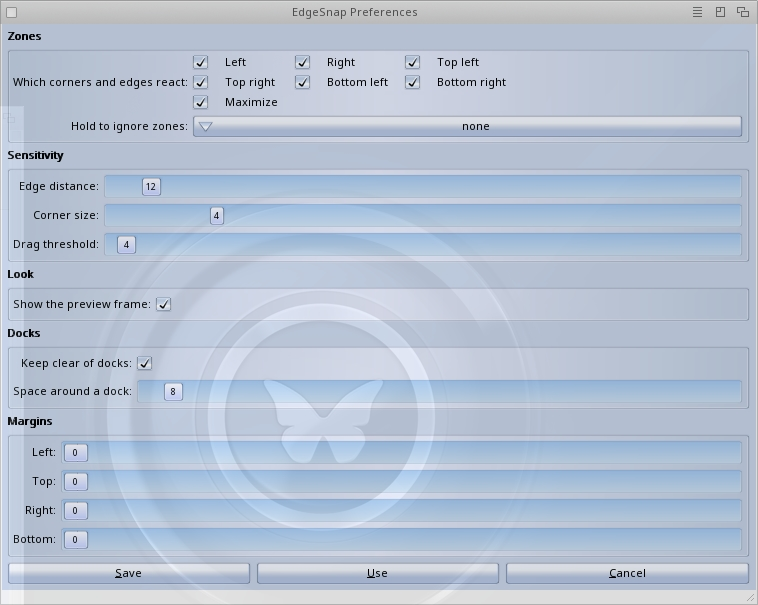
- Settings live in SYS:Prefs/EdgeSnap, native on each system: ReAction
on AmigaOS 4, MUI on MorphOS, Zune on AROS. EdgeSnap follows changes
at once, without being restarted.
- Exchange enables, disables or removes it, as with any commodity.
- EdgeSnap QUIT stops it from a Shell or a script.
FOR PROGRAMMERS
The behaviour lives in edgesnap.library, not in the commodity: the commodity
is a client of it like any other program can be. Another program can place a
window in a zone or in any rectangle, find and move the seam between two
tiled windows, list the windows with their state, follow their changes and
lay out several windows in one call.
Since 2.10 the library also serves tiling window managers: one client owns
the interactive drag and any number own their layouts, work areas keep an
identity across a screen mode change, and a layout group can keep every
other program, the commodity's drag included, off its windows. Since 2.20 a
group can also keep gaps between its windows and margins from the edges of
the screen. Since 2.24 a tiler can list the seams between the windows of a
group and move each one by a token that names its windows, and a seam
dragged between them keeps the group's gap. The included esnaptest client
exercises the whole API on every system.
The library says 2.25 while EdgeSnap says 0.5, and that is not a mistake: a
library's version is its interface, not its product. While EdgeSnap is below
1.0 treat that interface as not frozen: methods are only ever appended,
never moved or removed, but names and arguments may still change.
THANKS
The icons are by Carlo Spadoni, who drew them for EdgeSnap and let me ship
them with it. The testers on the AROSWorld forum found the black areas in
Wanderer's drawers, the colour left along the seam and the traces of the
preview frame on one graphics driver, each with a video or a log that made
the cause findable. A MorphOS user asked for the old size back when a
snapped window is dragged away, the hotkeys came from a conflict found on
real MorphOS hardware, and the author of a tiling window manager asked for
the seams of a group.
LICENCE AND SOURCE
MIT. The full text is in the LICENSE file inside the archive.
Source, issues and the design notes: https://github.com/kaffeine1/edgesnap
|


 Ambient (150)
 EdgeSnap_0.5.lha