| Readme: | Short: Unofficial native Telegram chat client
Uploader: michele.dipace@kaffeine.net (Michele Dipace)
Author: Michele Dipace <michele.dipace@kaffeine.net>
Type: comm/tcp
Version: 0.0.98
Replaces: comm/tcp/TelegramAmiga-MOS.lha
Architecture: ppc-morphos
Requires: MorphOS 3.x with its TCP/IP stack
WHAT IS THIS?
-------------
Unofficial Telegram Amiga: it uses the Telegram API and is part of the
Telegram ecosystem, but it is not made by Telegram.
Telegram Amiga brings real, live Telegram chat to the Amiga -- not through
a gateway, a proxy service or a web wrapper, but by speaking Telegram's
own MTProto protocol natively, from scratch, on your machine. You sign in
to your normal Telegram account, your chat list appears, and you talk to
people (and they talk back) on hardware that may well be older than they
are.
Everything is built in: RSA, Diffie-Hellman, AES, SHA and the SRP two-
factor login are implemented inside the program. Zero external
dependencies -- no MUI, no ixemul.library, no AmiSSL, no TCP helper
beyond your system's own bsdsocket stack.
One program, two faces, one engine and one saved login:
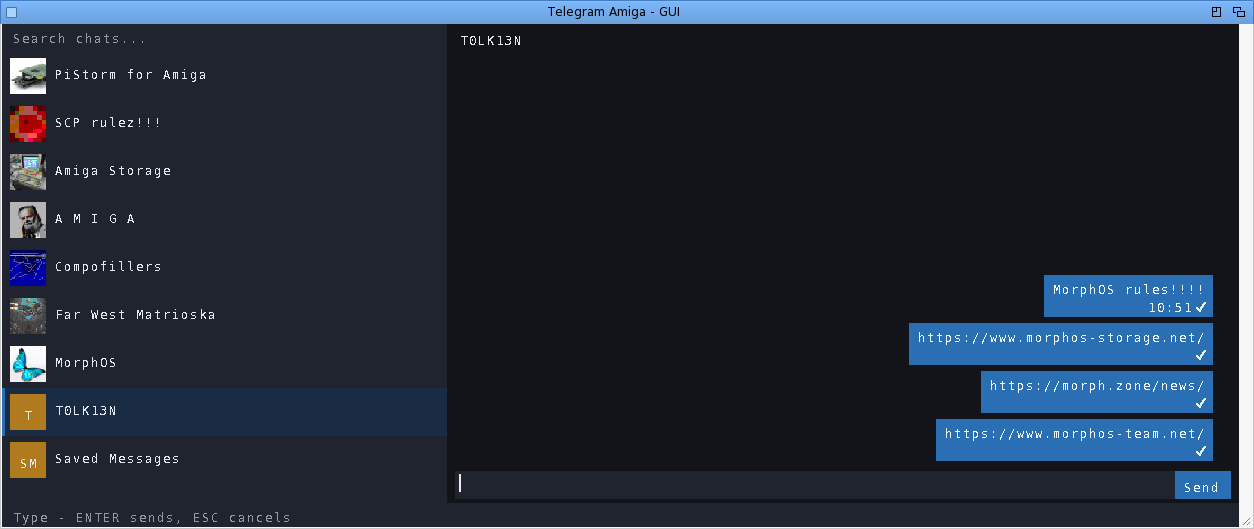
TelegramAmiga - the native Intuition/GadTools GUI: chat list with real
profile-picture avatars, message bubbles, scrollbars,
mouse wheel, context menus. This package ships its icon.
The same binary also runs a full-screen text/console client
from a Shell -- the manual gives the command line.
WHAT CAN I ACTUALLY DO WITH IT?
-------------------------------
Read and send messages in private chats, groups and channels. Download a
received file (right-click -> Download) or send one from disk, up to
250 MiB on this build, including files over 10 MiB.
Photos appear immediately as blurred previews, refine from a bounded download
and reuse decoded pixels from disk when reopened. Click one for a larger
progressive viewer, or disable inline loading on a slower machine and open
only the images you choose. Forward one message to Saved Messages in a
click, or choose another destination through chat search.
Use the pinned Saved Messages chat as a cloud transfer drawer between the
Amiga and your phone or PC. Reply to a specific message (right-click it).
Edit or delete your own messages. See
real delivery state: one tick = sent, two blue ticks = read, updating
live. See who is typing. Search for chats. Send messages from your desk
at work and find the conversation already synced when you get home to
the Amiga -- and the other way round.
Message times follow your Amiga clock. Unread badges and your chat order
survive restarts. The window remembers where you left it, and can open
on its own screen if you prefer a dedicated page for chatting.
GETTING STARTED
---------------
1. Copy this drawer to a WRITABLE volume (not from the archive directly).
2. Double-click TelegramAmiga (or TelegramAmiga-TUI on very low-end setups).
3. First run walks you through the normal Telegram login: phone number,
the code Telegram sends you, and your cloud password if you use
two-factor. That is all -- next time it goes straight to your chats.
The login is stored in telegram-auth.bin next to the program. Treat that
file like a house key: NEVER copy it around or share it -- anyone who has
it has your Telegram session. Full EN and IT manuals are in the archive,
including per-platform notes and troubleshooting.
WHAT IS NEW IN 0.0.98
---------------------
ADDED
- Each chat decides whether its new messages ring. A chat muted in Telegram,
on the phone or anywhere else, stays silent here too and shows no pop-up
until the time it was muted for has passed; it still counts in the window
title and on its row. That time is checked against Telegram's clock, so a
machine whose own clock nobody set still gets it right. Chats Telegram keeps
silent, messages sent silently and your own messages from another device
never ring. Direct chats ring; groups and channels stay quiet until you let
them; a chat that rang waits half a minute before it can ring again; the
chat open in front of you never rings, while the others now ring even with
the window in front. The right mouse button over a chat in the list opens a
menu of its own: Remove chat, Mute or Unmute, and for groups and channels
Enable or Disable ring; anywhere else in the window it still opens the menu
bar. The choices are kept in data/telegram-chat-notify.txt.
- A sound of your choice for new messages. "Settings > Notifications > Sound
file..." picks any sound the system's sound datatype reads (IFF 8SVX
everywhere, WAV and others where a datatype is installed), up to 1 MB;
"Built-in chime" goes back to the client's own short chime. A chat can have
a sound of its own: "Sound..." in the chat row's right-button menu, and
"Default sound" to drop it. A sound plays when Beep is on and the chat
rings, for at most three seconds, while the client goes on working; without
a sound device the screen flashes as before. The text client rings the same
sounds while /bell is on. Six short sounds of our own come in the sounds/
drawer of the packages, in IFF 8SVX so that every system plays them, and
choosing a sound plays it at once. On AROS the sound goes out through the
unit set in Prefs/AHI, as the chime does: the system's sound datatype picks
an audio mode of its own, which on a Raspberry Pi is not HDMI. On an Amiga
without AHI the built-in chime goes to Paula with its volume and pitch; it
was silent there. The menu once called "New messages" is now
"Notifications". The choices are kept in data/telegram-notify.txt and
data/telegram-chat-notify.txt.
- In a group, the new-message pop-up says who wrote: "Name: text". The name
comes with the update or from the names the client already knows; when it is
unknown, and for channel posts and anonymous admins, the line shows the text
alone as before. A long name is cut so the text keeps most of the line.
- The login says that a Telegram account must exist already: the number
screen, the text client before it asks for the number, the manuals' first
start and the README. The client signs in to an account but cannot create
one yet, and a first-time user without one waited for a code that could
never have been used.
- Messages from earlier days show their day: the transcript opens each day
with a line carrying its date ("Today", "Yesterday", or the day and the
month, with the year when it is not the current one), and a run of messages
from one sender breaks at a new day. The text client, which already marked a
change of day, now also opens an older page with its date. Today comes from
the same clock as the message times, so a machine whose clock was never set
still gets it right.
- Typed emoticons become emoji: :) :D ;) :P :( :'( :O :* <3 and xD, standing
alone, turn into their emoji when a space follows or the message is sent,
and Backspace straight after brings the typed characters back. "Settings >
Emoticons become emoji" turns it off; the choice is kept in
data/telegram-emoticons.txt.
- Reactions: the reactions on a message show under its bubble, an emoji of the
sheet with its count (custom and paid ones as a plain mark), yours
highlighted, and they follow Telegram's updates while the chat is open.
Every 20 seconds the open chat also asks Telegram for the current reactions
of the messages in view that are not yours and already have some, as
Telegram asks apps to do, since most chats send no update when someone else
reacts. "React..." in a message's right-button menu adds one of ten common
reactions, and choosing yours again takes it back; a reaction a group does
not allow gets a plain-words status line. The text client prints the counts
after the line and adds /react <id> <name>. "React...", first in a message's
menu, opens a grid of the ten reactions' own emoji, five to a row like the
strip of the official desktop client, with yours on the accent colour. The
ten are among the reactions Telegram accepts everywhere: tears of joy and an
open mouth, which it refuses, became rolling on the floor laughing and a
shocked face. A group or a channel that allows only some reactions gets
those in the grid, in its own order (asked from Telegram the first time
React... opens there); one that allows none says so in the status line. A
reaction added in a private chat shows too: Telegram reports it there by
editing the message, not with the reaction update groups get, and when that
edit is of a message with a photo or formatted text the client asks Telegram
for the message's reactions.
FIXED
- Avatars and emoji look as they should on screens of more than 256 colours.
They were drawn with the screen's palette pens, at most 256 and shared with
every other program, so their colours came out as whatever near ones were
left and the emoji's shading went flat. Where the graphics card's library
writes the window's frame, as on MorphOS and AROS, they are now drawn in
their own colours, smoothly scaled, with a soft edge on the round avatars
and the emoji's edges blended into what is behind them. Paletted screens,
slower 68k machines and frames the library does not take keep the pens.
- AROS: the client no longer asks for /dev/urandom on every encrypted message.
AROS has none, so the answer always came from the client's own generator,
and the failing open cost a trip through DOS each time. MorphOS asks once
and remembers the answer.
KNOWN ISSUES
- AROS x86_64 with an e1000 network card (the default in QEMU and VirtualBox):
the system can crash after minutes or hours of network use. AROS's e1000
driver frees memory from its interrupt, which breaks the allocator when a
program is allocating at that moment; small test programs without any
Telegram code crash the same way. Fixed on AROS's side after an earlier
report, most likely in the AROS nightly builds first and not yet in AROS
One; until the installed AROS carries the fix, another network card model
avoids it.
- An underscore, an asterisk, a backquote or a tilde in a message is drawn as
the character it is. They used to double as the switches for italic, bold,
code and strike, so a typed "_" vanished and turned the rest of the bubble
italic; Telegram's own formatting now travels on bytes no text carries. The
text client looks the same as before.
- A name, a message or a preview too long for the room kept for it no longer
ends in a box: an emoji that does not fit whole is left out instead of being
cut in half. A rare control character inside a message can no longer turn
the letter after it into an emoji.
- The temporary files in T: that keep the network's progress lines out of
sight no longer get crossed. Switching chat while a photo was still loading
and a file was being sent could take the sender's file away from it and hand
its name to the next request; that request could not open it and wrote its
progress lines to the Shell window instead. Each request now keeps its own
file until it is done.
A COMMUNITY PROJECT
-------------------
MIT licensed, non-commercial, written for the love of the platform.
Bug reports and wishes are very welcome -- testers on real hardware
(A1200s, A4000s, Pegasos, Sam, FPGA machines) are what moves this
project forward.
The icon is our own design. Carlo Spadoni optimised it for each system,
put it on a standard drawer for the drawer icon, and let me ship his
versions.
Source + issues:
https://github.com/kaffeine1/telegram-amiga
Development diary:
https://androidlab.it/en/telegram-amiga-mtproto-client-development-diary/
|


 Ambient (150)
 TelegramAmiga_0.0.98.lha