| Readme: | Short: Unofficial Telegram Amiga Client
Uploader: michele.dipace@kaffeine.net (Michele Dipace)
Author: Michele Dipace <michele.dipace@kaffeine.net>
Type: comm/tcp
Version: 0.5
Replaces: comm/tcp/Amigram-MOS.lha
Architecture: ppc-morphos
Requires: MorphOS 3.x with its TCP/IP stack
WHAT IS THIS?
-------------
Amigram - Unofficial Telegram Amiga Client.
A native Telegram client for the Amiga, written from scratch on
Telegram's own MTProto protocol: no gateway, no proxy, no web page. You
sign in with your normal Telegram account. The cryptography (RSA,
Diffie-Hellman, AES, SHA and the SRP login for 2FA) is built in, so it
needs no MUI, no ixemul.library and no AmiSSL, only the system's
bsdsocket stack.
Unofficial: it uses the Telegram API but is not made by Telegram.
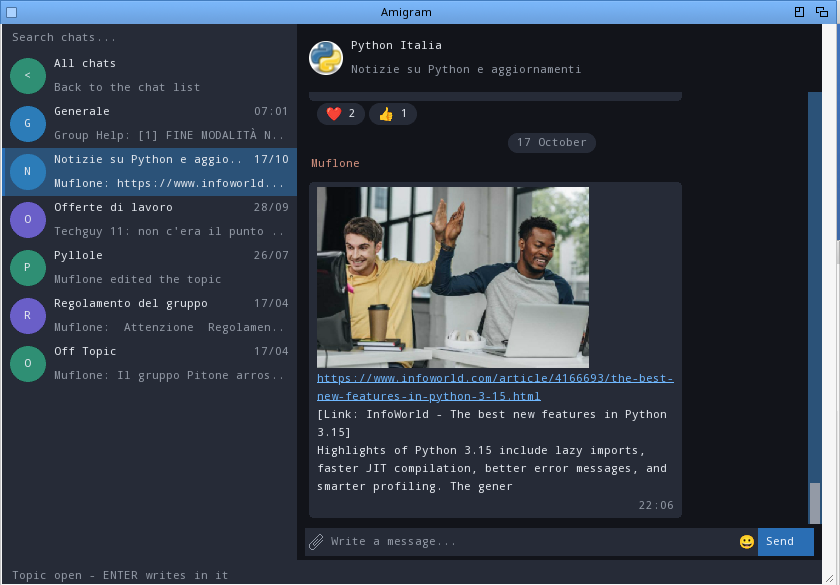
Amigram the window client (Intuition/GadTools): chat list with
avatars, bubbles, photos, emoji, menus. The same
program runs a text client from a Shell; the manual
gives the command.
WHAT CAN I DO WITH IT?
----------------------
Read and send messages in private chats, groups and channels. Reply,
react, forward, edit and delete your own messages, hide other people's
messages in groups. See read receipts and who is typing. Get a pop-up
and a sound for new messages, chosen per chat. Download and send files,
up to 250 MiB on this build. Photos, video frames and link
previews show in the chat, with a viewer for a larger copy; a text-only
mode keeps slow machines quick. Saved Messages works as a transfer
drawer between the Amiga and your phone or PC. The window remembers
where you left it and can open on its own screen.
GETTING STARTED
---------------
1. Copy this drawer to a writable volume.
2. Double-click Amigram.
3. Sign in: phone number, the code Telegram sends, and the cloud
password if you use 2FA. Next time it opens on your chats.
The login is kept in telegram-auth.bin next to the program. Never share
it: whoever has it is in your Telegram account. The archive has full
manuals in English and Italian, with notes for each platform.
WHAT IS NEW IN 0.5
------------------
ADDED
- Topics in forum groups. A group divided into topics opened as one transcript
with every topic's messages mixed, each one quoting the line that created
its topic, and what was sent landed in General. Now such a group opens on
General, its main topic, with the list of its topics in place of the chat
list: "All chats" first, which goes back, then each topic with its title,
its newest message and who wrote it, the time, how many messages are unread,
a pin when the group pins it, and the topic's colour as its square. A click,
ENTER or an F-key opens another topic: the header says which is open, the
messages are that topic's alone, older ones page in as in any chat, and what
is written, replied, attached or polled goes into it. (A group whose General
gives nothing opens on the list alone, says to choose a topic and sends
nothing until one is open.) ESC, or "All chats", brings the chat list back
with the topic still open; a click on the group's row shows its topics
again. The list is read again every 30 seconds while it is on show, and a
topic is marked as read when it is open in front of you. A message that
arrives in another topic of the open group counts on that topic's row at
once and is told like any other chat's news (title, sound, pop-up), and the
news of the other chats are not lost while the topics stand in their place:
they are counted for when the chat list comes back. A topic you never opened
shows all its messages as unread, as the official clients do: Telegram's own
count for such a topic is zero whatever it holds, so the number is asked
from the topic's thread (for the topics opened after you joined the group).
The group's own row counts what its topics hold unread, so it is right the
moment the chat list comes back. The text client has /topics, which lists
them numbered, and /topic n, which reads only that topic from then on
(history, new messages, what is sent); /topic alone goes back to every
topic; with /ids on, /topics adds each topic's id and how far it is read.
Not yet: creating, renaming or closing topics, the pinned message of a
topic, and the "@" count of a topic.
- Find in chat (Edit menu, Amiga+S): the search box at the top of the chat
list searches the messages of the open chat on Telegram. Type the words and
press ENTER; the messages found take the place of the chat list, newest
first, with who wrote them, how they start and their date. A click or ENTER
on one shows the chat around that message, with the message highlighted in
the middle; another hit can be picked right away, and ESC brings the chat
list back. From an older stretch of the chat the jump button brings back the
newest messages, and messages that arrive meanwhile are counted on it rather
than glued below the old ones.
- Find in all chats (Edit menu, Amiga+G): the same search box searches the
messages of every chat of the account. Each message found shows the name of
its chat, who wrote it and how it starts, and its date; a click or ENTER
opens that chat around the message, and the list of results stays in place
for the next one until ESC. A chat that was not in the chat list is added to
it when opened this way.
- /find words in the text client: it searches the messages of the open chat
and prints the newest ten found, like a page of history.
- The Archive. Archived chats (Amigram menu, Amiga+A) shows the chats kept in
Telegram's Archive in place of the chat list; ESC, or the menu item again,
goes back. They open like any other chat. Archive in a chat's menu (right
click on its row) moves it there and Unarchive, in the Archive, brings it
back; both reach the other devices, and a chat moved on another device
follows here. A large Archive shows its most recent chats (32, or 16 on
68k). The text client leaves the archived chats out of /list.
- Pinned messages. A chat with a pinned message shows it on a bar under the
header, "Pinned:" and how it starts; a click on the bar shows the chat
around that message, highlighted, and the jump button goes back to the
newest. With several pinned messages the bar shows one at a time and says
which ("Pinned 2/5:"): each click shows that message and moves the bar to
the one pinned before it, round to the latest again. They are read from
Telegram right after the chat opens and again when someone pins or unpins a
message there. The latest 8 pins are kept (5 on MorphOS, 4 on 68k). A
message just pinned, here or by someone else while the chat is open, is the
one the bar shows, at once; one just unpinned leaves the bar at once.
- Links with words of their own. A link hidden behind words showed only the
words: its address was read and dropped, and without a preview there was no
way to open it. The words are now underlined in the link's colour and
followed by a number, and the address stands on a line of its own under the
text, [1] https://...; a click on the words, on the number or on the address
opens it. An address the text or its preview already shows gets no second
line. In the composer [words](https://address) sends such a link, and an
edit brings it back written that way. The text client prints the words, the
number and the lines with the addresses.
- Drafts keep their formatting. A draft left here with markers (**bold**, a
spoiler, a link, a block) is saved on Telegram with its styles, so the other
devices show them; a draft with styles written elsewhere comes into the
message box as the markers that give them again, and as plain text when
"Markdown formatting" is off. It used to be saved, and shown, as plain text
with the markers in it.
- A block of code can name its language: three backticks, the language, and
the code from the next line. It is sent with the block and shown as the
block's first line, here and in a message received; an edit keeps it, and
never turns the first line of a plain block into a language.
- Spoilers. Hidden text, in a message received or in one sent with
||spoiler||, is covered by a bar in the text's colour until its message is
clicked; the click opens every spoiler of that message and does nothing
else. It used to show as plain text. An edit brings the spoiler back as its
markers, so saving keeps it. The text client prints it between two bars.
- The text client has the chat menu's commands for the open chat: /mute (for
good, or with a time: /mute 30m, 1h, 8h, 2d) and /unmute send the mute to
Telegram; /markread marks the chat as read on every device, which the text
client never did by itself, and /markunread marks it as unread; /vote votes
the last poll shown (/vote 2, or /vote 1 3 where several answers are
allowed, /vote none to take the vote back) and prints the poll with the
votes as they stand.
- Find in chat and Find in all chats go past their first page. When a page of
hits comes back full (20, 12 on MorphOS) the list ends with a row, More
results...; a click or ENTER on it brings the next, older hits under the
ones listed, and so on until the list is full (for the search across chats:
60 hits, 40 on 68k, 36 on MorphOS). A hit of any page opens its chat on the
message, and the list, with its last row, comes back for the next one.
- Message <name>, in the menu of someone else's message in a group, opens a
private chat with who wrote it. The chat joins the chat list when it was not
there and stays after a restart; nothing reaches the other person until a
message is written. It is left out where there is nobody to write to: one's
own messages, service lines, a channel writing as itself.
- Mute... in a chat's menu asks for how long: an hour, eight hours, or until
it is taken back. A timed mute ends by itself on Telegram's clock, on every
device. Until now a mute was always for good.
- Delete chat..., for a chat with one person, asks whether its messages go for
both of you or for you only; until now they went for this account alone.
- Delete and Pin ask how. In a chat with one person Delete is now on every
message, theirs too, and asks whether the message goes for both of you or
for you only; several selected messages get the same question once and leave
in one request. Pin asks, in a chat with one person, whether the message is
pinned for both of you or for you only, and in a group or a channel whether
the members are told ("Pin and notify") or not ("Pin quietly"). Cancel
leaves everything as it was. Until now a pin was always quiet and, in a chat
with one person, always for this account alone, and there only one's own
messages could be deleted from the menu.
- Create poll... in the first menu makes a poll in the open chat. A small
window takes the question, two to ten answers and three switches: Several
answers, Public votes (who voted what can be seen; votes are anonymous
otherwise) and Quiz. A quiz has one right answer, picked with the two arrows
beside the switch, by typing its number on the switch, or with a click on
the answer's label, which then reads "Right"; it cannot allow several
answers, and where the screen has the room it has a line, Why, for the
explanation shown to who has answered. TAB or the cursor keys move between
the lines, ENTER goes to the next and, on Create, sends, and a click picks a
line. Answers left empty are dropped, and the window says what is missing
when the question, the second answer or the quiz's right answer is. Telegram
takes polls in groups and channels (and in Saved Messages), not in a chat
with one person, where the menu item says so. If Telegram refuses the poll,
or cannot be reached, what was typed is kept and the menu item opens on it
again.
- Formatting typed in the message box is sent as formatting: **bold**,
__italic__, ~~strike~~, ||spoiler||, a backtick before and after for code,
three of them for a block of code. The markers leave the text and the
message carries the styles, so the other clients show them; the message just
sent shows them here too. A marker counts only at the start and at the end
of a word, a style of one line ends on that line, and nothing inside code is
a marker, so that 2 ** 3, a || b or __init__.py go as they are. "Markdown
formatting" in the settings switches it off (data/telegram-markdown.txt);
the text client sends as typed. Edit brings a message back with its bold,
italic, code and strike written as those markers, and saving sends the
styles again; before, an edit sent the bare text and the message lost its
formatting. Where the markers cannot say what the message shows, the plain
text comes back and the status line says that saving changes the formatting.
- Stop poll, in the menu of a poll's message, on one's own polls while they
are open: after a confirmation the poll is closed for good and the message
shows the final results.
- A quiz shows its explanation once it is answered, on a line that starts with
"Why:", under the votes; a poll whose votes are public says so next to the
number of votes. Both were read past until now.
- An album shows as one block. The photos or files sent together are one
message each: they used to stand apart, each with its name and its time. Now
the parts of an album are drawn a pixel apart, with the sender's name above
the first and the time under the last, on either side of the chat. The album
is known behind photos and files (grouped_id, read behind the media), not
behind other media.
- Stickers show their picture where the system has a datatype for WEBP. A
sticker's still (animated and video stickers have one too) is a WEBP
picture, which Amigram does not decode: it is fetched like a photo's and
handed to datatypes.library, once, and what comes back is kept in the photo
cache. The picture stands on the chat's background, without a bubble, 160
pixels wide at most. The pixels are asked for in one request, the whole
picture as ARGB, which is what every picture.datatype from V43 on answers
alike: on a real PiStorm with AfA OS (its picture.datatype is 46.9) a
request for RGBA was answered with nothing and a request for a part of the
picture with scrambled rows, and a sticker came out as stripes. The check
that decides whether stickers can be pictures now looks at the colour of
what comes back, not only at its size. Where the picture.datatype knows no
alpha (AfA OS, AmigaOS 3.5 to 3.2 before 47.9) the datatype hands the
sticker over on a white ground. Where no datatype reads WEBP, or reading
fails, a sticker stays the emoji it stands for, as before, and nothing is
fetched. "Sticker pictures" in the settings switches it
(data/telegram-stickers.txt): on by default, off by default on a 68k below
the 68040, where a datatype takes seconds for each sticker, and it needs
"Show inline photos". Like the photos' switch, a choice equal to the
machine's own is kept as "auto" and follows the machine the drawer is on.
AROS has a WEBP datatype in the system; AmigaOS 3 (with picture.datatype V43
or later), AmigaOS 4 and MorphOS need one installed.
- Where AmigaOS 3, AmigaOS 4 or MorphOS has no WEBP datatype, Amigram offers
its own. It is not in the archives: webp.datatype is a project of its own
(github.com/kaffeine1/webp-datatype), and the client fetches it only when
asked. Pressing "Sticker pictures" in the settings on a system with no
datatype opens a requester that says which two files would be written
(SYS:Classes/DataTypes/webp.datatype and DEVS:DataTypes/WebP) and from
where. On Install the two files of version 45.1 are fetched from the public
Telegram channel @amigram1, each is kept only if its SHA-256 is the one this
program carries (include/tg_version.h), they are copied into place, the
system is told (AddDataTypes REFRESH) and stickers are pictures from the
next chat opened (the library with its run bit, as its own archive installs
it). It is all or none: no file already there is ever replaced or removed, a
file that is not the one expected is deleted, and if the second file cannot
be written the first comes out again. The offer is not made on AROS, which
has its datatype, nor where picture.datatype is older than V43, which cannot
hand a true-colour picture to the client (the status line says so). A press
on the line when it shows "off" now always asks for the pictures: before,
with the pictures wanted and no datatype, the first press switched them off.
- Who voted..., in the menu of a poll whose votes are public, once you have
voted (or the poll is yours, or closed): Telegram is asked for the voters
and a requester lists them under each answer, the latest 50 votes (30 on
68k), with a last line when there are more. In the text client /voters does
the same for the last poll shown.
- A chat pinned or unpinned, or marked as unread or read, on another device is
followed while the client runs: the pins and the marks are read again from
Telegram at the next poll and the chat list is drawn again. They used to
wait for the next start or for Reload chat list.
- Muted chats are marked in the chat list, as in the official clients: the
unread badge of a muted chat is grey instead of blue, and with nothing
unread a small crossed loudspeaker sits at the right of its row, left of the
pin when the chat is pinned too. The chat list is not read from Telegram at
every start, so the mutes are learnt in the background: one chat every few
seconds, from the top of the list (every ten seconds on 68k), never while
typing, during a transfer or under an open menu. The marks then follow a
Mute or Unmute from here, at once, or from another device.
- The update notice. Releases are announced on the public Telegram channel
@amigram1 (the list can hold more channels or groups), in a post that says
"Amigram" and the version. Once a day the client goes round them, one at
each quiet moment: it asks a channel for its newest posts with the program's
name in them, and the highest version the round reads counts; when it is
higher than the one running, the status line says so, once for each version,
and About says it for as long as it holds. Nothing is downloaded and nothing
is installed. "Check for updates" in the settings switches it off; what it
knows is kept in data/telegram-update.txt. The list of channels is
TG_UPDATE_CHANNELS in include/tg_version.h, eight names at most; a build
with an empty list never looks, and there that line of the settings is
greyed. @amigram1 is also where the WEBP datatype is fetched from: a post
counts as an announcement only where "Amigram" is followed, after a space,
by a version, so the datatype's files raise nothing as long as no caption
puts its number right after the program's name.
- Albums, and several files at once. The requester of "Send photo..." and of
"Send file...", from the menus or from the paperclip, now takes several
files: hold Shift and click more than one, ten at most. Photos picked
together leave as an album, one message: a small window says how many they
are and how big, takes the caption, which goes on the first photo, and
offers Album, Files or Cancel. Other files, photos sent as Files, and photos
picked together with other files go one message each, one after the other,
the caption on the first. The status line says which one is going up ("2/5
name 40%"), and Esc stops them all; a file that cannot be read, or that is
not a JPEG or PNG when it is meant for an album, is left out and the others
still go, and the closing line says how many went and how many were left
out. They all go to the chat that was open when they were picked, even if
another one is opened meanwhile. Each photo is uploaded as a single photo
is, then kept with messages.uploadMedia, and one messages.sendMultiMedia
makes the album. A drop on the window still sends one file.
- Open a downloaded file, or show it in its drawer. Once a download from this
client has saved a message's file, the message's menu offers Open and Show
in drawer in place of Download. Open hands the file to the Workbench as a
double click on its icon would (workbench.library 44: AmigaOS 3.5 and later,
AmigaOS 4, MorphOS, AROS); Show in drawer opens the drawer it is in. A
program is opened only after a confirmation, since opening one runs it. On
an older Workbench the status line says where the file is. Where each file
went is kept in data/telegram-saved.txt (the latest 48, 16 on 68k) and
checked when the menu opens: a file moved or deleted by hand brings Download
back. Files downloaded by an earlier version are not known until they are
downloaded again.
- Several messages at once. Select, in a message's menu, starts a selection: a
click on a message marks it or takes its mark away, and Shift+click marks
everything from the message last clicked to that one. The composer gives way
to a bar that says how many are selected, with Forward, Delete and Cancel
(Esc cancels too, and so does opening another chat). Forward uses the usual
chat chooser and sends them all in one request, oldest first. Delete asks
once for all of them and does what the single entries do: your own messages
are deleted for everyone; other people's are hidden here in a group, and in
a private chat deleted for you only. The selection covers the messages that
are loaded.
- Polls. A poll used to show as "[Media]"; it now shows its question, its
answers, numbered, and what kind it is (a quiz, several answers allowed,
closed). Vote... in the message's menu (right click) lists the answers in
the menu's place: a click votes; where several answers are allowed each has
a mark that a click turns, and Send vote sends them. Once voted, or when the
poll is yours or closed, each answer shows its share of the votes, yours are
marked, and a quiz marks the right one; the votes of the others follow while
the chat is open (updateMessagePoll). Take back vote undoes a vote, except
in a quiz. The text client shows the poll the same way and cannot vote yet.
The latest 8 polls read can be voted (3 on 68k); an older one still shows,
and can be voted after opening its chat again.
- Unread mentions. When messages of the open chat mention you and you have not
seen them, a round "@" button with their number shows at the bottom right,
over the jump button. A click shows the chat around the oldest of them,
highlighted, and marks that mention as read on Telegram; the next click goes
to the next one.
- An ARexx port, AMIGRAM (AMIGRAM.1 when a copy already runs), for scripts and
the Shell: rx "address AMIGRAM 'SHOW'". SHOW brings the window up, from its
AppIcon too; HIDE parks it on the AppIcon; OPEN <name> opens the chat with
that name, or the first whose name starts with it or contains it, in either
case of letters; QUIT ends the program. UNREAD, CHAT and VERSION answer with
a text in RESULT: how many unread messages there are, the open chat's name,
the program's version. SEND <chat> <text> sends a message to the chat with
exactly that name, open or not, the window up or on its AppIcon; it is
switched off until you allow it, because any program on the machine could
otherwise write as you. The result code is 0; 5 when no chat has that name;
10 for an unknown command, a missing argument, or SEND while it is off; 20
when Telegram could not be reached. The port and SEND each have a switch in
the settings.
- The time zone from the environment. On a machine whose clock is not set (no
battery clock: it starts in 1978), message times were shown in the time zone
of the Locale preferences, which know no summer time. If ENV:TZONE or ENV:TZ
holds a zone in the usual form, for example CET-1CEST,M3.5.0,M10.5.0/3, that
zone is used instead, with its summer time. A clock that is set keeps
showing its own time, as before.
- Pin and Unpin in a message's menu (right click on the message). In a group
or a channel the message is pinned for everyone, without notifying the
members; in a private chat the pin is yours alone, the other person is shown
nothing. Telegram decides who may pin: where you may not, the status line
says it refused.
- Drafts. What is left unsent in the composer stays with its chat: it is saved
on Telegram when another chat is opened or the client is closed, so the
other devices show it, and it comes back in the composer when the chat is
opened again. A chat that holds a draft shows it under its name in the chat
list, after "Draft:"; the open chat's row shows none, its draft being in the
composer. Drafts written on other devices are read when the client starts
and on Reload chat list, and followed while it runs: the open chat's
composer takes the change as long as nothing else was typed in it. Sending
the message clears the draft everywhere; emptying the composer (ESC) and
leaving the chat deletes it. A draft is plain text here: the formatting or
the reply set on another device are not shown, and stay on Telegram until
the text is changed. The newest 16 drafts are kept (8 on 68k); Saved
Messages and forum topics have none yet. The window only.
- Mark as unread and Mark as read in a chat's menu (right click on its row).
Unread sets Telegram's own mark, a round dot in place of the count, on every
device; read marks the chat's messages as read on Telegram and clears the
dot. The marks set on other devices are read when the client starts and on
Reload chat list.
- Leave... and Delete chat... in a chat's menu, on Telegram and not only in
this list as Remove chat does: a group or a channel is left; a private chat
has its messages deleted for you, on all your devices, while the other
person keeps theirs. Both ask first.
- In the Archive, Back to chats is also the last line of the menu that a right
click on a chat opens.
- Pinned chats. The chats pinned on Telegram (on the phone, in the desktop
client or here) come first in the chat list, in Telegram's order, with a pin
mark at the right of the row where the unread badge would be, sized with the
font. Pin and Unpin are in the chat's menu (right click on the row) and
reach the other devices. The pins are read when the client starts and on
Reload chat list; Saved Messages stays at the bottom.
CHANGED
- A pinned chat with unread messages shows its pin beside the badge. The pin
stood where the badge goes and gave way to it, as in Telegram Desktop, so a
pinned chat with something new could not be told from the others (the phone
tells it by its shade). The topics of a forum follow the same rule.
- The pictures of the chats come much sooner on a quick machine. The avatars
of chats never opened were fetched one every four seconds on every machine,
and those kept on another of Telegram's datacenters only when their chat was
opened. Where one is fetched and drawn in half a second at most, and from
the start on PowerPC, x86 and ARM, the next now follows at once, and the
ones on another datacenter are fetched too (the one-off key exchange with it
is paid once, about a second on those machines). A slow machine or a slow
link keeps the pause after each picture, and a 68k never pays that key
exchange for the list.
- The right-click menus hold only what concerns the thing clicked. A chat's
menu no longer repeats Archived chats and Reload chat list, which are in the
Amigram menu (Amiga+A for the first); a message's menu no longer ends with
Find in chat, Send file... and Send photo..., which are in the menus
(Amiga+S, Amiga+F, Amiga+P) and under the paperclip. The longest menu goes
from fifteen lines to twelve.
- Amigram is now free software under the GNU General Public License, version 3
or later (the LICENSE file in every archive). Up to and including the 0.1
beta it was under the MIT License: those releases stay under it, and so does
the code contributed in that time.
- The 68k program asks for less memory in one piece. Its static data was one
block of 2.1 MB that had to be free as a whole for the program to load at
all, which a machine with 4 MB of fast RAM does not have: the window's own
state (300 KB) is now taken from the free memory when the window opens, the
text kept for each message read is 4.5 KB instead of 8 (the window shows 2
KB of it on the 68k), and five functions that each had their own scratch
copies of the chat list share three. The block is 1.5 MB, and the text
client of the 68000 package takes 1.7 MB instead of 1.8. On an emulated
A1200 with 2 MB of chip and 4 MB of fast RAM under AmigaOS 3.2, where the
program did not load before, the window opens and chats open, with about 3.9
MB taken in all and 1.4 MB left free.
- The paperclip at the left of the message box is redrawn after the desktop
client's: a thin clip tilted on its side, outer and inner loop, in crisp
one-pixel lines. It comes in two sizes, 16 pixels for small fonts and 20
when the box is taller.
- The paperclip now opens a small menu instead of a file requester: Photo...,
File... and, in a group, a channel or Saved Messages, Poll... The menu sits
just above the paperclip; any key or a click elsewhere closes it. Photo...
and File... are the menu's "Send photo..." and "Send file...". Before, the
paperclip opened one requester for any file and asked Photo or File when a
picture was picked.
- Clicking another chat while typing no longer throws the text away: it
becomes the draft of the chat being left.
- Mute and Unmute in a chat's menu now go to Telegram: the chat is muted on
every device, for good, until it is unmuted, here or elsewhere. A chat muted
or unmuted on another device follows while the client runs. The menu says
Unmute for a chat Telegram holds muted, wherever it was muted. Without a
connection the mute stays on this machine, as before, and the status line
says so; mutes set by older versions keep working and Unmute clears them.
Sound and previews of the chat are left as they are.
- A chat on screen is now marked as read on Telegram, as every official client
does: the other devices stop counting its messages and the sender sees them
read. It happens while the window is the active one and the chat shows its
newest messages, a moment after the chat opens and again as new messages
arrive; not while the window is behind, not while an older stretch of the
chat is on screen, and not for the chat the program opens by itself at
start, until you type or click in it: picking another chat leaves it unread.
- The settings have a panel of their own, opened with "Settings..." in the
first menu (Amiga+T), in place of the Settings menu, which had grown to
three levels. Every preference is a line: a switch, a choice that a click
moves on, or an action that opens a requester, in four groups (new messages,
photos and emoji, window and files, ARexx). Up and Down move, SPACE, ENTER
or a click change the line, LEFT and RIGHT step a choice; a Close button at
the top right, ESC, or a click on the chat list closes it. It follows the
theme and the screen's font, scrolls when the window is short, and stays
open across the switch to an own screen.
- Mentioning someone with "@" in a group works in more places and for more
people. The list that opens now holds who wrote in the chat (so it works in
basic groups and on MorphOS, where it never opened), then the group's recent
members; each line shows the name and, when there is one, the username, and
what is typed narrows it by either. It holds up to 64 people (12 on 68k) and
shows eight at a time, scrolling under the highlight with the cursor keys or
the mouse wheel. From three letters on, when nobody listed matches, Telegram
is asked for the members that do, so someone who has not written lately can
be found in a large group. People without a username can be mentioned too:
their first name is written, and the message tells Telegram whose name it
is, as the official clients do. MorphOS now asks for the member list like
the other systems: 64 recent members (24 on 68k).
FIXED
- A pinned chat showed the unread count it had the last time the chat list was
read, until it was opened: what had been read on the phone since still
counted. After the start the counts are corrected in the background, a chat
at a time, but the pinned chats were skipped (their mute was already known
from the answer that lists the pins, and the walk asks only about chats
whose mute it does not know). Their counts now come from that same answer:
at the start, on Reload chat list and when the pins change on another
device.
- The chat the program opens by itself at the start kept its unread badge
after it had been read: the badge went only with a click on the row. It now
goes when Telegram is told the chat was read.
- A result of Search Telegram no longer shows the pin or the mute mark of the
chat that was on that row of the list before the search. The results took
the rows as they were and changed only the name, so the second result of a
search could carry the pin of the second chat of the list.
- On a slow machine the window could stop showing what arrived. When a look at
Telegram for new messages took as long as the pause between two looks (a
real A1200 with a 68020 at 14 MHz and a busy chat: two and a half seconds
each), the next one started at once and the window never reached the rest of
its work: new messages were not drawn, ARexx commands were not answered and
the pop-up did not come, until a key or a click broke the run. The pause now
counts from the end of a look, and the window makes one look in each turn.
- The pills of the reactions under a message were too tight: with four pixels
at each end the count ran into the pill's round end, plainly so with a wide
font. The room at the ends now follows the pill's height (a very narrow
window keeps the old measure).
- A message with a photo, a file, a link preview or a bot's keyboard lost its
formatting: the caption of a photo was never bold, and a post with a link
preview, the usual place for a link with words of its own, showed as plain
text. On the wire the styles come after the media, which is not read whole,
so the reader never reached them. They are now looked for further on in the
answer (a list in which every item reads as a style and lies inside the
caption, before the next message starts) and put on the caption alone, with
the file's label or the preview's lines left after it.
- The unread badges of the chat list were those of the last time the list was
saved: a chat read meanwhile on the phone still showed its old count after a
start, until Reload chat list. The background step that learns the mutes now
asks Telegram for each chat's dialog (messages.getPeerDialogs, one chat
every few seconds, top of the list first), which carries the mute and the
unread count together, and the badges follow. The open chat keeps its own
count.
- Struck-through text was drawn underlined, like code. It now has a line
through it.
- A chat whose latest messages are heavy (links with previews, photos, files)
could open empty on the 68k builds and then show only its newest five
messages: thirty of them unpack to more than the 64 KB those builds keep for
an answer (32 KB in the 68000 text client), and the whole page was dropped.
Such a page is now asked again shorter, a third each time, so the chat opens
with what fits; its older pages and a search in it are asked that short from
the start, and a search still offers its further results. Seen on an
emulated A1200.
- A message that Telegram refused, or that got no answer, vanished from the
message box without a word. It now stays there, and the status line says why
in plain words: you cannot write in this chat, only their contacts can
write, this account was deleted, slow mode and how long to wait, no answer
from Telegram, and so on; a reason it does not know is shown as Telegram's
own code. When no confirmation came the message may have gone all the same,
and the line says to check the chat before sending again.
- An edit of a long message (more than about a thousand characters) with
accented letters reached the other clients with replacement characters in
their place: the buffer for its UTF-8 text was smaller than the one of a new
message.
- ENTER on an edit that changed nothing asked Telegram all the same and was
refused in silence; it now sends nothing. An edit that cannot be saved no
longer throws the text away: it stays in the message box, and the status
line says so.
- A message with a quote block lost its bold, italic, code and strike, and its
reactions were not shown: the quote entity of the current layer carries its
flags before its place and was read as an unknown one, which ended the
reading of that message.
- A link with a preview could be impossible to open: when the message hid its
address behind a word, nothing in the bubble could be clicked but the
picture, and that opened the picture. The address of the page now stands on
a line of its own under the preview whenever the message does not show it,
and a click on the preview's picture opens the link, as on the other
clients. Where no browser command is installed, and for a page that is a
picture itself, the click still shows the picture.
- A chat muted on Telegram could still pop up and ring here: its mute was only
known for the chats of the last Reload chat list, not after a normal start.
The client now asks Telegram about a chat the first time a message arrives
from it (and when its menu opens), once per run, and only when pop-ups or
the sound are in use.
- Opening another chat while a message was being edited left the edit armed:
the next ENTER tried to edit a message with that number in the other chat.
The edit now ends with the chat.
- Reload chat list read the first page of the chat list over and over: it
stopped at 30 chats plus the pinned ones (10 on MorphOS), however many the
account had. It now reads page after page to the end of the list or until
the list is full, and so do the first login and Browse all chats. It also no
longer adds, as chats, people who merely wrote the last message of a group
or were forwarded from.
- After a chat was dragged to another place in the list, two rows stayed lit:
the open chat and the row that took the dragged one's place. The second went
away only at the next redraw.
- A message deleted for everyone somewhere else (on the phone, in the web
client, by a group admin) now leaves the open chat in the window at once;
before, it stayed until the chat was opened again (issue #19).
- Shift+Enter at the end of the message shows its new line at once, with the
caret at its start. Before, the caret stayed on the line above, one blank
further right, and the box grew only at the next key, so a second
Shift+Enter seemed to add two lines (issue #18).
- A reply now always shows which message it answers: the window draws the
sender and the start of that message above it, and the text client quotes it
when it is on the same page. Before, only a reply that quoted a piece of
text was marked, so a reply to a photo, or a plain reply, looked like an
ordinary message. When the answered message is not loaded yet, the reply
says so and fills in when it arrives.
A COMMUNITY PROJECT
-------------------
Free software under the GNU GPL version 3 or later, and non-commercial.
Bug reports and wishes are welcome: testers on real hardware are what
moves this project forward.
The icon is our own design. Carlo Spadoni optimised it for each system,
put it on a standard drawer for the drawer icon, and let me ship his
versions.
Source and issues:
https://github.com/kaffeine1/telegram-amiga
Development diary:
https://androidlab.it/en/telegram-amiga-mtproto-client-development-diary/
Support my work on Patreon, or with a one-time tip on Ko-fi
(voluntary: nothing is needed to use the program):
https://www.patreon.com/c/kaffeine1
https://ko-fi.com/kaffeine1
|


 Ambient (151)

 Amigram_0.5.lha