| Readme: | Short: Receive files from a web browser
Author: Andreas 'Andiweli' Stuermer (MUI edition: Jan Zahurancik)
Uploader: Lastic (lasticppc@gmail.com)
Type: comm/net
Version: 1.2
Architecture: ppc-morphos
Requires: MorphOS 3.x, TCP/IP stack (bsdsocket.library)
URL: https://github.com/Andiweli/AmiDrop
https://github.com/AmiKit/AmiDrop_MUI
License: MIT
MorphDrop 1.2 - MorphOS port of AmiDrop
UNOFFICIAL port. Not supported by the original authors. Provided "as is",
without warranty of any kind.
OVERVIEW
========
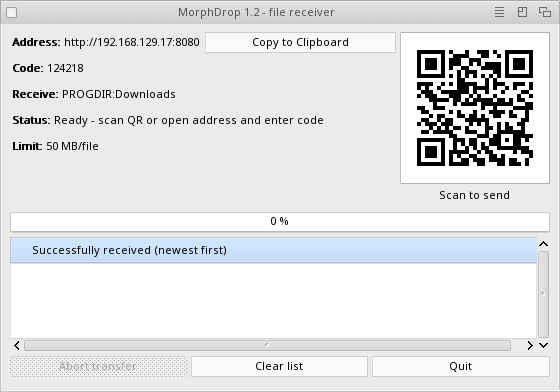
MorphDrop is a small file receiver. Start it on your MorphOS machine, open
the address it shows (or scan its QR code) in a web browser on a phone,
tablet or PC, and send files straight to a folder on the MorphOS machine.
No software is needed on the sending device.
The interface uses MUI (MUI edition by Jan Zahurancik / AmiKit). The window
is resizable and has a Copy to Clipboard button for the address.
Main features:
- QR code for quick connection from phones and tablets
- 6-digit pairing code for PCs (can be switched off in Preferences)
- files are streamed to disk through a temporary file
- configurable receive folder, TCP port and file size limit
- transfer history and progress display
REQUIREMENTS
============
- MorphOS 3.x (made and tested with MorphOS 3.21)
- a running TCP/IP stack with bsdsocket.library
- MUI 3.8 or newer (part of MorphOS)
- the MorphOS machine and the sending device must reach each other on
the same network
INSTALLATION
============
Copy the MorphDrop drawer wherever you like. There is nothing else to
install and no Installer script.
USING
=====
1. Start MorphDrop (double-click the icon).
2. Phone: scan the QR code.
PC: open the address shown in the window and enter the 6-digit code.
3. Choose files in the browser and send them.
Received files go to PROGDIR:Downloads by default. The folder is created
when it is needed. Change it in Project > Preferences, where you can also
set the TCP port (default 8080) and the file size limit (default 50 MB,
512 KB to 1 GB). Preferences are saved to ENVARC:MorphDrop.prefs.
See MorphDrop.guide for all details, safety notes and troubleshooting.
COMMAND LINE
============
Settings can also be given as ToolTypes or in the Shell:
PORT, MAXSIZEKB, RECEIVEDIR, STARTSERVER, NOCODENEEDED, IGNORESPACE,
SHOWTRANSFERINFO
Example:
MorphDrop PORT=8081 RECEIVEDIR=Work:Incoming
CONTENTS
========
MorphDrop the program
MorphDrop.guide documentation (AmigaGuide)
ReadMe this file
LICENSE_AND_CREDITS.txt licences and credits
CREDITS AND LICENCE
===================
AmiDrop (c) 2026 Andreas 'Andiweli' Stuermer, MIT licence.
https://github.com/Andiweli/AmiDrop
MUI edition by Jan Zahurancik / AmiKit.
https://github.com/AmiKit/AmiDrop_MUI
Icon by Martin 'Mason' Merz. DualPNG icons by Ken E. Lester & Jan.
QR code generation is based on work by Richard Moore / Project Nayuki.
MorphOS port by Lastic
(lasticppc@gmail.com), made with the help of
Claude Code (Anthropic's AI coding assistant). Building, testing and
guidance on real hardware by Lastic
on a PowerBook G4 15" 1.5 GHz (A1106) and an iBook G4 12" 1.33 GHz (A1133).
Full licence texts are in LICENSE_AND_CREDITS.txt.
|


 Ambient (151)

 MorphDrop_1.2.lha