| Readme: | Short: First native Telegram client for Amiga
Uploader: michele.dipace@kaffeine.net (Michele Dipace)
Author: Michele Dipace <michele.dipace@kaffeine.net>
Type: comm/tcp
Version: 0.7
Replaces: comm/tcp/Amigram-MOS.lha
Architecture: ppc-morphos
Requires: MorphOS 3.x with its TCP/IP stack
WHAT IS THIS?
-------------
Amigram is the first native Telegram client for the Amiga, written
from scratch on Telegram's own MTProto protocol: no gateway, no proxy, no
web page. You sign in with your normal Telegram account. The
cryptography (RSA, Diffie-Hellman, AES, SHA and the SRP login for 2FA) is
built in, so it needs no MUI, no ixemul.library and no AmiSSL, only the
system's bsdsocket stack.
It uses the Telegram API and is part of the Telegram ecosystem, but it is
not made by Telegram.
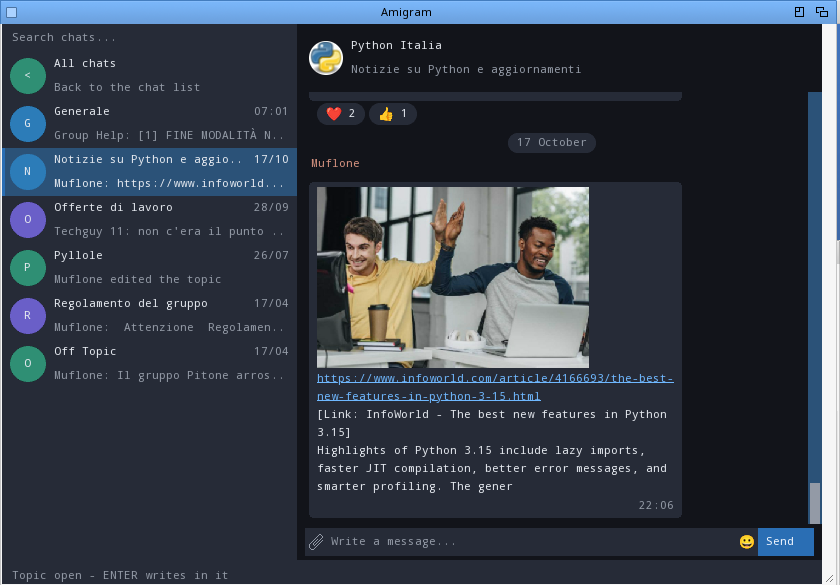
Amigram the window client (Intuition/GadTools): chat list with
avatars, bubbles, photos, emoji, menus. The same
program runs a text client from a Shell; the manual
gives the command.
WHAT CAN I DO WITH IT?
----------------------
Read and send messages in private chats, groups and channels. Reply,
react, forward, edit and delete your own messages, hide other people's
messages in groups. See read receipts and who is typing. Get a pop-up
and a sound for new messages, chosen per chat. Download and send files,
up to 250 MiB on this build. Photos, video frames and link
previews show in the chat, with a viewer for a larger copy; a text-only
mode keeps slow machines quick. Saved Messages works as a transfer
drawer between the Amiga and your phone or PC. The window remembers
where you left it and can open on its own screen.
GETTING STARTED
---------------
1. Copy this drawer to a writable volume.
2. Double-click Amigram.
3. Sign in: scan the QR code with Telegram on your phone (Settings >
Devices > Link Desktop Device), or press P for your phone number and
the code Telegram sends; then the cloud password if you use 2FA.
Next time it opens on your chats.
The login is kept in telegram-auth.bin next to the program. Never share
it: whoever has it is in your Telegram account. The archive has full
manuals in English and Italian, with notes for each platform.
WHAT IS NEW IN 0.7
------------------
ADDED
- Update from inside Amigram. When the update notice finds a newer version, a
requester offers to install it, and About offers it too for as long as it
holds. Update fetches that version's manifest from the update channel
(@amigram1), checks that it is signed with the author's key, whose public
half is built into Amigram, then fetches this system's program, checks its
size and SHA-256 against the manifest and puts it in place of the running
one, which is kept as Amigram.old; Amigram is then started again. A channel
taken over by someone else cannot hand out a program, a manifest of an older
version is refused, and if the new program cannot be written the old one is
put back. Nothing is installed unless Update is chosen. The text client, the
68000 one included, has the same: /update says whether a newer version is
out, /update yes installs it. The translations come with the program: the
manifest names each language's catalog too, with its size and SHA-256, and
the update puts it in Catalogs/<language>/ (the 68000 package gets its
smaller one); a catalog that does not come leaves the one that is there. The
first update this way is from this release to the next one.
- Amigram in Italian. Amigram speaks the language chosen in the Locale
preferences through the system's locale.library, the window and the text
client alike, the plain-68000 package included: menus, context menus, the
Settings panel with its values, every status line, the requesters (About,
Help, Log out, Update, deleting, leaving, pinning, muting, the WEBP
datatype), the poll and photo dialogs, the login and QR screens, the
composer, dates and the title's count of new messages; in the text client
the login, the chat list, /help and what every command answers. What the
session says is translated too: the media labels ([Photo], [Voice 0:07],
[File: ...]), polls, the service lines of a group ("Anna added Marco", "You
pinned a message"), Saved Messages, who is typing, where Telegram sent the
login code and why a login, a photo or an update did not go through.
English, built into the program, stands wherever a catalog has no text. The
Italian catalog ships in Catalogs/italiano/ next to the program; the 68000
package carries a smaller one, with only what the text client says. Where
locale.library looks for catalogs only in LOCALE:Catalogs (AmigaOS 3.2),
Amigram reads the one next to it by itself. The texts are in
locale/amigram.cd, a translation is one text file in locale/, and
scripts/catalog.py turns it into a catalog (no FlexCat or CatComp needed),
refusing a translation that changes a text's conversions, its number of
buttons, the spaces at its ends, or would not fit the status line;
docs/TRANSLATING.md says how. Texts printed with a number or a name go
through a bounded formatter of ours. Still in English, on purpose: the names
of the text client's commands, the technical lines meant for a bug report
and the debug log.
- A chat read on another device loses its badge here at once. The count beside
a chat used to wait for the chat to be opened, or for the next start:
reading it on the phone left the number in the list and in the window's
title. Telegram says how many messages are still unread
(updateReadHistoryInbox, updateReadChannelInbox) and the row, the title, the
Archive's line and the saved list take that count. The chat open in the
window keeps its own.
- The chat list shows each chat's last message under its name, as the official
clients do: who wrote it in a group, "You:" before one's own, a photo or a
file by its label, a service line as it reads, and the time on the right
(the date, when it is not of today). The lines come from what the program
receives anyway (the answer about each chat that the list already asks in
the background, the pinned chats' answer, the messages that arrive while the
window is open, what is sent from here and the chat that is opened), so it
costs no request; an edit changes the line and a deletion takes it away, and
what Telegram states as a chat's newest message stands also against a newer
one still held here (one deleted elsewhere without the news of it coming).
They are kept in data/telegram-last.txt between runs, so the list does not
start bare, and a log out removes them. A draft still goes first. "Previews
in the chat list", in the Settings, switches them off: nothing is kept then.
- A forwarded message says where it comes from: "Forwarded from Anna" on a
line of its own, in italics, before its text (the text client writes it in
brackets before the text). The name is the one of the user or channel the
forward names, or the name alone that someone who keeps the account out of
forwards lets through; the parts of a forwarded album say it once. A reply
to such a message quotes its text, not that line.
- An edited message says "edited" beside its time, in the window and in the
text client, also when the edit comes while the chat is open. An edit
Telegram marks as not to be shown (a keyboard that changed, a reaction)
leaves no mark.
- A channel's post shows how many saw it, an eye and the count (1.2K, 45K,
1.2M) before the time.
- A private chat says under the person's name when they were last here:
"online", "last seen at 14:05", "last seen on 26/11", or what Telegram says
of someone who keeps the time private ("last seen recently", "within a
week", "within a month", "a long time ago"); a bot is a bot. It comes with
the chat's own page, so opening a chat costs no request, and follows the
updates Telegram sends while the chat is open; "is typing..." still takes
the line while it lasts.
- The others see "is typing..." while a message is being written here, as with
every client: messages.setTyping, said again every few seconds for as long
as the text in the composer keeps changing, never in Saved Messages. "Show
others when I type", in the Settings, turns it off; it starts off on a 68k,
where each of those small requests holds the keyboard for a moment.
- A message can be sent without a sound for the others (silent): Alt+ENTER in
the composer, or Shift held while Send is clicked; the status line says
"Sent without sound". The text client has /silent text.
- Who read...: in the menu of one's own message in a group. Telegram tells who
read it and when (messages.getMessageReadParticipants), in small groups and
for a week; the names are the group's members', and a reader the client
cannot name is counted in a last line. Where Telegram does not tell (a big
group, an old message) the status line says why.
- Block and unblock a person (contacts.block, contacts.unblock): "Block..." in
the menu of a private chat's row, after a requester that says what it means.
Telegram is asked first whether the person is blocked already (the block may
have been made on another device), and the menu then reads "Unblock"; a
block or an unblock made elsewhere while Amigram runs is heard of too. The
text client has /block and /unblock for the open chat.
- A bot's buttons. The buttons a bot puts under a message, and the ones it
offers in place of typing, are listed under the message's text, a row a
line: [Yes] [No]. "Buttons..." in the message's menu reads them from
Telegram as they are now and puts them in the menu's place; a click presses
one. A callback goes to the bot (messages.getBotCallbackAnswer) and its
answer is shown, on the status line or in a requester when the bot wants it
read; a link is opened after a question that shows where it leads; a text to
copy goes to the clipboard; a button of the bot's own keyboard sends its
text. The kinds that need Telegram's own app (web apps, payments, games,
sharing a phone number or a place) say so. The text client has /press: alone
it lists the buttons of the last message that has some, /press 2 presses the
second. A message with buttons now also shows its views and keeps its place
in an album, which the keyboard used to hide. A chat with a bot that holds
no message yet says "Press Enter to start the bot": ENTER, or a click on
Send, sends it /start, and the header says "bot" there too.
- Translate: in the menu of someone else's message, Telegram puts its text in
the language Amigram speaks (messages.translateText) and a requester shows
it. The text client has /translate for the last message received. A
translation of Amigram names the language Telegram is to translate into (a
two-letter code in the catalog).
- Updates that install by themselves: "Install updates by themselves" in the
settings, off until switched on and greyed while "Check for updates" is off.
When the day's look finds a newer version, it is fetched from the channel,
its manifest's signature and its own size and SHA-256 checked, and put in
place with the old one kept as Amigram.old, without the "Update now?"
question; then the same "Quit|Later" to start the new one. Kept in
data/telegram-update.txt ("auto 1"). About's Update and the text client's
/update yes are as before.
- An ARexx script for new messages: "Script for new messages..." in the
settings picks one, and the news a pop-up would tell (not a muted chat's)
hands it to ARexx at its REXX port as a function, with the chat's name as
its argument and AMIGRAM as its host. A new command, NEWS, answers with that
news: the chat's name, a TAB and the text. The script's message comes back
to the AMIGRAM port and is freed there; at the end the program waits a few
seconds for scripts still running, and leaves its port behind, deaf, rather
than let one answer into freed memory.
- A reply that quotes part of a message: Reply on a message with part of its
text selected sends that part as the reply's quote (quote_text of
inputReplyToMessage), and the reply bar shows it. When Telegram does not
find it in the message as it has it (a sign the window shows in another way,
say), the reply goes again without the quote and the status line says so.
- A person in the contacts: "Contact..." in a person's row menu asks Telegram
whether they are one (users.getFullUser, the user's contact flag); one who
is not is put in under the names Telegram has for them or typed ones
(contacts.addContact), with a question about seeing this account's phone
number, and one who is can be renamed there or taken out
(contacts.deleteContacts). The text client, the 68000 one included, has
/addcontact and /delcontact.
- One's own profile: "My profile..." in the Amigram menu shows the name and
the bio as Telegram has them (users.getFullUser with inputUserSelf) and
changes either (account.updateProfile): Name... asks the first and the last
name, Bio... the bio, 70 letters at most, which the status line says when
Telegram finds it too long. The text client, the 68000 one included, has
/profile, /profile name and /profile bio.
- Two more ARexx commands: CHATS answers with the chat list, a line a chat
with its name, a TAB and its unread count; LAST with the open chat's newest
message, its sender, a TAB and the text on one line.
- A forgotten cloud password at login. On the password screen TAB asks
Telegram to mail a code to the account's recovery email
(auth.requestPasswordRecovery) and says where it went; the field then takes
that code, and with it (auth.recoverPassword) the login is done and Telegram
removes the cloud password, which a requester says. TAB goes back to the
password. The text client has the same with /recover at its password prompt.
Without a recovery email it says that only Telegram's apps can reset the
password, after a week.
- Contacts: Chats > Contacts... puts the address book (contacts.getContacts)
in the sidebar, by name, where a search's results stand: a click opens the
chat with that person, ESC goes back. A big address book keeps its first
names (128, 64 on a 68k machine) and says how many there are; Find in all
chats finds the rest. The text client, the 68000 one included, has
/contacts, a numbered list to pick from as /add has.
- Scheduled messages (schedule_date). "Send later..." under the paperclip asks
when the composer's text goes (21:30, 28/11 21:30 or 28/11/2026 21:30, up to
a year ahead) and Telegram keeps it until then. "Scheduled..." lists the
chat's waiting messages (messages.getScheduledHistory), soonest first; one
picked is sent at once (messages.sendScheduledMessages) or deleted
(messages.deleteScheduledMessages). The text client, the 68000 one included,
has /later 21:30 text, /later, /later send n and /later delete n.
- A link to a public chat on Telegram (t.me/name, t.me/name/123) clicked in a
message opens that chat in Amigram, at the message the link names, instead
of going to the browser. Invitations, sticker sets and the other kinds of
t.me link still go to the browser. A bot's link button does the same, and
reads the form Telegram's own apps use too
(tg://resolve?domain=name&post=123); any other tg: link, which only
Telegram's apps open, says so on the status line instead of going to a
browser that would not know it.
- Devices: "Devices..." in the Amigram menu lists where the account is logged
in (account.getAuthorizations): the program, the machine, its system, the
place and when it was last used, this one marked. The requester offers to
end every other session (auth.resetAuthorizations), and asks once more
before it does. The text client has /devices, and /devices end yes. The
network address Telegram gives for each device is neither kept nor shown.
- Comments on a channel's post. A post that takes comments says how many it
has in its time row, after the views, and "Comments..." in its menu opens
them in the transcript: the discussion group they are written in is found
(messages.getDiscussionMessage), kept among the chats Amigram knows without
a row in the list, and read as the thread that answers the post
(messages.getReplies), the way a forum's topic is read. What is written
there is a comment on the post; ESC goes back to the channel, at the post.
- Go to a date: a date typed in Find in chat (12/11/2026, 12.11.26 or
2026-11-12) shows the chat from that day on, the first message of the day
with what stands around it. The day is the one of the clock the times are
shown in.
- Start iconified: with the tooltype ICONIFY on the icon Amigram is started
from (or --iconify after --gui-live in a Shell), the window gives way to the
AppIcon on Workbench as soon as it has connected, and the notifications work
from there. A login, or a connection that fails, keeps the window.
CHANGED
- The WEBP datatype offered for stickers is now webp.datatype 45.3, posted in
@amigram1 next to 45.1: the same decoder, a new installation (icons and
Installer). Its four files are pinned by size and SHA-256 as before.
- The text client says "Auto-read every 1 second" and "1 hidden message back"
where it used to add "(s)" or an "s" to a word: a plural is a text of its
own now, as a translation needs it.
FIXED
- The names in the lists of results (the Archive's "More archived chats...",
the address book, a search) were converted for the window by a function of
their own that stopped at the first character it could not show: a channel
whose name began with such an emoji had no name at all, a "?" row (seen on a
Vampire). They are converted as the chat list's names are now, that
character left out (with the space it leaves at the head) and a known emoji
kept, and a row's initial is its first letter, past an emoji.
- The Archive on a full chat list (64 chats on a 68k), seen on a Vampire: a
chat opened from "More archived chats...", the address book or a search was
left out of the list, so it never opened and the window went on showing the
chat open before; it now takes the place of a hidden chat, else of the last
one of the main list that is not pinned, archived or open, as a pinned chat
does. When the list holds few archived chats (fewer than eight of those the
Archive has), the Archive opens straight on all of them, as "More archived
chats..." lists them, instead of showing one. And a chat whose name has only
letters the Amiga cannot show, which read as question marks, shows its
@username there when it has one.
- The lists of results (the Archive's whole list, the address book, a search)
drew initials only, though the pictures of most of those chats came with the
list: a result's row now carries its peer for the picture, and shows it as a
chat's row does. The address book had no pictures even so (seen on a
Vampire): its reading left each person's thumb behind, and on a 68k the
thumbs kept in memory (128) were pushed out by the hundreds of people read
before the rows on screen; the thumb now stays with the row, and goes back
in the store when the list is shown. Opening the Archive straight on all of
it no longer paints the few archived chats the list holds while the whole is
read: they flashed by for a second, with their pictures, before the long
list took their place (seen on a Vampire).
- The chat list drawn at start, before the connection, came without the newest
message under each name and with the pinned chats in their place by date; a
moment later, the session open, the lines appeared and the pinned chats went
to the top, so the list seemed to change order (seen on a Vampire). It now
shows the lines the last run kept and the pinned chats on top, as the last
run read them; they are kept in data/telegram-pins.txt (taken away at log
out) until Telegram is asked again.
- The way back from the Archive, when it opens straight on its whole list (a
full chat list on a 68k): that list is drawn as the results of a search,
which had no "Back to chats" band, and ESC led to the few archived chats the
list holds, never seen, so it took a second ESC or the band there (seen on a
Vampire). The band now stays over the whole list, and ESC there goes back to
the chats at once.
- The avatars of the chat list came back as initials after the address book or
the Archive had been open (seen on a Vampire): the thumbs kept in memory,
128 on a 68k, were pushed out one by one by the hundred and more people
those lists bring. The main list's chats now keep theirs, up to half the
store.
- The address book and the Archive, after a test on a Vampire: Contacts...
opened from the Archive left the Archive on, so a contact clicked there
opened a chat of the main list while the Archive stayed in view; it now
leaves the Archive first. A person with no name and no username, an account
deleted, reads "Deleted account" in the list and in the address book instead
of an empty row with a "?". A right click on a row of the address book gives
it a menu of its own: Open chat, Contact... and Block... (the window now
claims the right button over those rows too, or the system's menu bar opened
instead). Over the Archive the band at the top reads "Back to chats" and a
click on it goes back, as ESC does.
- The hints in the chat list's search field ("Type a name...", "Find in this
chat...", the Archive's) are drawn at their own length, with ".." where the
field has no room: they used the English texts' lengths, which cut the
Italian ones ("Scrivi un nome, ENTE"). The search's hint says no more than
"Type a name...": that ENTER goes with it was plain to see.
- In the text client a command typed at the first "Chat number:" prompt
(/logout yes, /add, /help) was taken as a chat to open. It runs as a command
now, with no chat open; a number, a name or /saved still opens the chat.
- A long topic title could run past the room of the window's subtitle line (60
letters written where 47 fit). The line is cut where it ends.
- The reader of a user knew the status "last seen recently" (and "within a
week", "within a month") only in the form older layers sent, without the
flags word the current layer puts after it, and did not step over a bot's
bot_info_version: reading a reply's users one after the other stopped at the
first such user. Both are read as the layer 214 schema has them.
- A jump to one message (a search hit, the pinned message, the target of a
reply, a link to a post, a day) in a chat of heavy posts could show another
post, or an empty chat. A page of messages that does not fit the unpack
buffer (64 KB on the 68k build, 32 KB on the 68000 one) is asked again
shorter, and the shorter page kept the offset of the first: six messages
asked ten places above the one wanted ended four places above it. The offset
now follows the page asked. Seen on a real 68k machine in a channel of posts
with videos.
- After such a jump the message stays in the middle of the view while pictures
arrive in the posts under it; each picture used to push it up, and a channel
of posts with pictures showed the next post. It lets go as soon as the chat
is scrolled.
- The line a reply shows when its target is not loaded, "Reply to an earlier
message", was not in the catalog and stayed English in the Italian window.
A COMMUNITY PROJECT
-------------------
Free software under the GNU GPL version 3 or later, and non-commercial.
Bug reports and wishes are welcome: testers on real hardware are what
moves this project forward.
Thanks to Enrico Vitale of ACube Systems for his tireless and fruitful
testing.
The icon is our own design. Carlo Spadoni optimised it for each system,
put it on a standard drawer for the drawer icon, and let me ship his
versions.
Source and issues:
https://github.com/kaffeine1/telegram-amiga
Development diary:
https://androidlab.it/en/telegram-amiga-mtproto-client-development-diary/
Support my work on Patreon, or with a one-time tip on Ko-fi
(voluntary: nothing is needed to use the program):
https://www.patreon.com/c/kaffeine1
https://ko-fi.com/kaffeine1
|


 Ambient (151)

 Amigram_0.7.lha