| Readme: | Short: Stylos Demo - Word Processor for MorphOS
Author: Yannick Buchy
Type: office/word processor
Version: 0.96
Architecture: ppc-morphos
Requires: TTEngine Fonts
============================================================================
STYLOS - Word Processor
Version 0.96
============================================================================
INTRODUCTION
------------
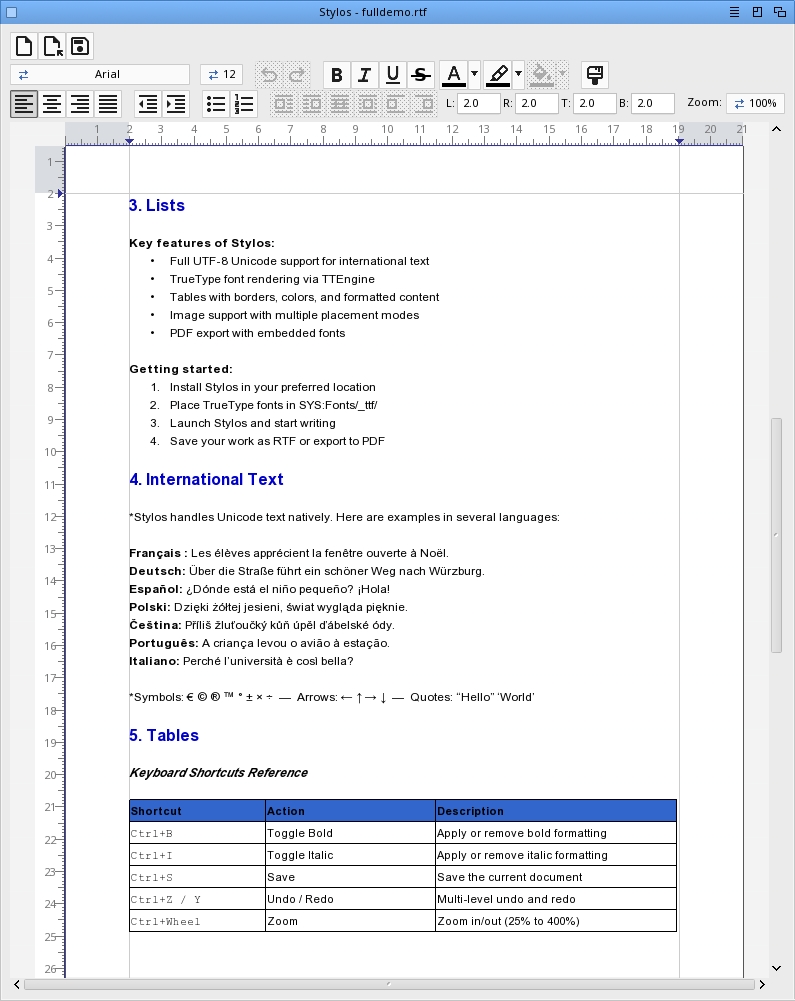
Stylos is a word processor for MorphOS using MUI (Magic User Interface) and
TTEngine for TrueType font rendering. It provides a WYSIWYG editing
experience with full UTF-8 Unicode support.
REQUIREMENTS
------------
- MorphOS 3.19+
- TrueType fonts in SYS:Fonts/_ttf/
INSTALLATION
------------
Simply copy the Stylos drawer to your preferred location.
Fonts are automatically scanned from SYS:Fonts/_ttf/
FULL VERSION INCLUDES
----------------------
- Save and export PDF and RTF with all formatting preserved
- Free updates until version 1.0 (including table support, PDF export
and translations)
HOW TO GET THE FULL VERSION
----------------------------
Contribute to the Stylos project and receive the full version:
PayPal : papiosaur2@hotmail.fr (send as a friend to avoid fees)
Minimum donation: 30 euros (includes localization of your choice).
After your donation, contact me to yannick.buchy@gmail.com.
FEATURES
--------
File Formats
* Plain text (.txt and other text extensions)
* RTF (.rtf) with bold, italic, underline, alignment, images, tables, Unicode
* PDF export (.pdf) with vector text, tables, images, lists
* Drag & drop from Ambient for text, RTF and image files
Text Editing
* Full UTF-8 support (Polish, French, German, and all Unicode characters)
* Word wrap with automatic line breaking
* Multi-page document support
* Blinking cursor with precise positioning
* Mouse text selection with drag and auto-scroll
* Double-click to select word
* Keyboard navigation (arrows, Home, End)
* Find and Replace (RCmd+F / RCmd+H)
Character Formatting
* Bold (Ctrl+B)
* Italic (Ctrl+I)
* Underline (Ctrl+U)
* Strikethrough (Ctrl+-)
* Text color and highlight color
* Format Painter (copies style, font, size and colors)
* Styles can be combined (bold + italic + underline + strikethrough)
* Apply to selection or for new text
Paragraph Alignment
* Left align
* Center align
* Right align
* Justify (proportional spacing)
* Per-line alignment support
Clipboard Operations
* Cut (Ctrl+X)
* Copy (Ctrl+C)
* Paste (Ctrl+V)
* Full UTF-8 clipboard support
Undo/Redo
* Multi-level undo history
* Undo (LAlt+Z)
* Redo (LAlt+X)
TrueType Fonts
* Automatic font scanning from SYS:Fonts/_ttf/
* Font selection via dropdown
* Sizes: 8, 9, 10, 11, 12, 14, 16, 18, 20, 24, 28, 32, 36, 48, 72
* Automatic Bold/Italic/BoldItalic variant detection
* UTF-8 encoding for all glyphs
Tables
* Insert via Insert menu
* Double-click a cell to enter editing mode, single click selects the table
* Cell background color
* Tab key cycles through cells
* Escape exits cell editing, then Escape again deselects the table
* Resize table globally with drag handles (corners and edges)
* Resize individual columns by dragging internal column borders
* Drag to reposition tables
* Saved and restored in RTF format
Images
* Insert via drag & drop (JPEG, PNG, BMP, GIF, TIFF, IFF/ILBM)
* Placement modes: Inline, Left, Right, Wrap, Behind, Break Left, Break Right
* Text flows around floating images (Left/Right/Wrap)
* Resize with drag handles
* Drag to reposition
* Saved and restored in RTF format (IFF/ILBM auto-converted to PNG)
Lists
* Bullet lists
* Numbered lists
* Multiple indent levels
Zoom
* Range: 25% to 400%
* Step: 10%
* Ctrl + Mouse wheel for quick zoom
* Dropdown selection
Page Layout
* A4 page format display
* Configurable margins
* Horizontal ruler with graduations
* Page gap between multiple pages
Scrolling
* Mouse wheel for vertical scrolling
* Horizontal and vertical scrollbars
* Smooth scrolling
KEYBOARD SHORTCUTS
------------------
RCmd+N New document
RCmd+O Open document
RCmd+S Save document
RCmd+Z Save As
RCmd+P Print
RCmd+? About
RCmd+Q Quit
LAlt+Z Undo
LAlt+X Redo
RCmd+X Cut
RCmd+C Copy
RCmd+V Paste
RCmd+A Select All
RCmd+F Find
RCmd+G Find Next
RCmd+B Find Previous
RCmd+H Replace
Ctrl+B Toggle Bold
Ctrl+I Toggle Italic
Ctrl+U Toggle Underline
Ctrl+- Toggle Strikethrough
Arrow keys Navigate character/line
Shift+Arrows Extend selection
Ctrl+Left/Right Word-by-word navigation
Home Go to line start
End Go to line end
Ctrl+Home Go to document start
Ctrl+End Go to document end
Page Up Scroll up one page
Page Down Scroll down one page
Ctrl+Wheel Zoom in/out
Tab Insert tab character / cycle table cells
Escape Deselect / exit table cell / deselect table
UTF-8 / UNICODE SUPPORT
-----------------------
Stylos fully supports UTF-8 encoding, allowing input and display of
international characters.
Also supported:
- All Latin-1 characters (French, German, Spanish accents, etc.)
- Latin Extended-A and B characters
- Any Unicode character present in the TrueType font
MENUS
-----
Project
New Create new document
Open... Open existing document
Save Save current document
Save As... Save with new name
Export PDF... Export document as PDF
Print... Print document
About... About Stylos
Quit Exit application
Edit
Undo Undo last action
Redo Redo last undone action
Cut Cut selection to clipboard
Copy Copy selection to clipboard
Paste Paste from clipboard
Select All Select entire document
Find... Find text in document
Find Next Find next occurrence
Find Previous Find previous occurrence
Replace... Find and replace text
View
Show Invisibles Toggle display of spaces, tabs and line breaks
Insert
Image... Insert an image file
Table... Insert a table
Format
Bold Toggle bold style
Italic Toggle italic style
Underline Toggle underline style
Strikethrough Toggle strikethrough style
Font Size... Change font size
Font Family... Change font
KNOWN LIMITATIONS
-----------------
- No headers/footers in RTF
- No printing implementation yet
- No spell checking
HISTORY
-------
Version 0.96 (13.03.2026)
- Removed Find/Replace bar keyboard shortcuts
- Unsaved changes requester now shows the document filename
- Undo/Redo menu items now display "Alt+Z" / "Alt+X" shortcut properly
using NM_COMMANDSTRING instead of text in the label
- Added double-click instruction for table cell editing in documentation
- Fixed typing over a selection requiring two Undo presses instead of one
- Format menu items (Bold, Italic, Underline, Strikethrough) now display
keyboard shortcuts (Ctrl+B/I/U/-)
- Show Invisibles toolbar button and menu item are now synchronized
- Fixed Paste not replacing selected text (now deletes selection before insert)
- Fixed table drawing causing GfxBase logs when scrolled above visible area
- Fixed cursor positioned after trailing space on double-click word selection
- Fixed cursor extending 1 pixel below selection highlight
- Fixed bullet lists, numbered lists, indent and list level changes only
applying to cursor line instead of all selected lines
- Fixed numbered list "1." overlapping correct numbering on every line
- Fixed Shift+Enter then Enter restarting numbering at 1 instead of continuing
- Fixed undo not restoring bullet/numbered list properties after selection delete
- Export PDF now asks for confirmation before overwriting an existing file
Version 0.95 (12.03.2026)
- Keyboard shortcuts follow MorphOS conventions (RCmd for menus, Ctrl for
formatting, LAlt for Undo/Redo), Save As now RCmd+Z, Strikethrough Ctrl+-
- Fixed TAB key now inserts a tab character instead of cycling toolbar buttons
- Fixed toolbar DtpicObject rendering glitch on focus changes
- Fixed freeze when iconifying or switching to a custom screen
- Color dropdown buttons now show a popup menu (Define new color / Remove color)
- French translation
- Fixed bullet/numbered lists not showing on empty documents
- Fixed ObtainBestPenA return value not checked (potential random background
color on low-color screens)
- Fixed word-wrapped text with mixed font sizes overlapping previous line
- Show invisibles: pilcrow (¶) rendered via font, soft break (↵) drawn
with graphics primitives for font-independent display
- Auto-scroll during text selection: document scrolls continuously when
mouse is above or below the visible area, speed proportional to distance
Version 0.94 (10.03.2026)
- Fixed memory corruption (buffer overflow on long documents)
- Fixed uninitialized table data when loading plain text files
Version 0.93 (09.03.2026)
- Fixed PageDown/PageUp now snaps to top of next/previous page with cursor
- Full undo/redo for all operations (formatting, colors, resize, indent, lists, alignment, margins, cell editing)
- Fixed arrow key navigation on wrapped lines and auto-scroll to cursor
- Fixed RCmd shortcuts eaten as text input
- Fixed PDF export page drift on multi-page documents
- Fixed PageUp/PageDown, selection highlight and image z-order rendering
- Fixed RTF save truncating documents with large embedded images
- Fixed Escape key not deselecting tables and images
- Fixed highlight rectangles too tall on lines with mixed font sizes
- Fixed excessive line spacing on wrapped lines within mixed-size paragraphs
- Fixed bullet and numbered lists not appearing in PDF export
Version 0.92 (08.03.2026)
- PDF export (File > Export PDF): vector text with embedded TrueType fonts,
tables with cell backgrounds and borders, images (JPEG/PNG), bullet and
numbered lists
- Delete selected objects (images/tables) with Delete or Backspace key
- Copy/Paste objects (Ctrl+C/V): creates a deep clone of images and tables
- Fixed table cell background color lost after save/reload in RTF
- IFF/ILBM images support
- Polish translation
Version 0.91 (06.03.2026)
- Fixed tables not selectable after save/reload (font path mismatch
MOSSYS:/SYS: caused TT_OpenFont to fail, breaking layout cache)
- Fixed image position lost after save/reload: horizontal placement
(posh=0 with shpwr=2) now correctly maps to WRAP instead of LEFT
- Fixed image vertical position shifted down after reload (double
newline after table in RTF import)
- Fixed negative image Y offset clamped to 0 on export
- Reduced idle CPU usage (cursor blink no longer triggers full redraw)
- Tab key inserts 4 spaces in text, cycles cells in tables
- Table cell cursor now placed at end of text when entering a cell
Version 0.9 (04.03.2026)
- Fixed justify alignment with images or tables
- Fixed zoom
- Improved ruler
- Fixed accent characters (é, ê)
- Fixed Backspace and Delete keys
- Fixed document font reading
- Collision detection between displaced tables and images
- Fixed rendering of tables and images near bottom of visible area
- Objects (images and tables) can now be moved across page boundaries
- Fixed Ctrl shortcuts firing twice (key-down and key-up)
- Shift+Arrow keys: selection extension
- Ctrl+Left/Right: word-by-word navigation
- Ctrl+Home/End: jump to document start/end
- Page Up / Page Down keys
- Mouse wheel scroll speed scales with zoom level
- Fixed UTF-8 decode safety in RTF export (truncated sequences)
- Fixed crash when exporting table cell background colors
- Improved error handling: file read/write errors are now detected and reported
- Fixed reference layout heights at non-100% zoom levels
- Fixed Unicode character spacing at non-100% zoom
Version 0.8 (01.03.2026)
- Table support: insert tables via Insert menu, saved/restored in RTF
- Table cell background color
- Table resize: global (8 handles) and individual column borders
- Table drag to reposition
- Color buttons: click applies last color, dropdown arrow opens picker
- Format Painter copies style, font, size, text color and highlight color
- Window title shows modified indicator (*) when document has unsaved changes
- Drag & drop confirmation before replacing existing content
- Strikethrough text formatting
- Fixed ruler and margins display when zooming
- Fixed color strip display under toolbar buttons
Version 0.7 (14.02.2026)
- Fixed AltGr key handling for non-French keyboard layouts
- Fixed highlight color cycle not matching actual highlight colors
- Fixed RTF files becoming non-editable when document font is in MOSSYS:Fonts/_ttf/
- Single instance: prevents opening Stylos twice (brings existing window to front)
- Added: Command-line argument: "Stylos <filename>" opens a document directly
- Save As: .rtf extension added automatically if no extension specified
- Default margins changed from 2.5cm to 2cm
Version 0.6 (10.02.2026)
- Image support
* Insert images via drag & drop from Ambient
* Image placement modes: Left, Right, Wrap, Behind, Break Left, Break Right
* Floating images with text flowing around them (Left/Right/Wrap)
* Image resize via drag handles (corners and edges)
* Image drag to reposition within the document
* Image selection with toolbar buttons for placement control
* Images auto-selected after insertion
* RTF export/import of images with placement and position preserved
- Toolbar: New, Open, Save buttons on a dedicated first row
- Save confirmation requester when overwriting an existing file
- Double-click word selection no longer includes trailing punctuation
- Fixed TLSF heap corruption crash when quitting with RTF file loaded
(stack overflow due to import_font_table on stack, moved to heap)
- Text color cycle updates when clicking on colored text
- Highlight color cycle updates when clicking on highlighted text
Version 0.5 (29.01.2026)
- RTF file format support (import and export)
* Open and save .rtf files with formatting preserved
* Bold, italic, underline styles
* Paragraph alignment (left, center, right, justify)
* Unicode characters encoded as \uN escape sequences
* Font name and size stored in RTF header
- Drag & drop support for .rtf files from Ambient
- RTF round-trip: open a .rtf, edit, save back with formatting intact
- Demo file included (demo.rtf)
- Ctrl+Y keyboard shortcut for Redo
- Ctrl+Z keyboard shortcut for Undo (direct, in addition to menu)
Version 0.4 (28.01.2026)
- Drag & drop support for text files from Ambient
- Unsaved changes confirmation on Quit/New/Open
- Window title shows current filename and modified indicator (*)
- Undo/Redo buttons grayed out when stacks are empty
- Clipboard encoding fix using charsets.library (copy/paste with
external apps now works correctly with Polish and other encodings)
Version 0.3 (25.01.2026)
- Full UTF-8 Unicode support
- TrueType font rendering via TTEngine
- Basic word processing features
- Multi-page support
- Text alignment (left, center, right, justify)
THANKS
------
MorphOS Team for MorphOS
CptBlood, Geit, Polymere, NewSense for bug reports
Skateman for the YouTube videos
All registered users and sponsors for their support
COPYRIGHT
---------
Copyright (c) 2026 Yannick Buchy
Stylos is provided as-is without warranty.
CONTACT
-------
yannick.buchy@gmail.com
Bug reports and suggestions welcome.
============================================================================
|


 Ambient (149)
 Stylos_0.96.lha